»
3
"2-
~
C;;.
...
-
0081"
R~
120·
.100·
"~.,"
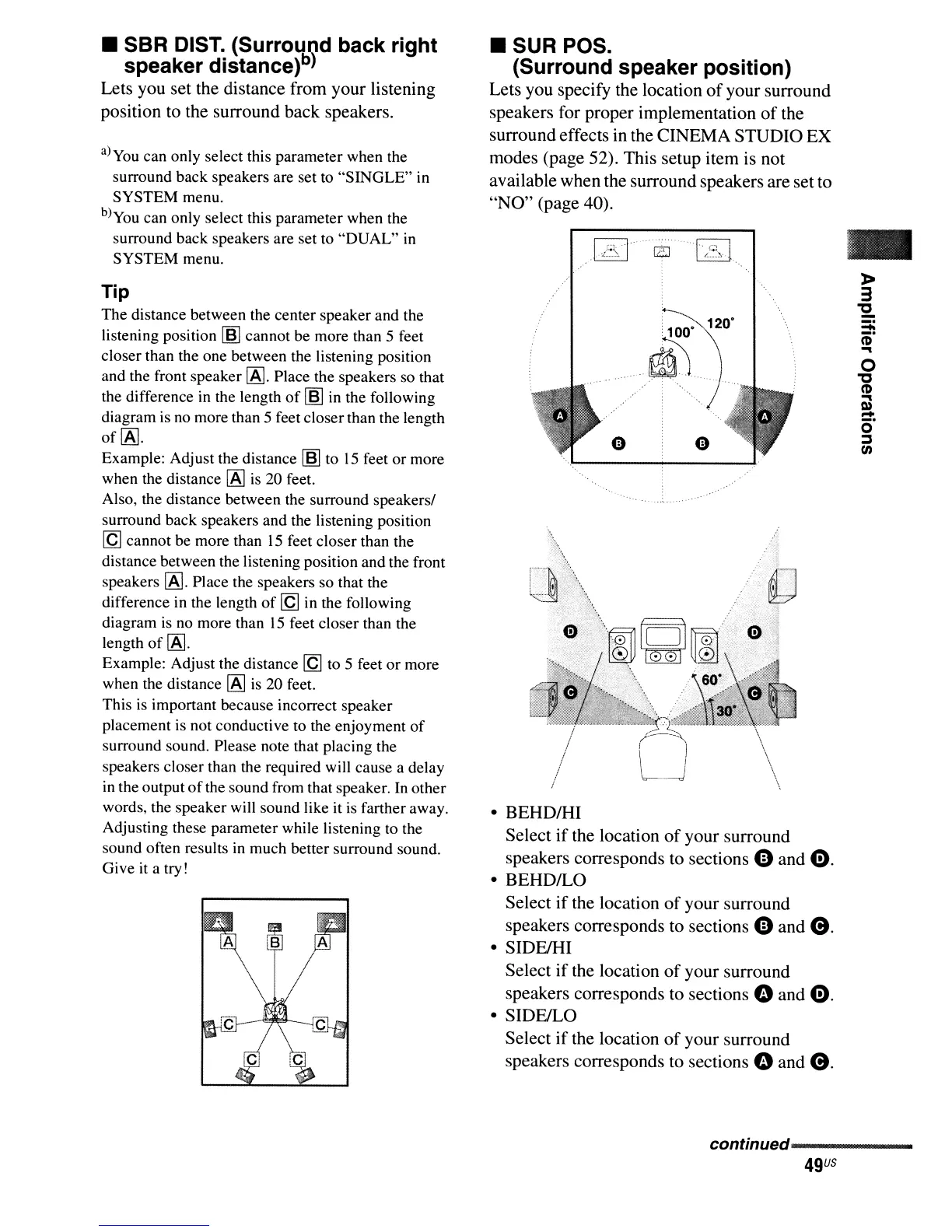
• BEHDIHI
Select
if
the location
of
your surround
speakers corresponds to sections
e and
0.
• BEHDILO
Select
if
the location
of
your surround
speakers corresponds to sections
e and
e.
• SIDFJHI
Select
if
the location
of
your surround
speakers corresponds to sections
0 and
0.
• SIDEILO
Select
if
the location
of
your surround
speakers corresponds to sections
0 and
e.
• SUR POS.
(Surround speaker position)
Lets you specify the location
of
your surround
speakers for proper implementation
of
the
surround effects in the CINEMA STUDIO EX
modes (page 52). This setup item is not
available when the surround speakers are set to
"NO"
(page 40).
Tip
The
distance between the center speaker and the
listening position
[§] cannot be more than 5 feet
closer than the one between the listening position
and the front speaker
IAJ.
Place the speakers so that
the difference in the length
of
[§] in the following
diagram is no more than 5 feet closerthan the length
of
IAJ.
Example: Adjust the distance [§] to
15
feet
or
more
when the distance
IAJ
is 20 feet.
Also, the distance between the surround speakers/
surround back speakers and the listening position
[Q
cannot be more than
15
feet closer than the
distance between the listening position and the front
speakers
IAJ.
Place the speakers so that the
difference in the length
of
[Q
in the following
diagram
is
no more than
15
feet closer than the
length
of
IAJ.
Example: Adjust the distance
[Q
to 5 feet
or
more
when the distance
IAJ
is
20 feet.
This is important because incorrect speaker
placement is not conductive to the enjoyment
of
surround sound. Please note that placing the
speakers closer than the required will cause a delay
in the output
of
the sound from that speaker. In other
words, the speaker will sound like it
is
farther away.
Adjusting these parameter while listening to the
sound often results
in
much better surround sound.
Give it a try!
a)you can only select this parameter when the
surround back speakers are set to
"SINGLE"
in
SYSTEM
menu.
b)you can only select this parameter when the
surround back speakers are set to
"DUAL"
in
SYSTEM
menu.
• SBR DIST. (Surround back right
speaker distance)b)
Lets you set the distance from your listening
position to the surround back speakers.
conunued------------



 To Next Page