Getting
Started
Description
and
location
of
parts
Fronf
ppne,'
-
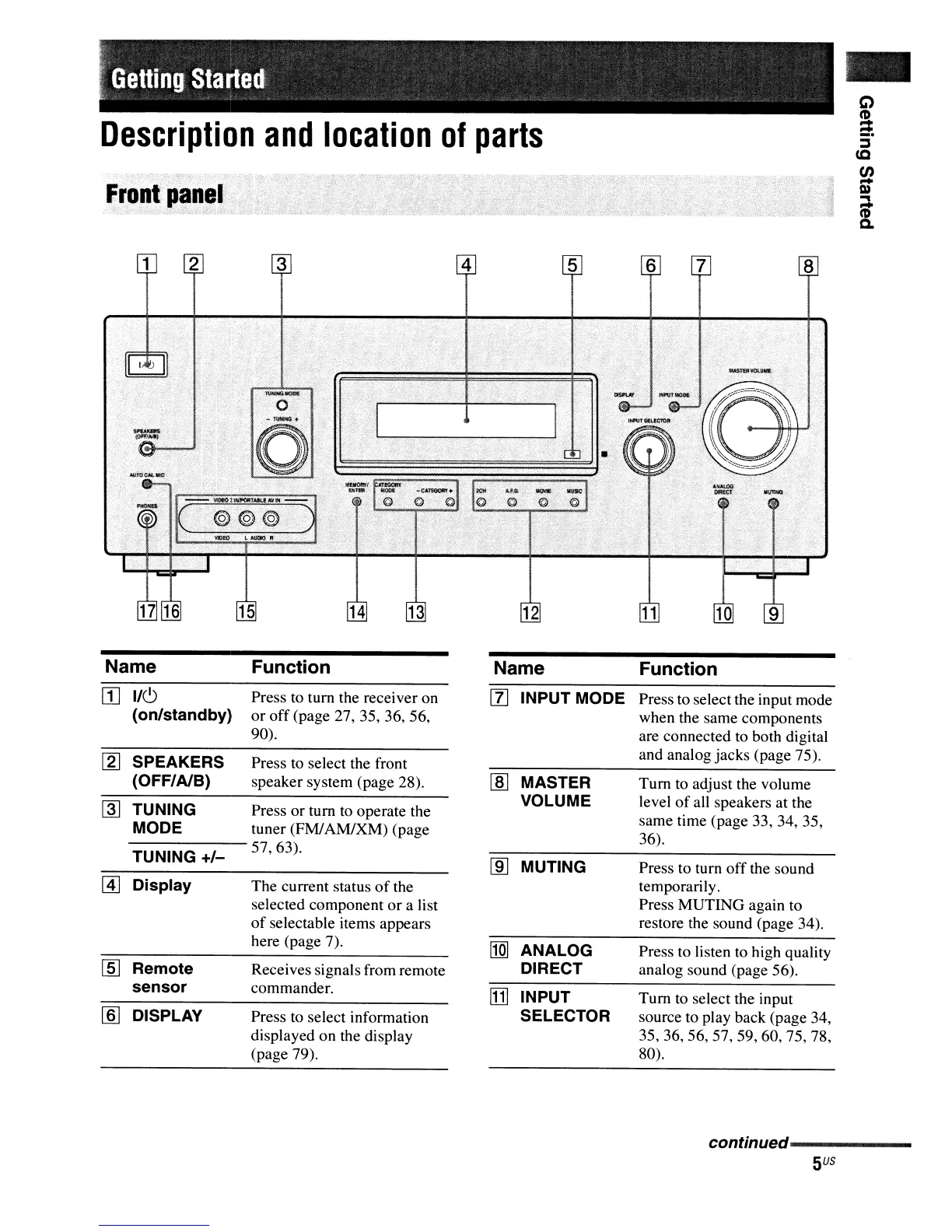
Name Function Name
Function
[I]
1/(9
Press to tum the receiver on
[l]
INPUT MODE Press to select the input mode
(on/standby)
or
off
(page 27,
35.36.56.
when the same components
90).
are connected
to
both digital
[g]
SPEAKERS Press to select the front
and analog jacks (page
75).
(OFF/AlB)
speaker system (page
28).
lID
MASTER
Tum
to
adjust the volume
~
TUNING Press or tum to operate the
VOLUME
level
of
all speakers at the
MODE tuner (FM/AM/XM) (page
same time (page
33,34,35.
57.63).
36).
TUNING
+/-
[ID
MUTING
Press to tum
off
the sound
~
Display The current status
of
the
temporarily.
selected component
or
a list
Press MUTING again to
of
selectable items appears
restore the sound (page
34).
here (page 7).
11m
ANALOG Press to listen
to
high quality
lID
Remote
Receives signals from remote
DIRECT
analog sound (page
56).
sensor
commander.
[j]
INPUT
Tum
to select the input
[ID
DISPLAY Press
to
select information
SELECTOR
source to play back (page
34.
displayed on the display
35,36,56.57.59.60.75,78.
(page 79).
80).
conNnued-----------
5
US



 To Next Page