3 Press the numeric buttons to
enter the channel number.
4 Press ENTER.
You
can also use MEMORY/ENTER on
the receiver.
The selected channel is tune in.
Displ~ling
the
XM·
Radi
informaf'
n
displa
Presetting
XM
Radio
channels
You
can select the channels you want directly
by
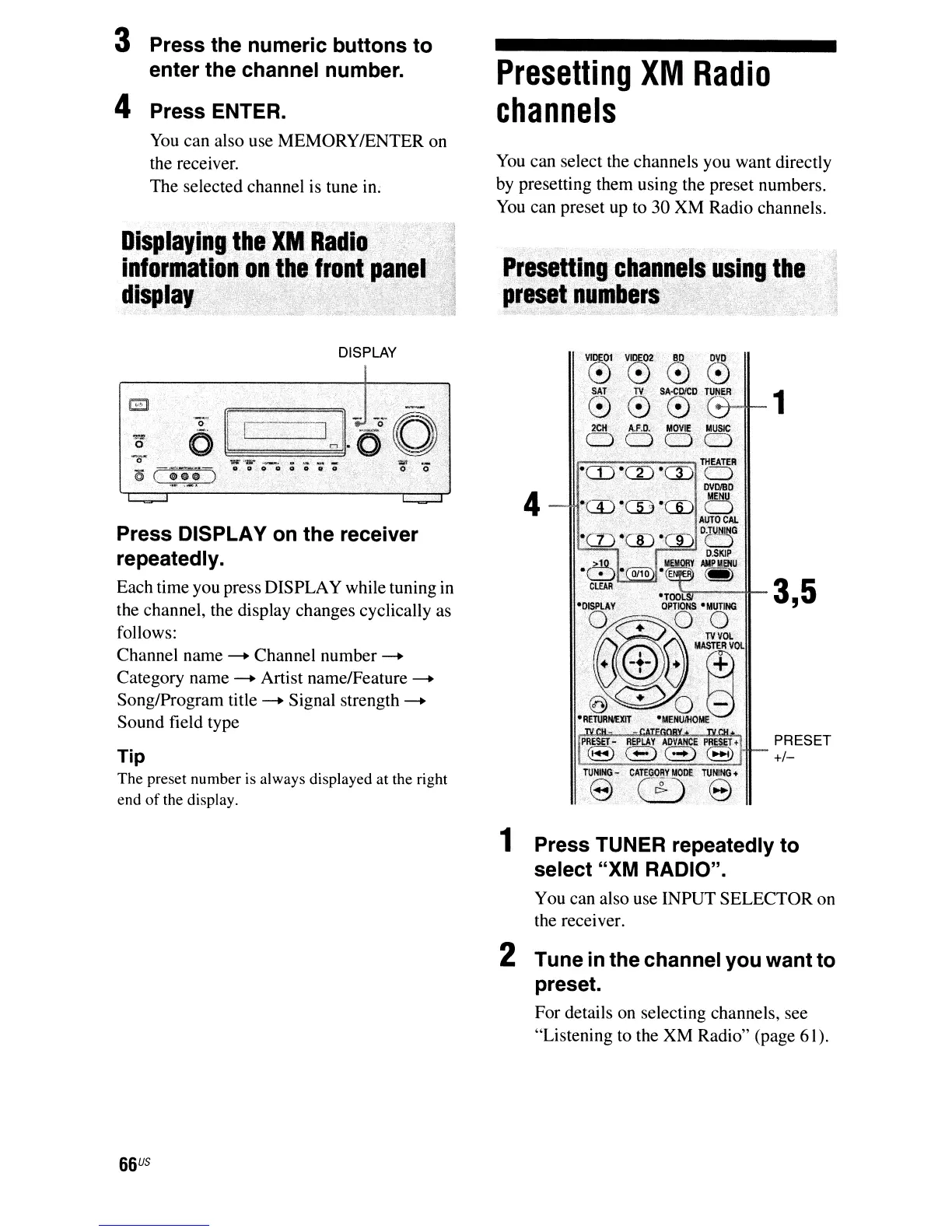
presetting them using the preset numbers.
You
can preset up to 30 XM Radio channels.
..
i
4
PRESET
TIp
~
The preset number is always displayed
at
the right
end
of
the display.
Press DISPLAY
on
the receiver
repeatedly.
Each time you press DISPLAY while tuning
in
3 5
,
the channel, the display changes cyclically as
follows:
Channel name
--+
Channel number
--+
Category name
--+
Artist name/Feature
--+
Song/Program title
--+
Signal strength
--+
Sound field type
DISPLAY
1 Press TUNER repeatedly to
select "XM RADIO".
You can also use INPUT SELECTOR on
the receiver.
2 Tune in the channel you want to
preset.
For details on selecting channels, see
"Listening to the XM Radio" (page 61).
66
us



 To Next Page