Selecting
channels
from
a
categ,ory
(CATEGORY
TUNINGl"
. -
You
can select a channel from one category or
all the categories by changing the category
mode.
2CH
A.F.D.
MOVIE
MUSIC
C)
C)
C) C)
THEATER
-CD-m-CD
0
DVDIBD
. .
MENU
-cu-m-rn
..
o
AUTO
CAL
-C7")
-00
-m-Q~G
. .
D,SKIP,
.~
'.
MEMORY
AMPIIEN.U
-(-..0 -@ID
-~
(_
CLEAR
4
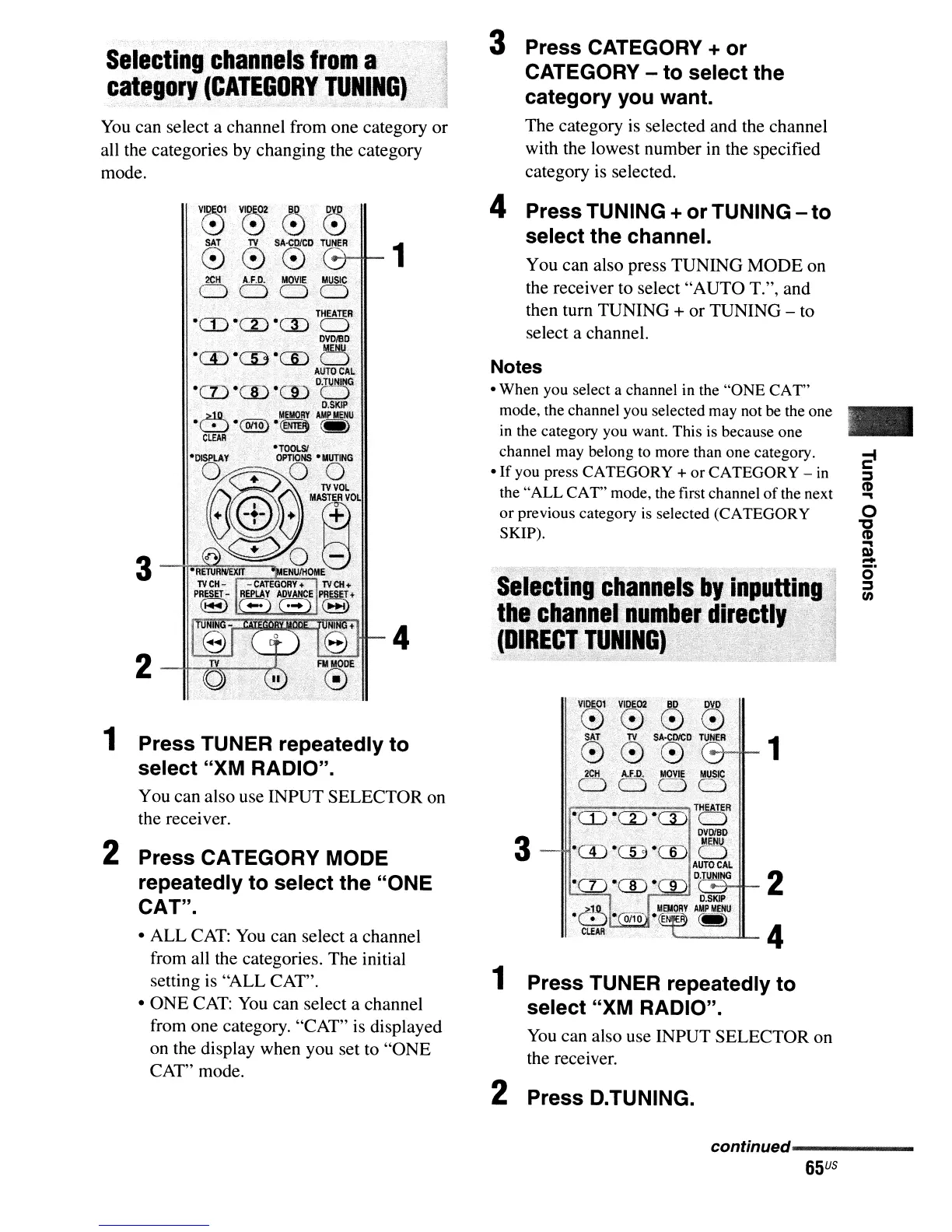
1 Press TUNER repeatedly
to
select
"XM RADIO".
You can also use INPUT SELECTOR on
the receiver.
2 Press CATEGORY MODE
repeatedly
to
select
the
"ONE
CAT".
• ALL
CAT:
You
can select a channel
from all the categories. The initial
setting
is
"ALL CAT".
• ONE
CAT:
You
can select a channel
from one category. "CAT" is displayed
on the display when you set to "ONE
CAT" mode.
3 Press CATEGORY +
or
CATEGORY -
to
select the
category
you want.
The category is selected and the channel
with the lowest number in the specified
category is selected.
4 Press TUNING +
or
TUNING -
to
select
the
channel.
You can also press TUNING MODE on
the receiver to select "AUTO T.", and
then turn TUNING
+ or TUNING - to
select a channel.
Notes
- When you select a channel in the
"ONE
CAT"
mode, the channel you selected may not be the one
in
the category you want. This is because one
channel may belong to more than one category.
-If
you press CATEGORY +
or
CATEGORY -
in
the"
ALL
CAT"
mode, the first channel
of
the next
or
previous category
is
selected (CATEGORY
SKIP).
Selecting
channels
by.
inputting'I
thechaonel
number
dir,ctIY"l
(DIRECT
TUNINGl··
OJ
'~:'~-0_~
R
~~_v
2
V~1
VIDE02
BO·
OVO
~000
SA,.
....•.•
TV
..
'.
SA·COICo
TUNER
1
0·'0
0
""""--11-
3
1 Press TUNER repeatedly
to
select "XM RADIO".
You
can also use INPUT SELECTOR on
the receiver.
2 Press D.TUNING.
-
o
"0
CD
...
Q)
-
O·
::::s
en
continued--------
_
65
US



 To Next Page