;.1
-
,
C)
(1)
I
J
-
=
~
CC
CJ)
ST
-
D)
M N
...
-
(1)
s·····l
f
Q.
• • •
! i E
'
•......
•
12
About
the
indicators
on
the
display~
,
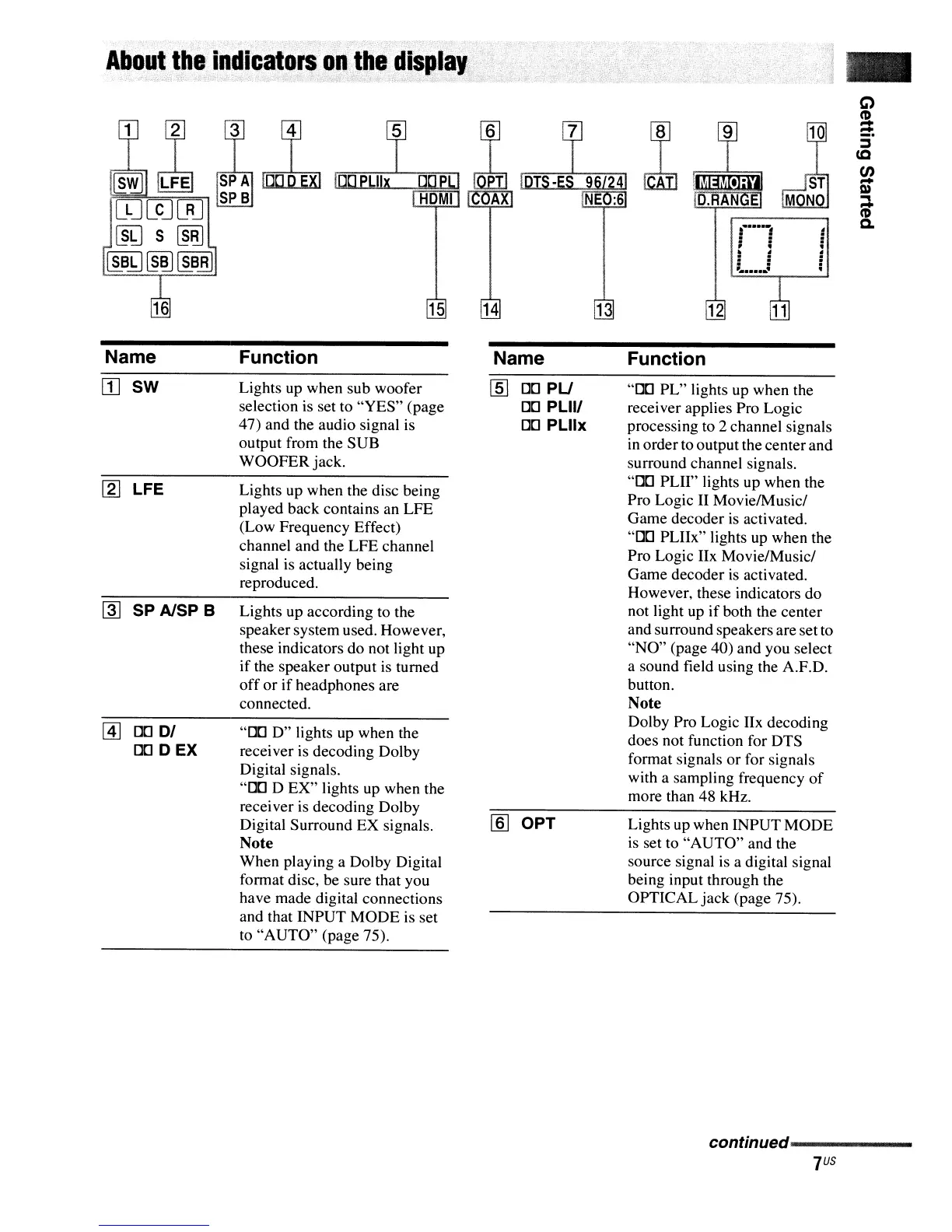
Name Function Name Function
[I]
sw
[2] LFE
~
SP AlSP B
@]
[)[]
DI
DD
D
EX
Lights up when sub woofer
selection is set to "YES" (page
47) and the audio signal is
output from the SUB
WOOFER jack.
Lights up when the disc being
played back contains an LFE
(Low Frequency Effect)
channel and the LFE channel
signal is actually being
reproduced.
Lights up according to the
speakersystem used. However,
these indicators do not light up
if the speaker output is turned
off
or
if
headphones are
connected.
"DD
D"
lights up when the
receiver is decoding Dolby
Digital signals.
"DD D EX" lights up when the
receiver is decoding Dolby
Digital Surround EX signals.
Note
When playing a Dolby Digital
format disc, be sure that you
have made digital connections
and that INPUT MODE is set
to
"AUTO" (page 75).
lID
DD
PU
DD
PLlII
DD
PLllx
[ID
OPT
"DD PL" lights up when the
receiver applies Pro Logic
processing to 2 channel signals
in
orderto output the centerand
surround channel signals.
"DD PLII" lights up when the
Pro Logic II Movie/Music/
Game decoder is activated.
"DD PLIIx" lights up when the
Pro Logic IIx Movie/Music!
Game decoder is activated.
However, these indicators do
not light up
if
both the center
and surround speakers are set to
"NO"
(page 40) and you select
a sound field using the A.F.D.
button.
Note
Dolby Pro Logic IIx decoding
does not function for DTS
format signals or for signals
with a sampling frequency
of
more than 48 kHz.
Lights up when INPUT MODE
is set to "AUTO" and the
source signal is a digital signal
being input through the
OPTICAL jack (page 75).
conHnued-------------
7
US



 To Next Page