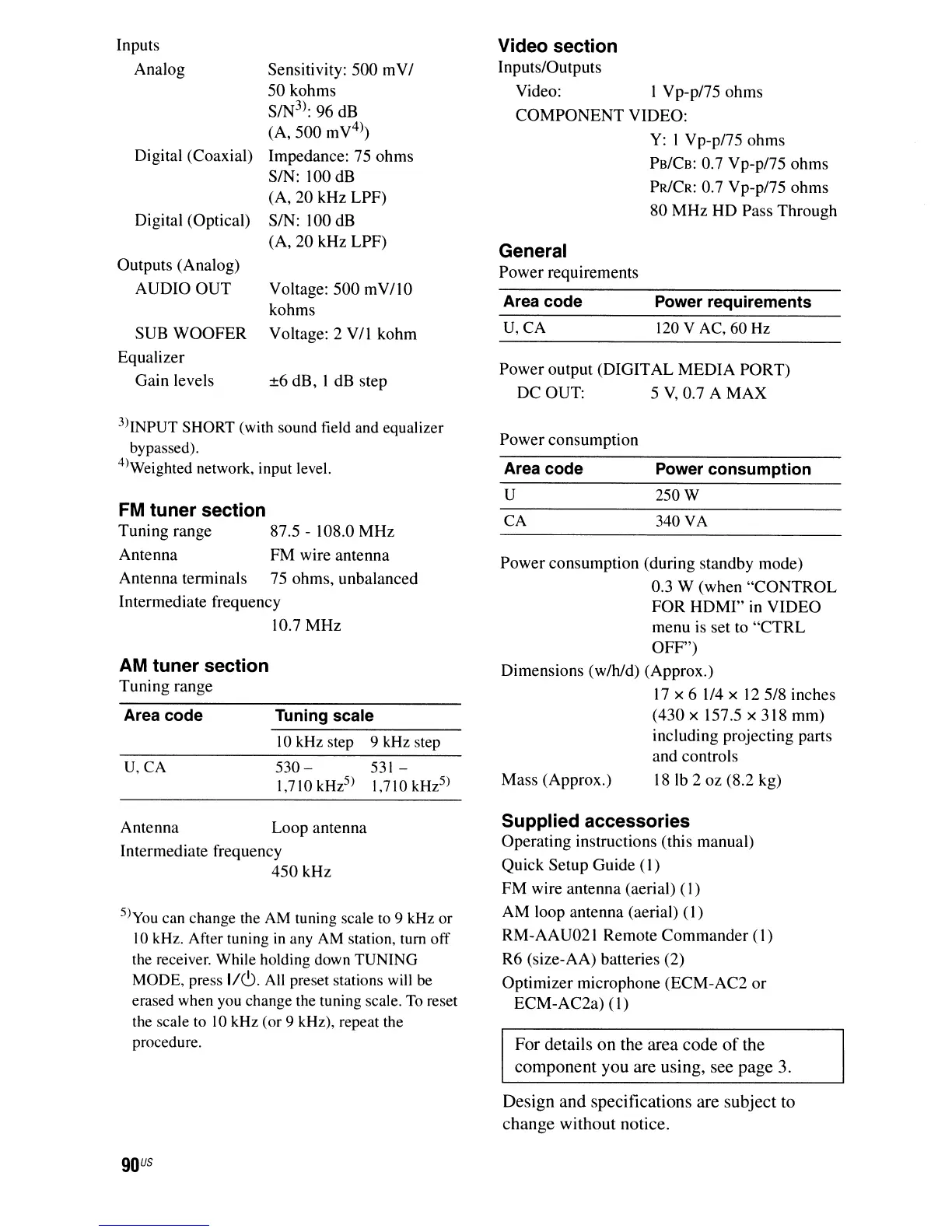
Power output (DIGITAL MEDIA PORT)
DC OUT: 5
V,
0.7 A
MAX
Video section
InputslOutputs
Video: I Vp-pl75 ohms
COMPONENT
VIDEO:
Y:
I Vp-p/75 ohms
PB/CB:
0.7 Vp-pl75 ohms
PR/CR:
0.7 Vp-pl75 ohms
80
MHz
HD Pass Through
Inputs
Analog
Digital (Coaxial)
Digital (Optical)
Outputs (Analog)
AUDIO
OUT
SUB
WOOFER
Equalizer
Gain levels
Sensitivity: 500
mVI
50 kohms
S/N
3
):
96 dB
(A,
500
mV
4
)
Impedance: 75 ohms
SIN: 100 dB
(A, 20 kHz LPF)
SIN:
100 dB
(A, 20 kHz LPF)
Voltage:
500
mV/lO
kohms
Voltage: 2 VII kohm
±6 dB, I dB step
General
Power requirements
Area code
U,CA
Power requirements
120
V AC, 60
Hz
3)INPUT SHORT (with sound field and equalizer
bypassed).
4)Weighted network, input level.
Power consumption
FM
tuner section
Tuning range 87.5 - 108.0
MHz
Antenna FM wire antenna
Antenna terminals 75 ohms, unbalanced
Intermediate frequency
10.7 MHz
250W
340
VA
CA
U
Mass (Approx.)
Power
consumption (during standby mode)
0.3 W (when
"CONTROL
FOR
HDMI"
in
VIDEO
menu is set to
"CTRL
OFF")
Dimensions
(wlhld)
(Approx.)
17
x 6 1/4 x
12518
inches
(430 x
157.5x318mm)
including projecting parts
and controls
181b 2 oz (8.2 kg)
10kHz step 9 kHz step
Tuning scale
530-
531
-
1,710 kHz
5
) 1,710 kHz
5
)
U,CA
Area code
AM
tuner section
Tuning range
Antenna Loop antenna
Intermediate frequency
450
kHz
5)you can change the
AM
tuning scale
to
9
kHz
or
10kHz. After tuning
in
any
AM
station, tum off
the
receiver. While holding down TUNING
MODE, press
1/6.
All
preset stations will
be
erased when you change the tuning scale.
To
reset
the scale to 10kHz (or 9 kHz), repeat the
procedure.
Supplied accessories
Operating instructions (this manual)
Quick Setup Guide
(I)
FM wire antenna (aerial)
(I)
AM loop antenna (aerial)
(I)
RM-AAU021 Remote Commander
(I)
R6 (size-AA) batteries (2)
Optimizer microphone (ECM-AC2
or
ECM-AC2a)
(I)
For
details
on
the
area
code
of
the
component
you
are
using,
see
page
3.
Design
and
specifications
are
subject
to
change
without
notice.
90
US



 To Next Page