15
US
F:\Sony SEM
HA\Revision2_DG800\JC060412_2667346121DG800_US\2667346121\US03CON_STR-DG800-
CEL.fm
masterpage: Right
STR-DG800
2-662-258-12 (1)
Getting Started
1: Installing speakers
This receiver allows you to use a 7.1 channel
system (7 speakers and one sub woofer).
To fully enjoy theater-like multi channel
surround sound requires five speakers (two
front speakers, a center speaker, and two
surround speakers) and a sub woofer (5.1
channel).
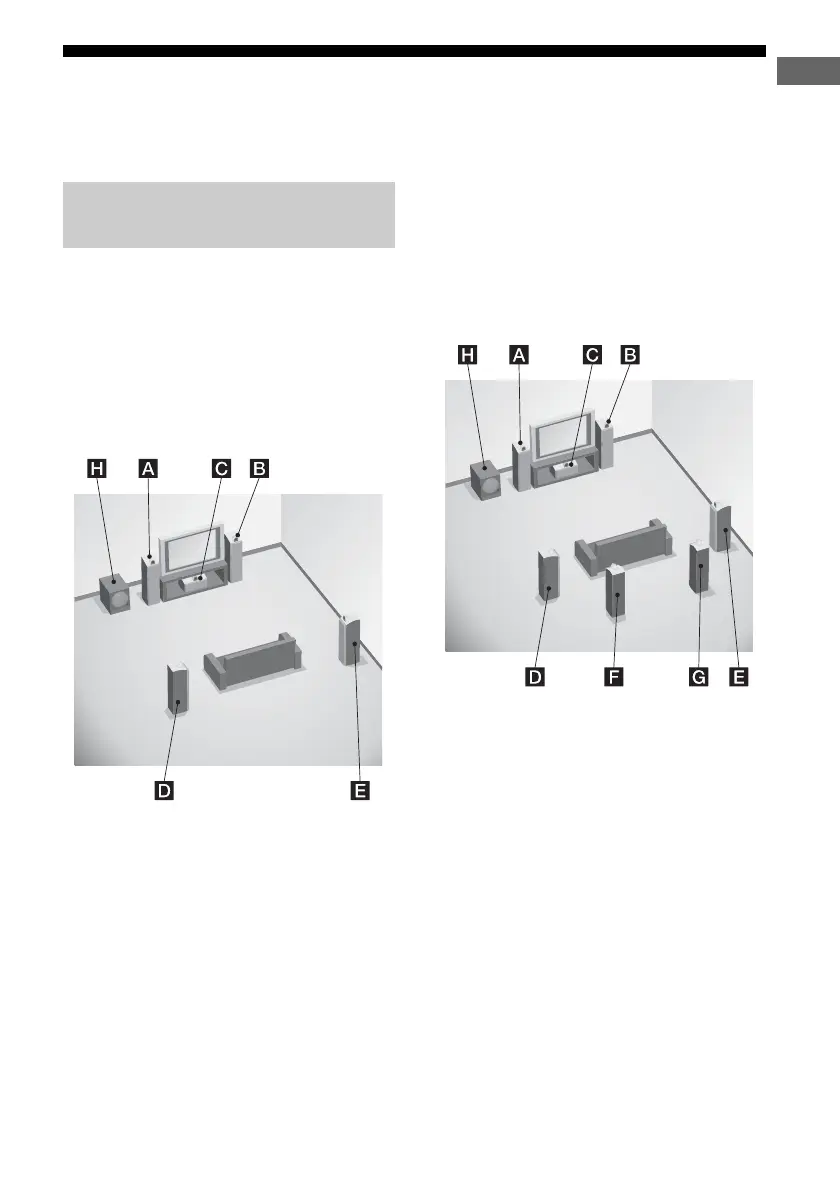
Example of a 5.1 channel
speaker system configuration
AFront speaker (L)
BFront speaker (R)
CCenter speaker
DSurround speaker (L)
ESurround speaker (R)
HSub woofer
You can enjoy high fidelity reproduction of
DVD software recorded sound in the Surround
EX format if you connect one additional
surround back speaker (6.1 channel) or two
surround back speakers (7.1 channel) (see
“Using the surround back decoding mode” on
page 53).
Example of a 7.1 channel
speaker system configuration
AFront speaker (L)
BFront speaker (R)
CCenter speaker
DSurround speaker (L)
ESurround speaker (R)
FSurround back speaker (L)
GSurround back speaker (R)
HSub woofer
Tips
• When you connect a 6.1 channel speaker system, place
the surround back speaker behind the listening position.
• Since the sub woofer does not emit highly directional
signals, you can place it wherever you want.
• If you connect the SUR PRE OUT jack to another power
amplifier, you are recommended to connect the surround
speakers to the SPEAKER jacks of that amplifier. Do not
connect the surround speakers to this receiver.
Enjoying a 5.1/7.1 channel
system
US01COV_STR-DG800-CEL.book Page 15 Tuesday, March 14, 2006 3:53 PM



 To Next Page