22
US
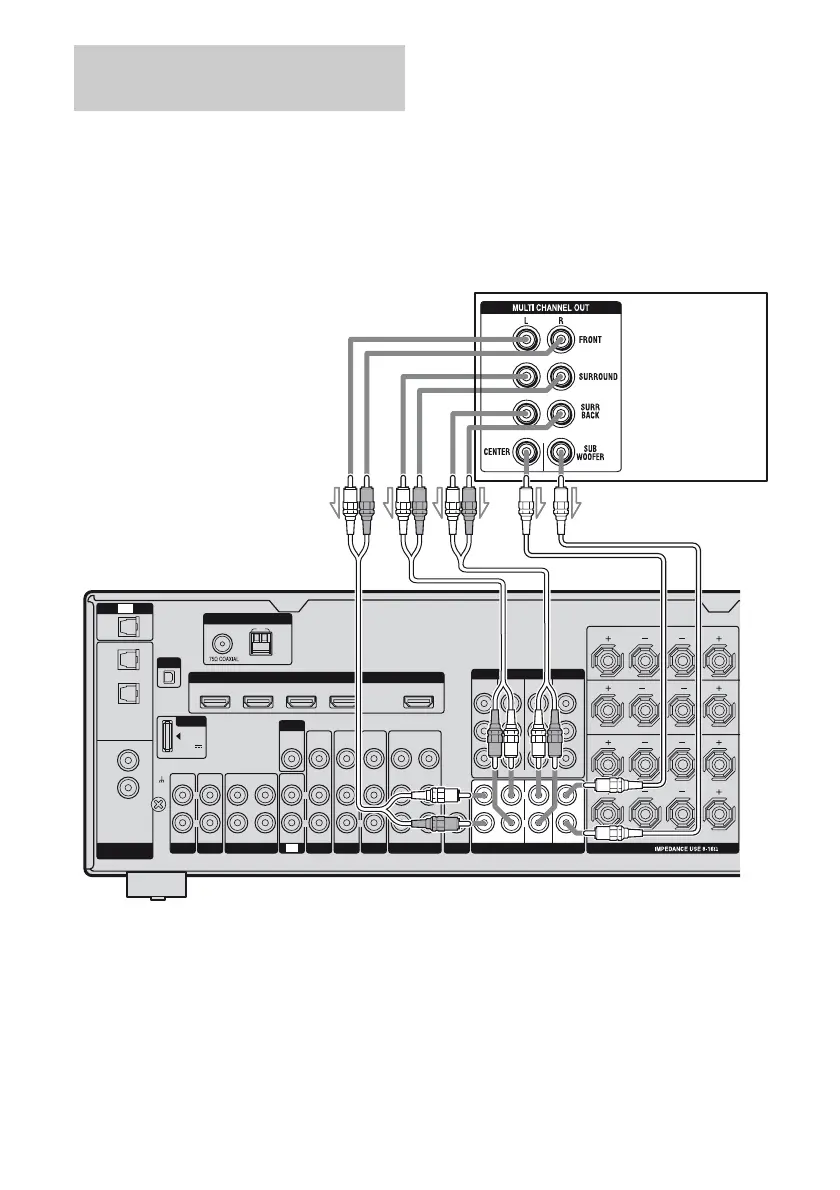
If your DVD or Super Audio CD player is
equipped with multi channel output jacks, you
can connect them to the MULTI CHANNEL
INPUT jacks of this receiver to enjoy multi
channel sound. Alternatively, the multi
channel input jacks can be used to connect an
external multi channel decoder.
Notes
• Before connecting cords, make sure to disconnect
the AC power cord (mains lead).
• Audio input signals from MULTI CHANNEL
INPUT jacks are not output to any audio output
jacks. The signals cannot be recorded.
Connecting components with
multi channel output jacks
DIGITAL
ASSIGNABLE
OPTICAL
IN
OPTICAL
VIDEO 1
IN
COAXIAL
DVD
IN
TV
SAT
IN
SA-CD/
CD
IN
XM
DMPORT
DC5V
0.7A MAX
SAT IN
HDMI
BD IN DVD IN VIDEO 1 IN OUT
MD/TAPE
OUT
SIGNAL
GND
IN IN
TV
IN
AUDIO
IN
VIDEO
IN
SAT
AUDIO
IN
VIDEO
IN
BD
MONITOR
AUDIO
IN
VIDEO
IN
AUDIO
IN
VIDEO
IN
DVD
AUDIO
OUT
AUDIO
OUT
VIDEO
OUT
VIDEO
OUT
VIDEO 1
MULTI CHANNEL INPUT
SA-CD
/
CD
IN
PHONO
SUBWOOFER
FRONT
SURROUND SUR BACK
COMPONENT VIDEO
MONITOR
OUT
COMPO 3
IN
COMPO 2
IN
COMPO 1
IN
Y
PB/
C
B
PR/
C
R
FRONT A
LR
FRONT B
LR
SURROUND
LR
SURROUND BACK
LR
SPEAKERS
AM
FM
ANTENNA
R
L
R
L
R
L
R R
L
R
L
R
L L
ASSIGNABLE (INPUT ONLY)
CENTER
SUBWOOFER
DVD player,
Super Audio CD
player, etc.
AB
A Audio cord (not supplied)
B Monaural audio cord (not supplied)












 To Next Page