6
US
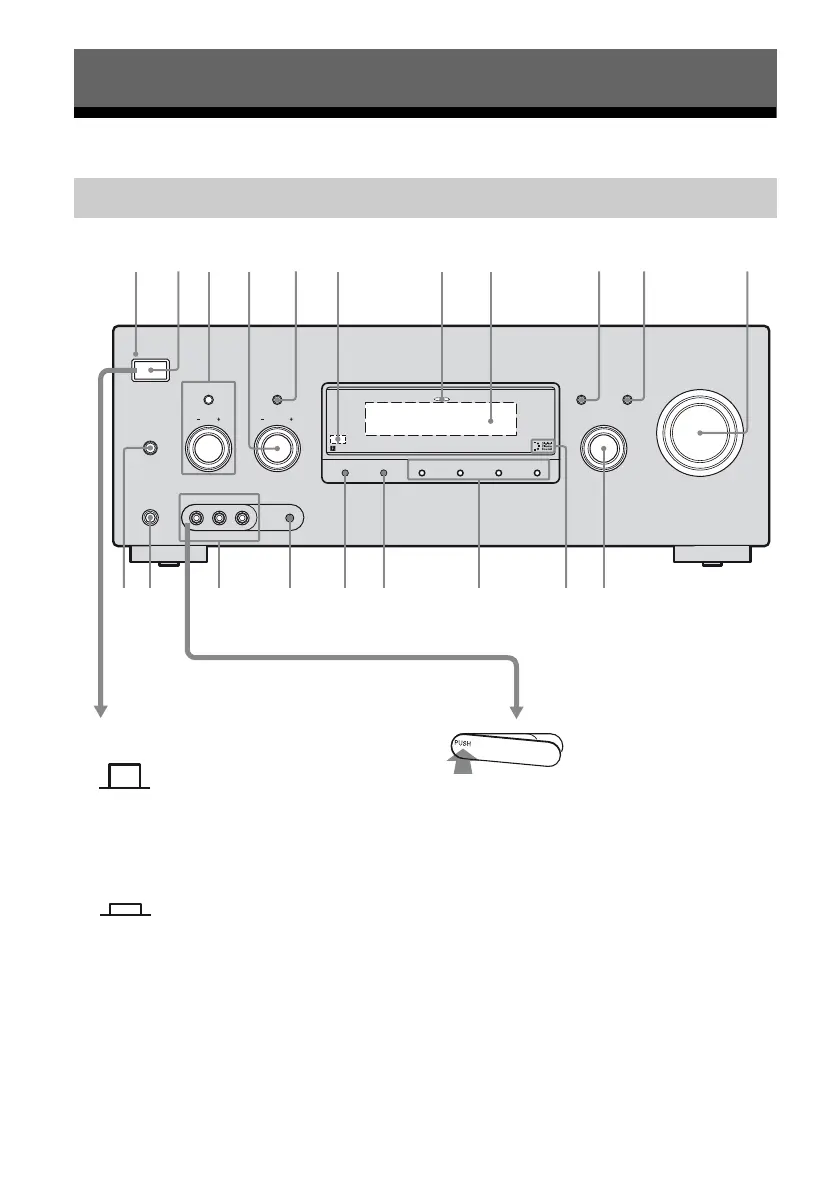
Description and location of parts
Status of the POWER button
x
(Off)
The receiver is turned off (initial setting).
Press POWER to turn the receiver on.
You cannot turn the receiver on using the
remote.
x (On/Standby)
Press
?/1 on the remote to turn the receiver on
or set it to the standby mode.
When you press POWER on the receiver, the
receiver will be turned off.
To remove the cover
Press PUSH.
When you remove the cover, keep it out of
reach from children.
Getting Started
Front panel
SPEAKERS
(OFF/A/B/A+B)
PHONES
VIDEO 2 IN/PORTABLE AV IN
VIDEO L AUDIO R AUTO CAL MIC
MEMORY/
ENTER
2CH/
A.DIRECT
A.F.D. MOVIE MUSICDIMMER
MULTI CHANNEL DECODING
INPUT SELECTOR
TONE MODE
ON/STANDBY
TUNING MODE
POWER
TUNING
DISPLAY INPUT MODE
MASTER VOLUME
TONE
1 32 5
qa
46 78 9q;
qsqf qdqgqhqlw; qjqk












 To Next Page