•
*
Super Audio
L CD player,
CD player
TV
DIGITAL
MEDIA PORT
adapter
oAudio cord (not supplied)
4)
Video cord (not supplied)
*The type
of
connector varies depending on the
DIGITAL MEDIA PORT adapter.
For
details, refer to the operating instructions
supplied with the DIGITAL MEDIA PORT
adapter.
page
14
Video components
•
DVD
player, Blu-ray disc player
• Satellite tuner, Set-top box
•
DVD
recorder,
VCR
Audio components page
13
• Super Audio
CD
player,
CD
player
• MD deck,
Tape
deck
•
DIGITAL
MEDIA
PORT
adapter
This section describes how
to
connect your
components to this receiver. Before you begin,
refer to "Component to be connected" below
for the pages which describe how to connect
the audio/video components.
After connect all yourcomponents, proceed
to
"4: Connecting the antennas (aerials)" (page
15).
Component
to
be
connected
See
.
Connecting
audio
components
3:
Connecting
the
audio!
video
components
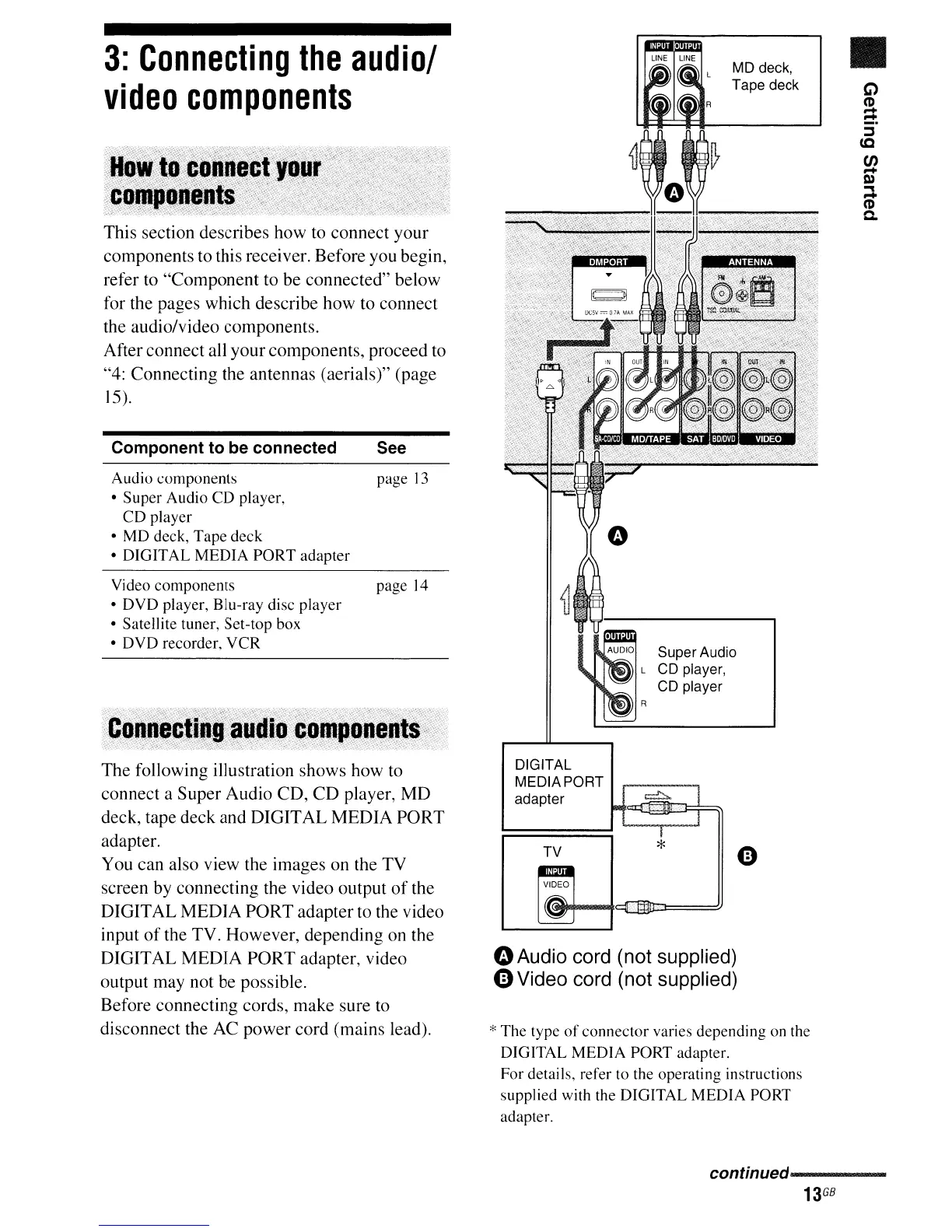
The following illustration shows how to
connect a Super Audio CD, CD player, MD
deck, tape deck and DIGITAL MEDIA PORT
adapter.
You can also view the images on the TV
screen by connecting the video output
of
the
DIGITAL MEDIA PORT adapter to the video
input
of
the TV. However, depending on the
DIGITAL MEDIA PORT adapter, video
output may not be possible.
Before connecting cords, make sure
to
disconnect the AC power cord (mains lead).
continued-----
13
GB


 To Next Page