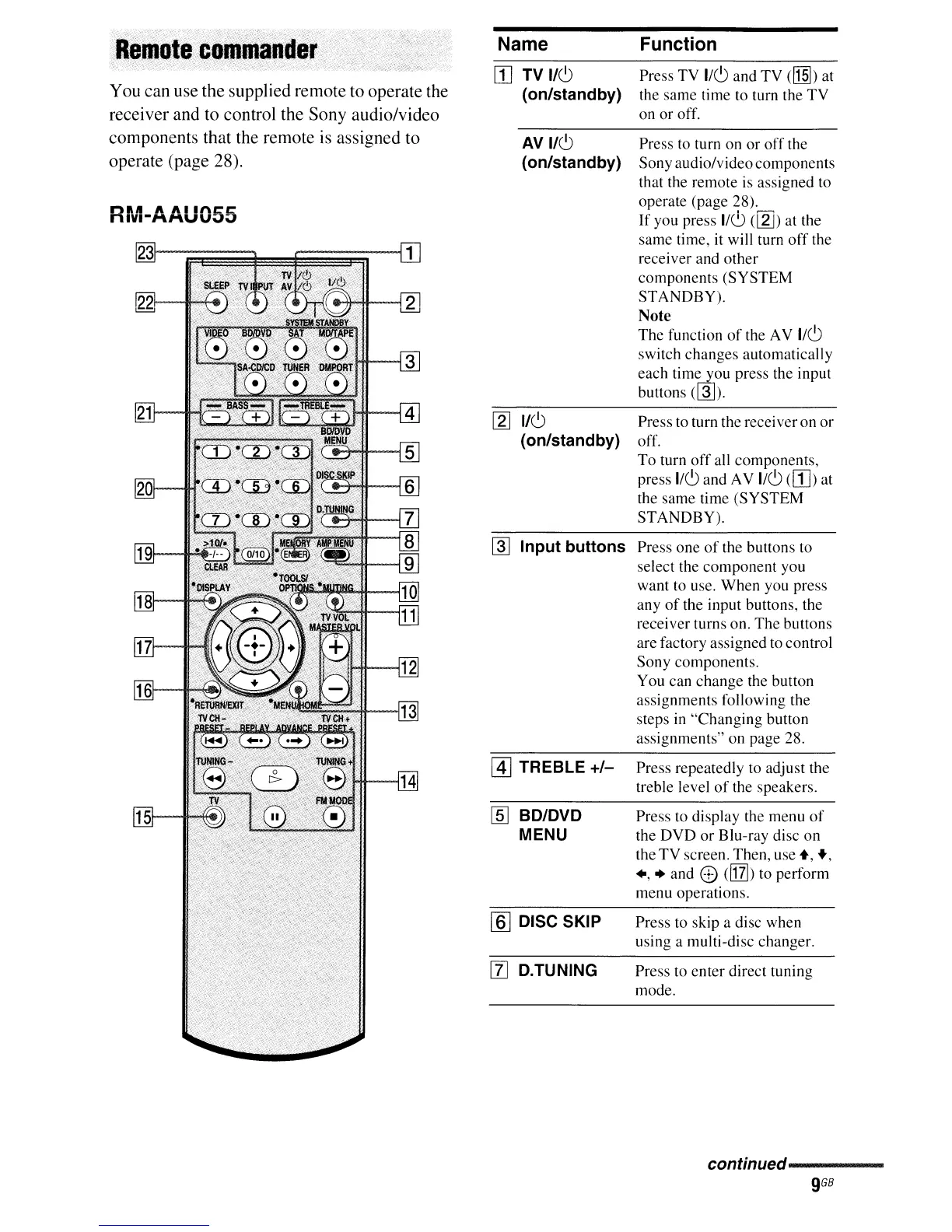
You can use the supplied remote to operate the
receiver and to control the Sony audio/video
components that the remote
is
assigned to
operate (page 28).
Name
W TV
1/6
(on/standby)
AVI/6
(on/standby)
[2J
1/6
(on/standby)
~
Input buttons
@]
TREBLE
+/-
lID
BD/DVD
MENU
[ID
DISC SKIP
[l] D.TUNING
Function
Press TV
1/6
and
TV
([1§])
at
the same time to turn the
TV
on
or
off.
Press to turn on
or
off
the
Sonyaudio/videocomponents
that the remote is assigned to
operate (page 28).
If
you press
1/0
(llJ)
at the
same time, it will turn
off
the
receiver and
other
components (SYSTEM
STANDBY).
Note
The
function
of
the AV 1/6
switch changes automatically
each
tim~ou
press the input
buttons
(@J).
Press to turn the receiver on
or
off.
To
turn
off
all components,
press
1/6and AV 1/6
(W)
at
the same time (SYSTEM
STANDBY).
Press one
of
the buttons to
select the component you
want to use. When you press
any
of
the input buttons, the
receiver turns on. The buttons
are factory assigned to control
Sony components.
You can
change
the button
assignments following the
steps in
"Changing
button
assignments" on page 28.
Press repeatedly to adjust the
treble level
of
the speakers.
Press to display the menu
of
the
DVD
or
Blu-ray disc
on
the
TV
screen. Then, use
+,
.,
+,
..
and e
clIT])
to perform
menu operations.
Press to skip a disc when
using a multi-disc changer.
Press to
enter
direct tuning
mode.
continued-----


 To Next Page