27
GB
Connection and Preparation
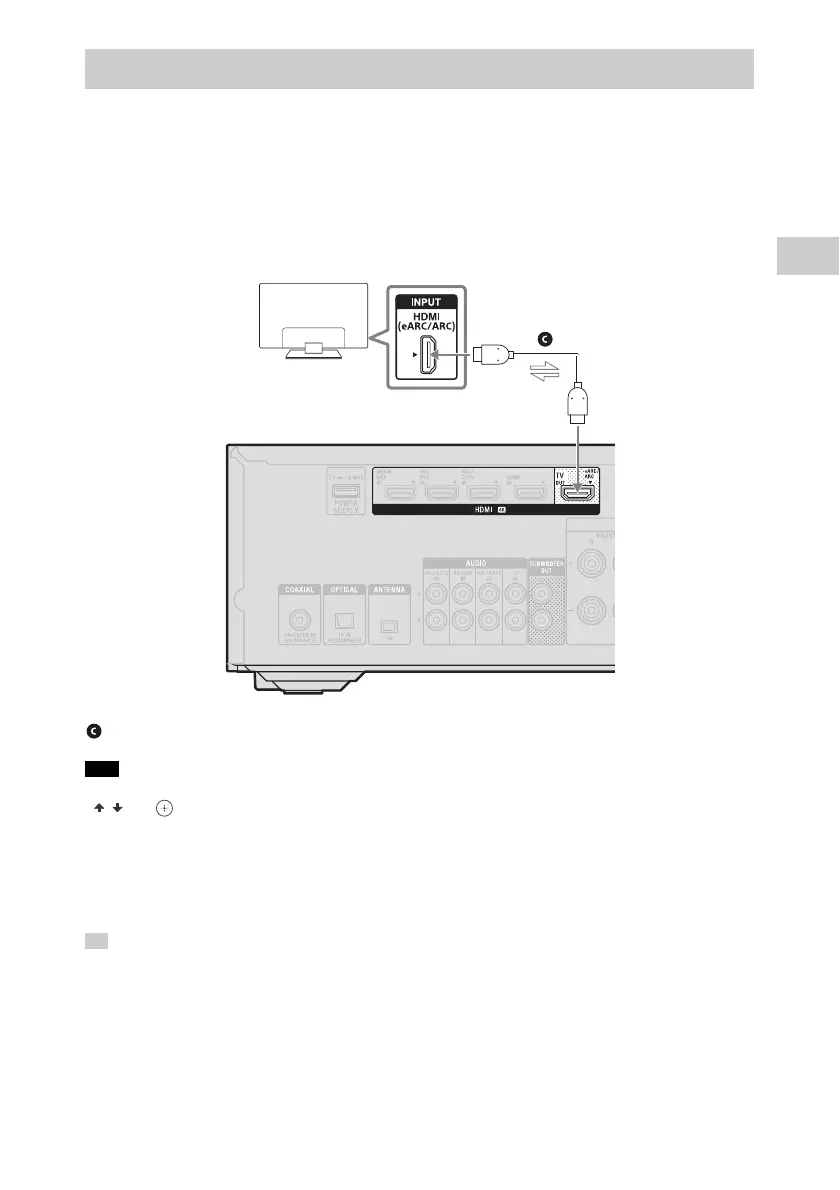
If the HDMI jack on the TV is compatible with eARC or ARC
Both eARC and ARC are functions that send TV digital sound to audio-visual devices through
an HDMI cable.
If the TV’s HDMI input jack is labeled “eARC” or “ARC,” this TV is compatible with the eARC or
ARC function. Simply by connecting the receiver with the TV’s eARC- or ARC-compatible
HDMI input jack using an HDMI cable, you can listen to TV audio from the speakers
connected to the receiver.
• For this connection, you need to turn the Control for HDMI function on. Press AMP MENU, then press
/ and to select “<HDMI>” – “CTRL.HDMI” – “CTRL ON”.
• You also need to set the eARC or ARC function of your TV to on. For details, refer to the operating
instructions of the TV.
• If the HDMI TV OUT jack on your receiver is labeled “ARC,” update the software of the receiver. For details,
refer to “Updating the software (UPDATE)” in Help Guide.
If the HDMI TV OUT jack on your receiver is labeled “eARC/ARC,” its software already supports the eARC
function.
If the eARC- or ARC-compatible HDMI jack of the TV is already connected to another device, disconnect
the device and connect the receiver.
Connecting a TV not compatible with 4K
Note
Tip
HDMI cable (not supplied)
Audio/Video signals
TV



 To Next Page