31
US
Getting Started
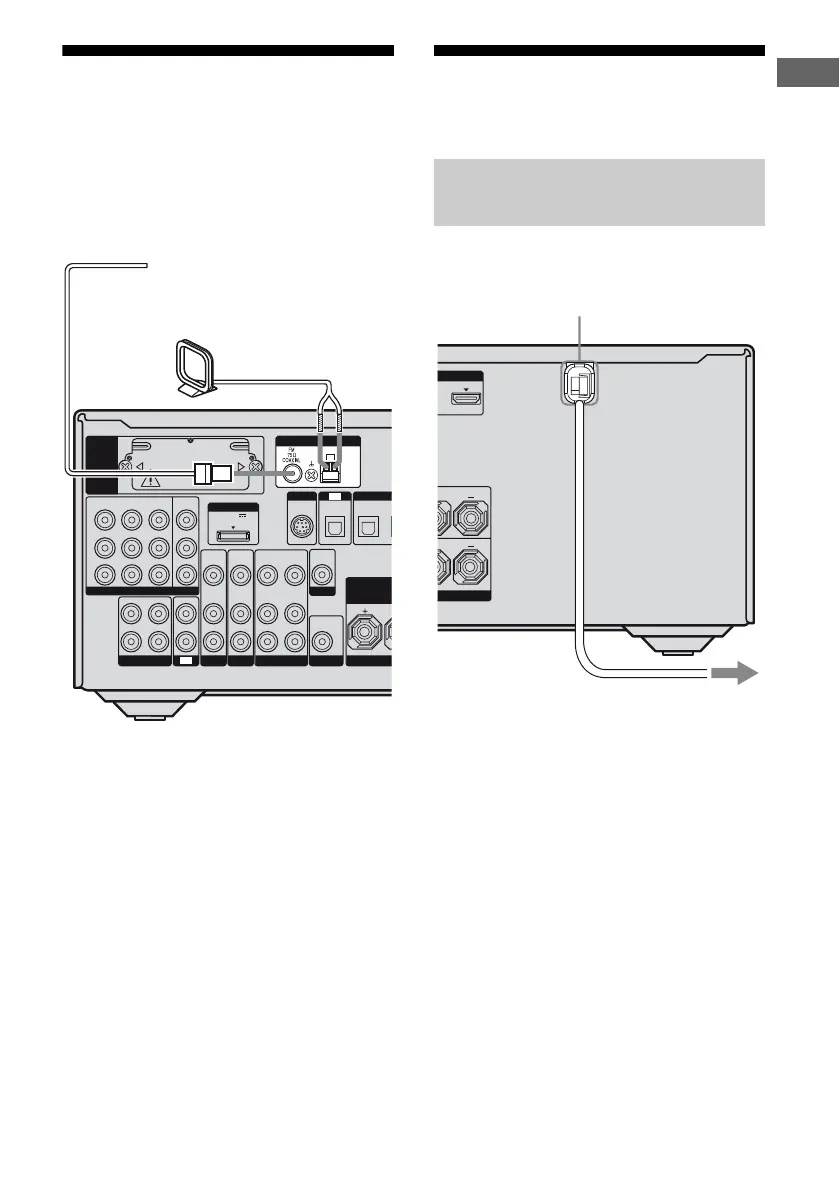
5: Connecting the
antennas (aerials)
Connect the supplied AM loop antenna
(aerial) and FM wire antenna (aerial).
Before connecting antennas (aerials), be sure
to disconnect the power cord.
Notes
• To prevent noise pickup, keep the AM loop
antenna (aerial) away from the receiver and other
components.
• Be sure to fully extend the FM wire antenna
(aerial).
• After connecting the FM wire antenna (aerial),
keep it as horizontal as possible.
6: Preparing the receiver
and the remote
Connect the AC power cord (mains lead) to a
wall outlet.
L
R
DIGI
DC5V
0.7A MAX
DMPORT
IN 3
AM
Y
P
B
/
C
B
COMPONENT VIDEO
OUT
IN
P
R
/
C
R
IN 2
IN 1
MONITOR
OUT
SA-CD/CD/CD-R
VIDEO 1
IN
TV
AUDIO
IN
VIDEO
IN
SAT
AUDIO
OUT
AUDIO
OUT
VIDEO
OUT
VIDEO
OUT
IN
OPTICAL
AUDIO
IN
VIDEO
IN
SUBWOOFER
MONITOR
AUDIO
IN
VIDEO
IN
BD
R
SAT
IN
OPTI
ASSIGNABLE (INPUT ONLY)
SURROUND
BI-AM
FRONT
TV
SIRIUS
EZW-T100
ANTENNA
FM wire antenna (aerial) (supplied)
AM loop antenna (aerial)
(supplied)
Connecting the AC power cord
(mains lead)
OUT
L
L
AC power cord (mains lead)
To the wall outlet















 To Next Page