70
GB
D:\NORM'S JOB\SONY HA\SO0155\STR-DN1020_PMRF 03\4273051141_GB\GB05ENJ_STR-
DN1020-CEL.fm
masterpage: Left
STR-DN1020
4-273-051-14(1)
This section explains how to set up
manufacturer-installed Windows Media
Player 12 for Windows 7.
For details on how to operate Windows Media
Player 12, refer to Help for Windows Media
Player 12.
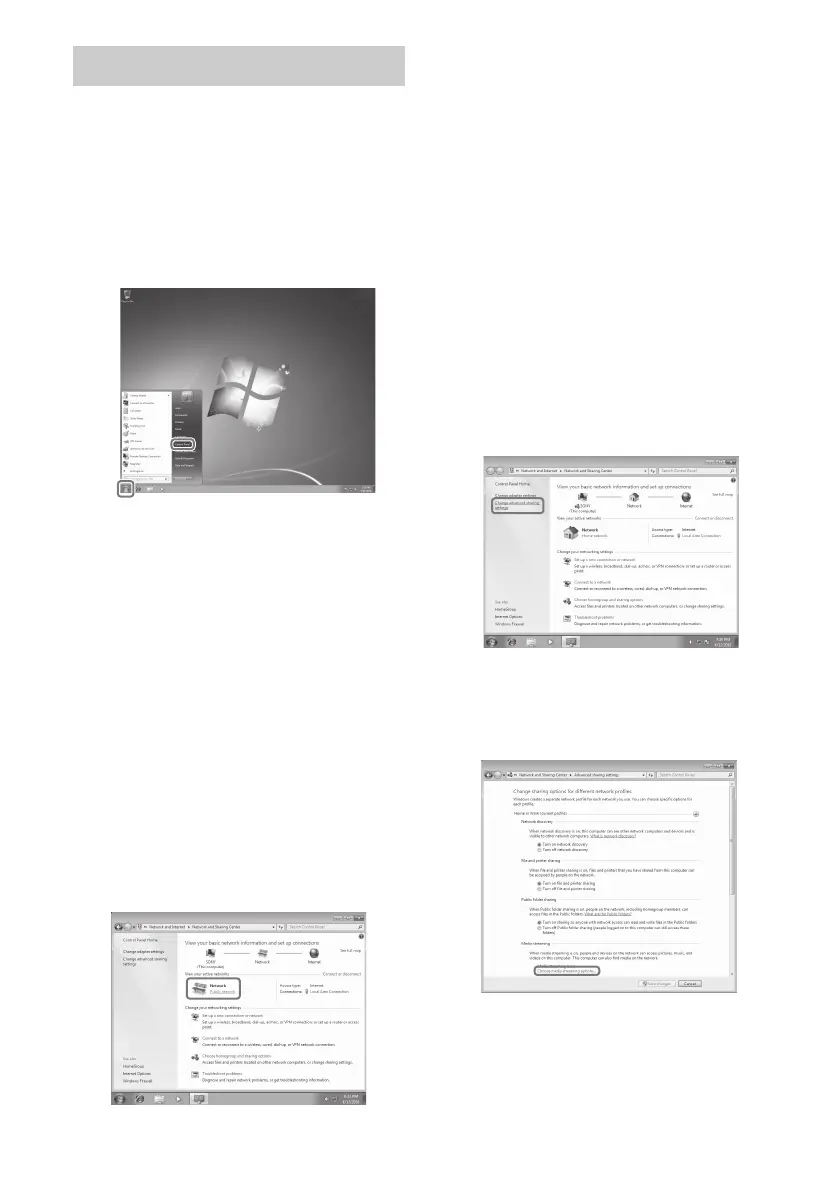
1 Go to [Start] – [Control Panel].
2 Select [View network status
and tasks] under [Network and
Internet].
The [Network and Sharing Center]
window appears.
Tip
If the item you want does not appear on the
display, try to change the display type of the
Control Panel.
3 Select [Public network] under
[View your active networks].
If the display shows other than
[Public Network], go to step 6.
The [Set Network Location] window
appears.
4 Select [Home network] or
[Work network] according to
the environment in which the
receiver is used.
5 Follow the instructions that
appear on the display
according to the environment
in which the receiver is used.
When the settings are completed, confirm
that the item under [View your active
networks] is changed to [Home network]
or [Work network] in the [Network and
Sharing Center] window.
6 Select [Change advanced
sharing settings].
7 Select [Choose media
streaming options…] from
[Media streaming].
When using Windows 7



 To Next Page