5
STR-K680/K780
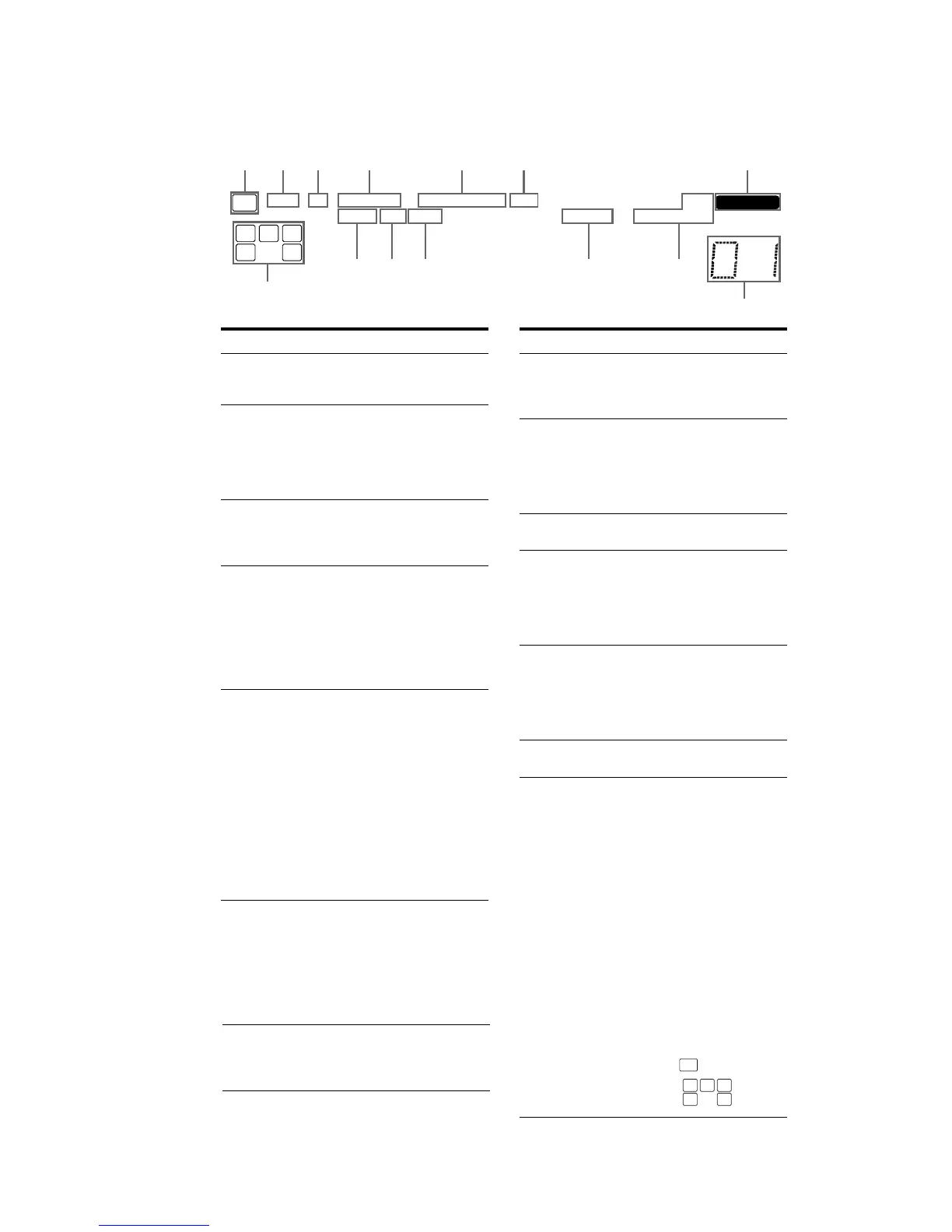
About the indicators on the display
MEMORY
L C R
SL
S
SR
SW
LFE
SP
RDS
STEREO MONOD.RANGE
SLEEP OPT COAX
DIGITAL
;
DTS
;
PRO LOGIC II
q; 9qd
qf
qaqs
214356 7
8
Name Function
A SW Lights up when audio signal is
output from the SUB WOOFER
jack.
B LFE Lights up when the disc being
played back contains an LFE
(Low Frequency Effect)
channel and the LFE channel
signal is actually being
reproduced.
C SP Lights up when the receiver is
turned on. This indicator does
not light up if a headphone is
connected to the PHONES jack.
D ;DIGITAL Lights up when Dolby Digital
signals are input.
Note
When playing a Dolby Digital
format disc, be sure that you
have made digital connections
and that INPUT MODE is not
set to “ANALOG”.
E ; PRO
LOGIC (II)
“; PRO LOGIC” lights up
when the receiver applies Pro
Logic processing to 2 channel
signals in order to output the
center and surround channel
signals. “; PRO LOGIC II”
lights up when the Pro Logic II
Movie/Music decoder is
activated.
Note
Dolby Pro Logic and Dolby Pro
Logic II decoding do not
function for DTS format
signals.
Name Function
F DTS Lights up when DTS signals are
input.
Note
When playing a DTS format
disc, be sure that you have made
digital connections and that
INPUT MODE is not set to
“ANALOG”.
G MEMORY Lights up when a memory
function, such as Name Input,
Preset Memory, etc., is
activated.
H Preset
station
indicators
Lights up when using the
receiver to tune in radio stations
you have preset. For details on
presetting radio stations.
I Tuner
indicators
Lights up when using the
receiver to tune in radio stations,
etc.
Note
“RDS” appears for models of
area code AEP, UK only.
J D.RANGE Lights up when dynamic range
compression is activated.
K COAX Lights up when INPUT MODE
is set to “AUTO” and the source
signal is a digital signal being
input through the COAXIAL
jack, or when INPUT MODE is
set to “COAX IN”.
L OPT Lights up when INPUT MODE
is set to “AUTO” and the source
signal is a digital signal being
input through the OPTICAL
jack, or when INPUT MODE is
set to “OPT IN”.
M SLEEP Lights up when the Sleep Timer
function is activated.
N Playback
channel
indicators
L
R
C
SL
SR
S
The letters (L, C, R, etc.)
indicate the channels being
played back. The boxes around
the letters vary to show how the
receiver downmixes the source
sound.
Front Left
Front Right
Center (monaural)
Surround Left
Surround Right
Surround (monaural or the
surround components obtained
by Pro Logic processing)
Example:
Recording format (Front/
Surround): Dolby Digital 3/2.1
Sound Field: A.F.D. AUTO
L C R
SL SR
SW LFE



 To Next Page