Hooking up the components
masterpage:Right
filename[\\Nas-data-server\SONY Current jobs\SONY STR-
LV500\_DTP\4248914121\424891412STRLV500CEL\GB03CON_STR-LV500-CEL.fm]
7
GB
model name1[STR-LV500]
[4-248-914-12(1)]
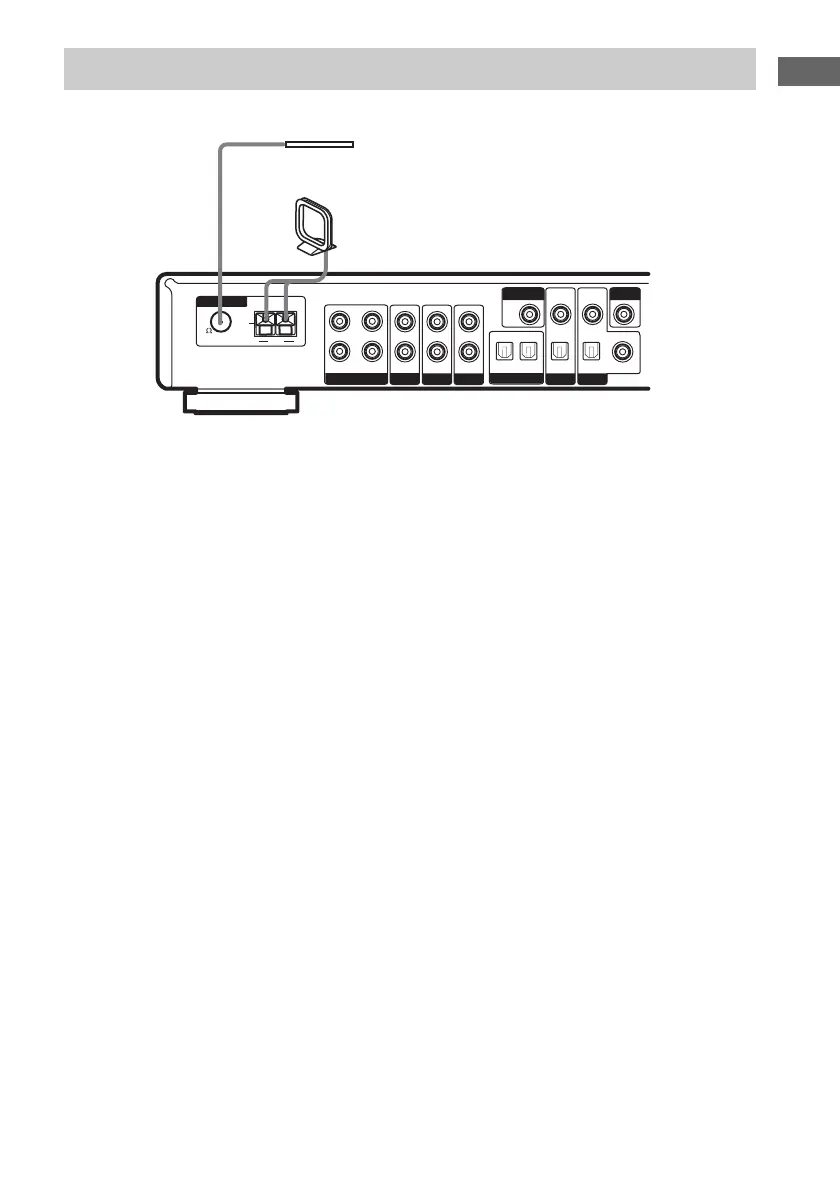
Connect the supplied AM loop antenna and FM wire antenna.
Notes
• To prevent noise pickup, keep the AM loop antenna away from the receiver and other components.
• Be sure to fully extend the FM wire antenna.
• After connecting the FM wire antenna, keep it as horizontal as possible.
Connecting the antennas
HDD/MD
VIDEODVD DVD
OPT OUT
HDD/MD
MONITOR
OPT IN OPT IN OPT IN COAX IN
OUT
VIDEO
IN
FM
U
AM
TV/SAT TV/SAT
ANTENNA
VIDEO
IN
VIDEO
IN
L
R
ININININOUT
75
AM loop antenna
(supplied)
FM wire antenna
(supplied)



 To Next Page