11
US
Connections
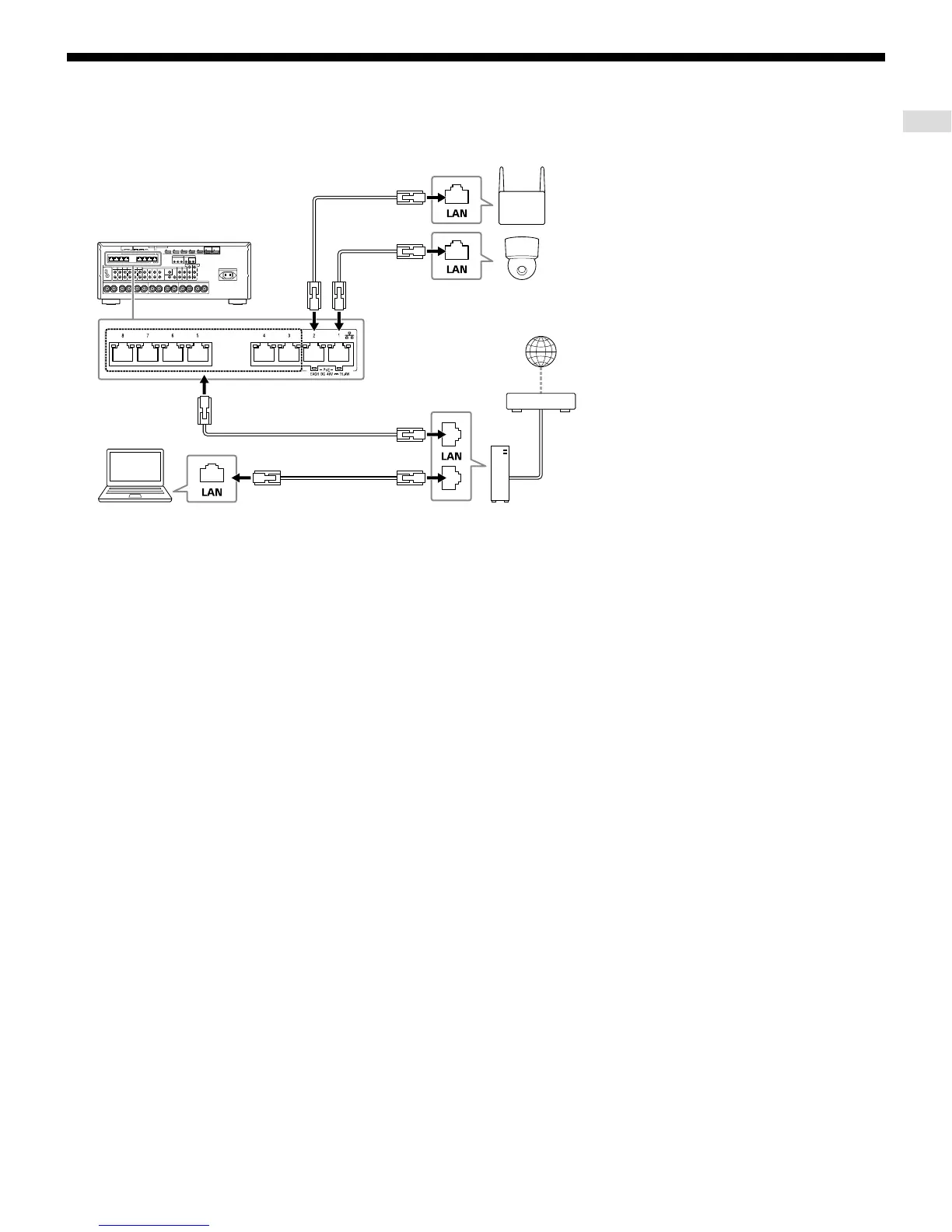
Making a connection for PoE (Power over Ethernet) (for STR-ZA3100ES only)
The following illustration is an example of configuration of a home network with the receiver
and a computer.
LAN cable
Modem
Wireless access point, etc.
Network camera, etc.
LAN cable
LAN cable
LAN cable
Computer
Router
Internet
Notes
• Connect a router to one of ports 1 to 8 on the receiver using a single LAN cable. Do not connect the
same router to the receiver using more than one LAN cable. Doing so may cause a malfunction.
• Ports No. 1 and No. 2 support PoE (Power over Ethernet, Alternative A). If you connect a PoE-compatible
device to one of these ports, power will be supplied to the device from the receiver.
• You can also connect a device that does not support PoE to the PoE port.
• The PoE port lights in red while supplying power.
• This receiver supports PoE Class 3.
• We recommend using a Category 7 cable.
STR-ZA3100ES



 To Next Page