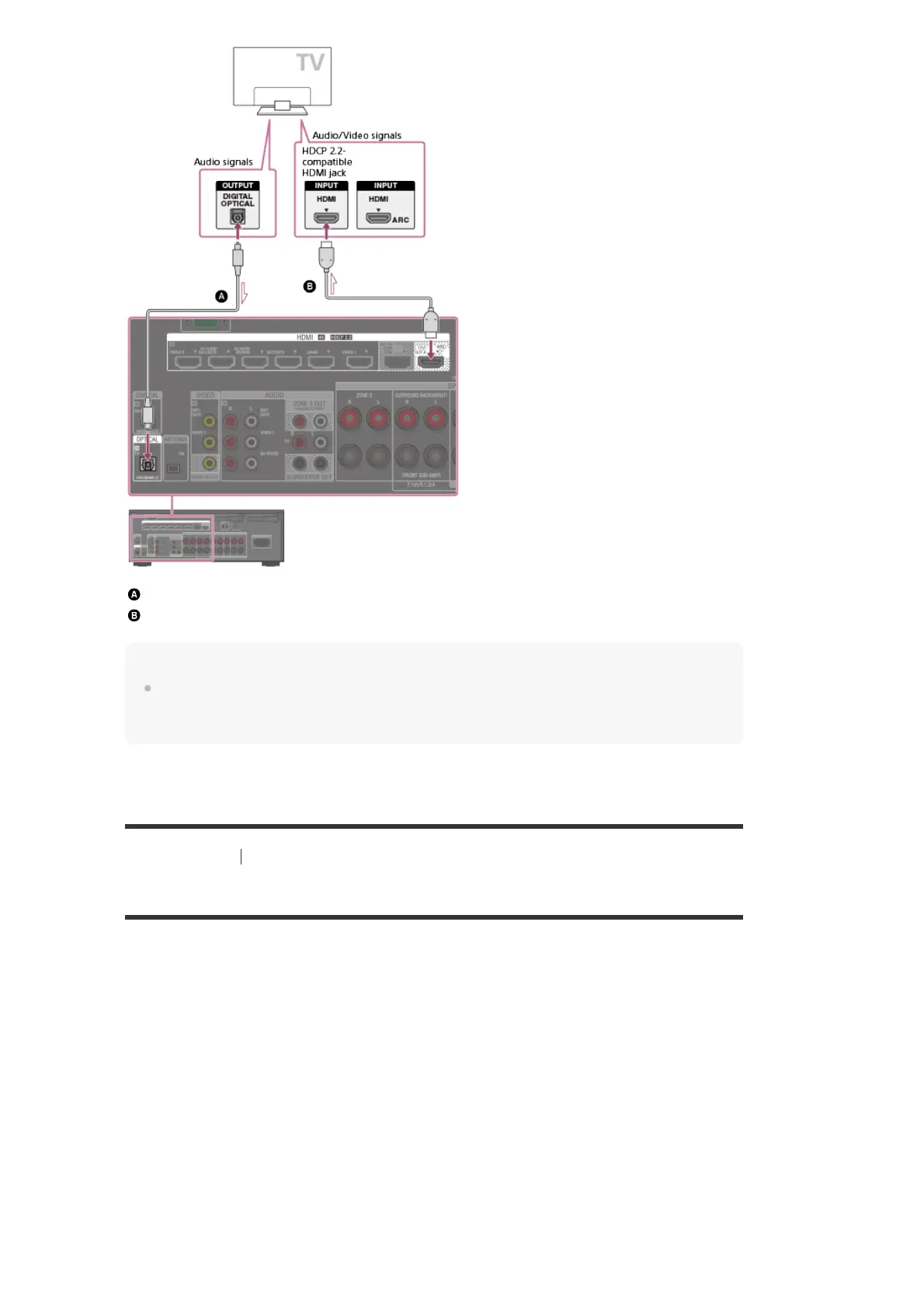
Optical digital cable (not supplied)
HDMI cable (not supplied)
Note
Sony recommends that you use an HDMI cable made by Sony or another HDMI-authorized cable.
Be sure to use a High Speed HDMI Cable with Ethernet. Premium High Speed HDMI Cable with
Ethernet that supports 18 Gbps is required for 4K/60p 4:4:4, 4:2:2, and 4K/60p 4:2:0 10 bit, etc.
[29] Preparation 3. Connecting a TV
About input/output of video signals
The digital video signals input to the HDMI IN jacks of this receiver are output from HDMI OUT
A (TV) or HDMI OUT B/HDMI ZONE jacks only. The analog video signals input from VIDEO IN
jacks are output from the MONITOR OUT jack only.
Use the following illustration as reference when you connect the receiver, AV device, and TV.



 To Next Page