Overview of MENU
MENU provides one-button access for controlling your TV. [t enables you to perform a variety of tasks
intuitively with a control panel on the screen rather than a variety of remote control button presses.
When you press the MENU button, you can select from basic TV functions: External Inputs,
Favorites, Cable, Antenna or Settings.
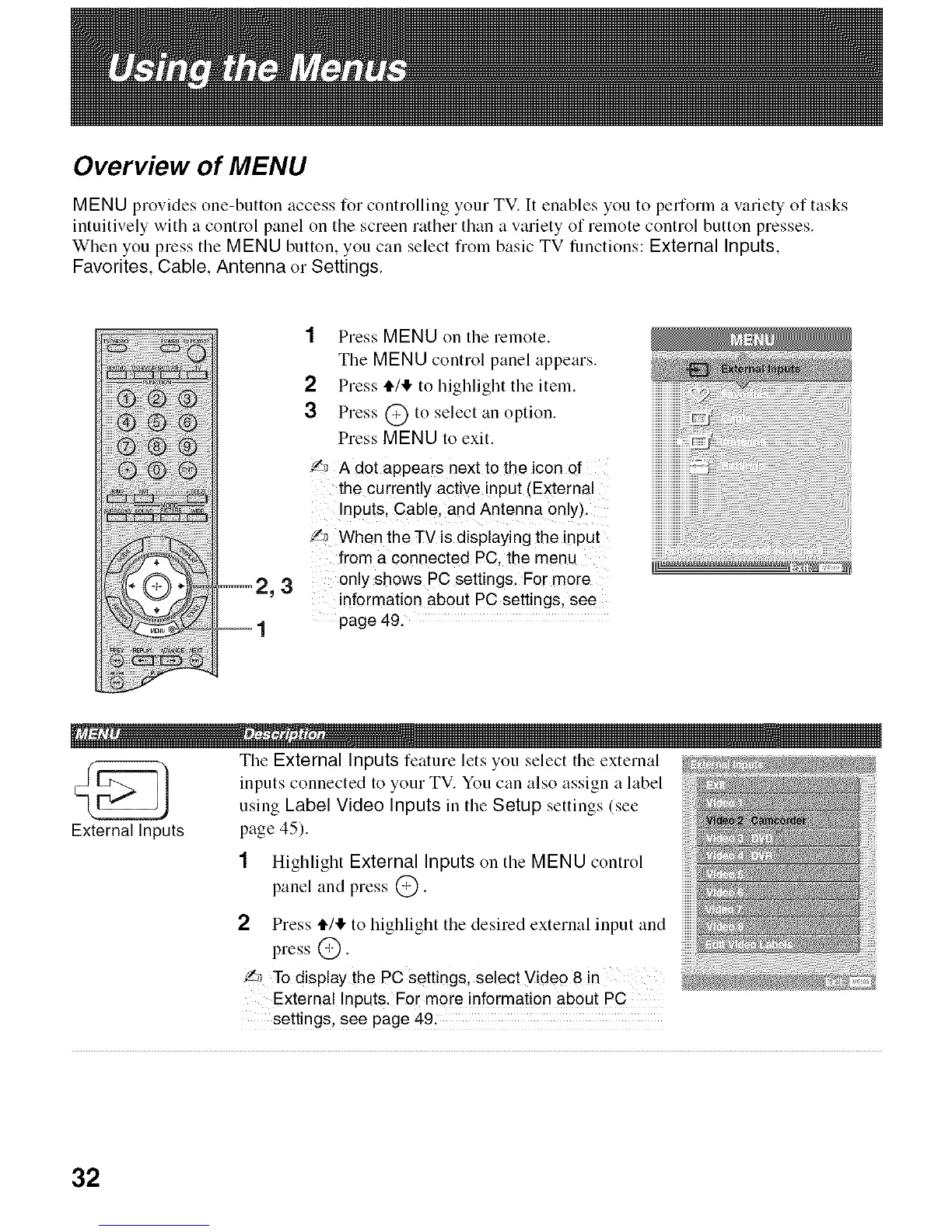
2,3
1
1 Press MENU on tile remote.
The MENU control panel appears.
2 Press tt/l!, to llighlight the item.
3 Press @ to select an option.
Press MENU to exit.
'/_ A dot appears next to the icon of
the currently active input (External
Inputs. Cable. and Antenna only).
Z,_ When the TV is displaying the input
from a connected PC the menu
only shows PC settings. For more
information about PC settings, see
page 49.
................................ _@@
External Inputs
The External Inputs feature lets you select the external
inputs connected to your TV. You can also assign a label
using Label Video Inputs in the Setup settings (see
page 45).
1 Highlight External Inputs on the MENU control
panel and press @.
2 Press tt/,!, to highlight the desired external input and
press @.
_ To display the PC settings, select Video 8 in
External Inputs. For more information about PC
settings, see page 49.
32







 To Next Page