EasyManua.ls Logo

Sony TC-252 D - Recording Procedures

Sony TC-252 D
19 pages
Print Icon
To Next Page IconTo Next Page
To Previous Page IconTo Previous Page
Loading...
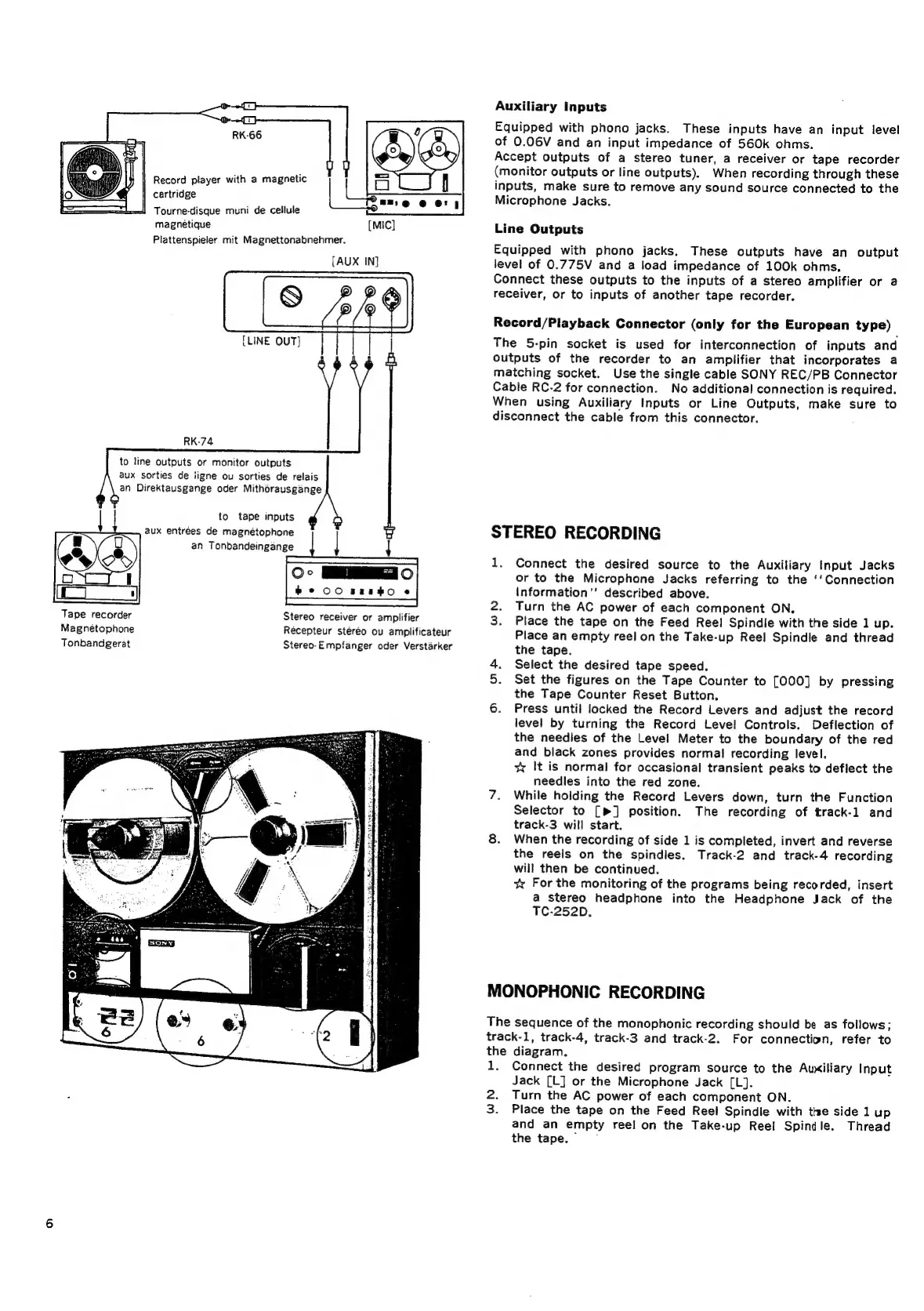
Tape
recorder
Magnetophone
Tonbandgerat
to
line
outputs
or
monitor
outputs
aux
sorties
de
iigne
ou
sorties
de
relais
an
Direktausgange
oder
Mithérausgange
Record
player
with
a
magnetic
cartridge
Tourne-disque
muni
de
cellule
magnétique
Plattenspieler
mit
Magnettonabnehmer.
[AUX
IN]
{LINE
OUT]
to
tape
inputs
aux
entrées
de
magnétophone
an
Tonbandeingange
|
uf
ET
2
OE
a
POROUS
TEN
Oc
MEO
be
00
srEHo
ec
ee
ee
Stereo
receiver
or
amplifier
Récepteur
stéréo
ou
amplificateur
Stereo-Empfanger
oder
Verstarker
Auxiliary
Inputs
Equipped
with
phono
jacks.
These
inputs
have
an
input
level
of
0.06V
and
an
input
impedance
of
560k
ohms.
Accept
outputs
of
a
stereo
tuner,
a
receiver
or
tape
recorder
(monitor
outputs
or
line
outputs).
When
recording
through
these
inputs,
make
sure
to
remove
any
sound
source
connected
to
the
Microphone
Jacks.
Line
Outputs
Equipped
with
phono
jacks.
These
outputs
have
an
output
level
of
0.775V
and
a
load
impedance
of
100k
ohms.
Connect
these
outputs
to
the
inputs
of
a
stereo
amplifier
or
a
receiver,
or
to
inputs
of
another
tape
recorder.
Record/Playback
Connector
(only
for
the
European
type)
The
5-pin
socket
is
used
for
interconnection
of
inputs
and
outputs
of
the
recorder
to
an
amplifier
that
incorporates
a
matching
socket.
Use
the
single
cable
SONY
REC/PB
Connector
Cable
RC-2
for
connection.
No
additional
connection
is
required.
When
using
Auxiliary
Inputs
or
Line
Outputs,
make
sure
to
disconnect
the
cable
from
this
connector.
STEREO
RECORDING
1.
Connect
the
desired
source
to
the
Auxiliary
Input
Jacks
or
to
the
Microphone
Jacks
referring
to
the
‘‘Connection
Information"
described
above.
2.
Turn
the
AC
power
of
each
component
ON.
3.
Place
the
tape
on
the
Feed
Reel
Spindle
with
the
side
1
up.
Place
an
empty
reel
on
the
Take-up
Reel
Spindle
and
thread
the
tape.
4.
Select
the
desired
tape
speed.
5.
Set
the
figures
on
the
Tape
Counter
to
[000]
by
pressing
the
Tape
Counter
Reset
Button.
6.
Press
until
locked
the
Record
Levers
and
adjust
the
record
level
by
turning
the
Record
Level
Controls.
Deflection
of
the
needies
of
the
Level
Meter
to
the
boundary
of
the
red
and
black
zones
provides
normal
recording
level.
x
It
is
normal
for
occasional
transient
peaks
to
deflect
the
needles
into
the
red
zone.
7.
While
holding
the
Record
Levers
down,
turn
the
Function
Selector
to
[>]
position.
The
recording
of
track-1
and
track-3
will
start.
8.
When
the
recording
of
side
1
is
completed,
invert
and
reverse
the
reels
on
the
spindles.
Track-2
and
track-4
recording
will
then
be
continued.
xv
For
the
monitoring
of
the
programs
being
recorded,
insert
a
stereo
headphone
into
the
Headphone
Jack
of
the
TC-252D.
MONOPHONIC
RECORDING
The
sequence
of
the
monophonic
recording
should
be
as
follows;
track-1,
track-4,
track-3
and
track-2.
For
connection,
refer
to
the
diagram.
1.
Connect
the
desired
program
source
to
the
Auxiliary
Input
Jack
[L]
or
the
Microphone
Jack
[L].
2.
Turn
the
AC
power
of
each
component
ON.
3.
Place
the
tape
on
the
Feed
Reel
Spindle
with
the
side
1
up
and
an
empty
reel
on
the
Take-up
Reel
Spindle.
Thread
the
tape.”

Related product manuals