EasyManua.ls Logo

Sony TC-366 - Page 22

Sony TC-366
53 pages
Print Icon
To Next Page IconTo Next Page
To Previous Page IconTo Previous Page
Loading...
Notes
on
replacing
the
heads:
(3)
Tape
Pass
Adjustment
(See
page
28)
1.
Erase
Head
Removal
(4)
Record
Bias
Adjustment
(See
page
33)
When
removing
the
erase
head
from
the
head
deck,
(5)
Record
Level
Check
(See
page
34)
remove
the
two
screws
shown
with
a
in
Fig.
12-1.
(6)
Record
Equalizer
Adjustment
(See
page
34)
(Do
not
remove
the
three
screws
shown
with
xX
in
(7)
Erase
Ratio
Measurement
(See
page
35)
Fig.
12-1)
Record
Head
.
(1)
Tape
Pass
Adjustment
(See
page
28)
Record
or
P.B.
Head
Removal
(2)
Record
Bias
Adjustment
(See
page
33)
When
removing
the
record
or
the
p.b.
head,
remove
(3)
Record
Head
Azimuth
Adjustment
(See
page
32)
the
respective
angle
adjusting
screws.
(4)
Record
Head
Phase
Check
(See
page
33)
(Do
not
turn
the
screws
except
the
angle
adjusting
(5)
Record
Level
Adjustment
(See
page
34)
screws.)
(6)
Record
Equalizer
Adjustment
(See
page
34)
(7)
Overall
Frequency
Response
(See
page 36)
After
replacing
the
heads,
be
sure
the
following
items.
PB.
Head
Erase
Head
(1)
Tape
Pass
Adjustment
(See
page
28)
(1)
The
tape
touches
at
the
center
of
erase
head
(2)
P.B.
Head
Azimuth
and
Angle
Adjustments
(See
page
30)
cores.
(3)
P.B.
Head
Phase
Check
(See
page
30)
(2)
The
tape
comes
in
contact
with
the
scrape
(4)
P.B.
Output
Level
Adjustment
(See
page
30)
flutter
filter
roller
in
FWD
mode.
(5)
P.B.
Equalizer
Adjustment
(See
page
31)
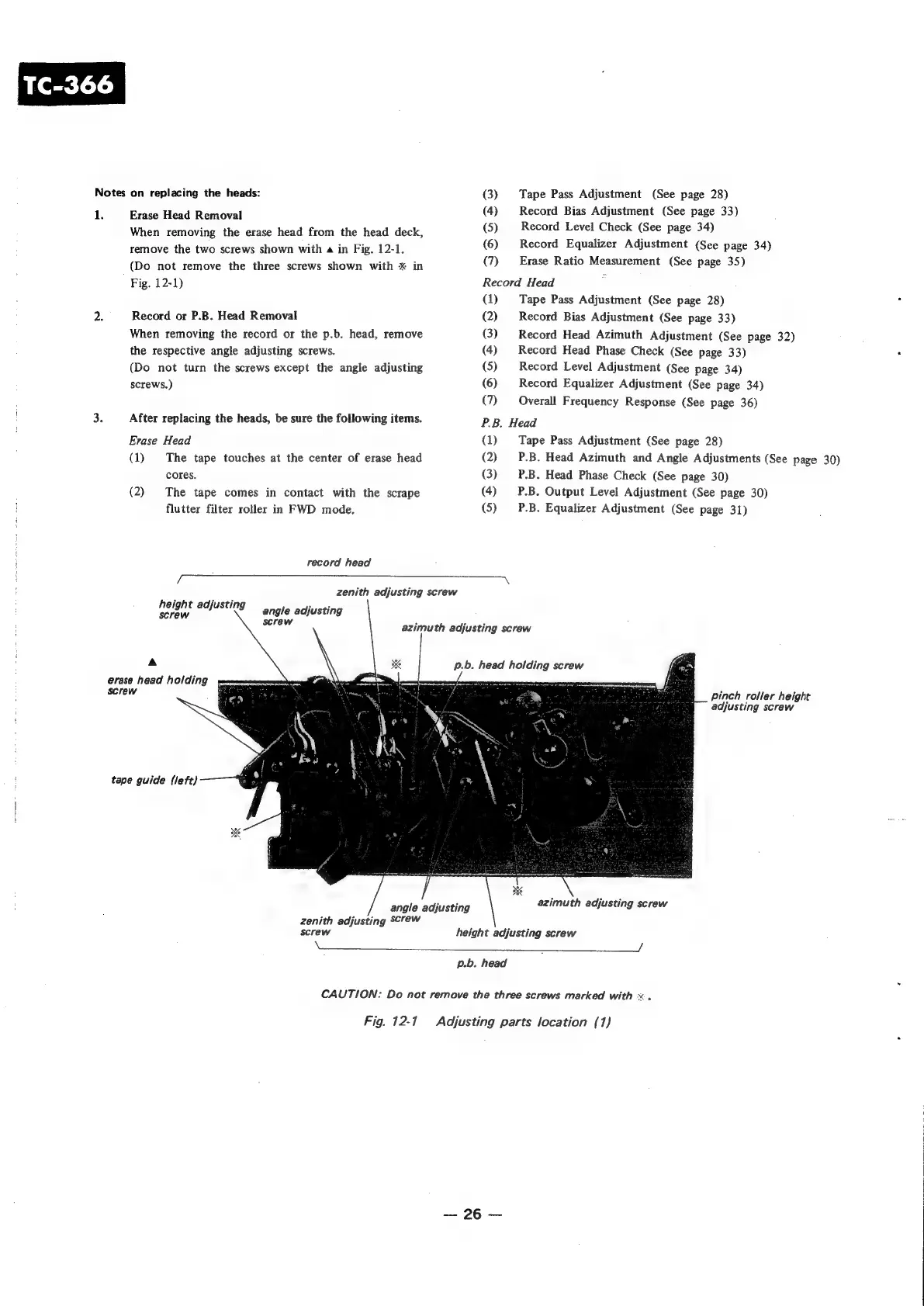
record
head
zenith
adjusting
screw
height
adjusting
screw
angle
adjusting
screw
azimuth
adjusting
screw
A
erase
head
holding
Screw
pinch
roller
height
adjusting
screw
tape
guide
(left)
angle
adjusting
azimuth
adjusting
screw
zenith
adjusting
Screw
screw
height
adjusting
screw
XX
:
2
p.b.
head
CAUTION:
Do
not
remove
the
three
screws
marked
with
x.
Fig.
12-1
Adjusting
parts
location
(1)
26

Other manuals for Sony TC-366

Related product manuals