CPD-E220/E215E/E220E
4-2
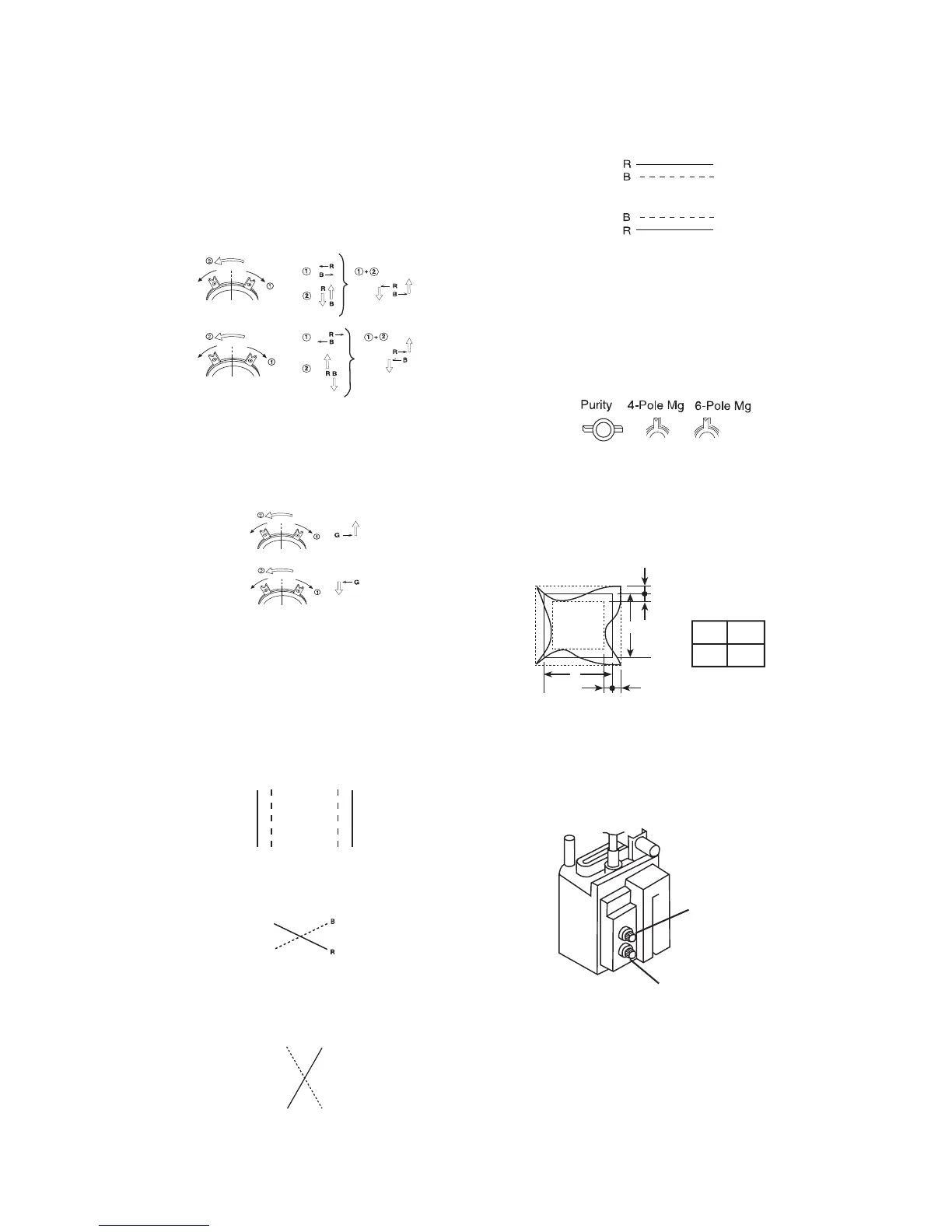
4. Display crosshatch pattern with red and blue lines and
black field.
5. Adjust H.STAT and V.STAT with 4 pole magnet. Use
4 pole magnet, not “HSTAT” and “VSTAT”.
6. Display crosshatch pattern with white lines and black
field.
7. Adjust HMC and VMC with 6 pole magnet.
8. Display crosshatch pattern with red and blue lines and
black field.
9. If necessary, repeat steps 5-8.
10. Change “CONV_OFF_NDX” to “3”.
11. Adjust H.TILT with TLH plate.
12. Adjust XCV with XCV VR.
13. Adjust YCH with YCH VR.
14. Adjust V.TILT with TLV VR.
15. If necessary, repeat steps 3-14 to make the optimum
condition for the entire screen.
16. Fix 4-pole magnet, 6-pole magnet and XCV VR with
white paint.
4-5.Vertical and Horizontal Position and Size
Specification
4-6.Focus adjustment
Adjust focus (V) and focus (H) for optimum focus.
4 Pole Magnet
6 Pole Magnet
TLH movement
R B B R
XCV movement
YCH movement
RB





 To Next Page