9
US
D:\###sagyou\10 gatu\1022\407410412CPDE400_UC\01US03BAS-UC.fm
masterpage:Right
CPD-E400
4-074-104-12 (1)
x
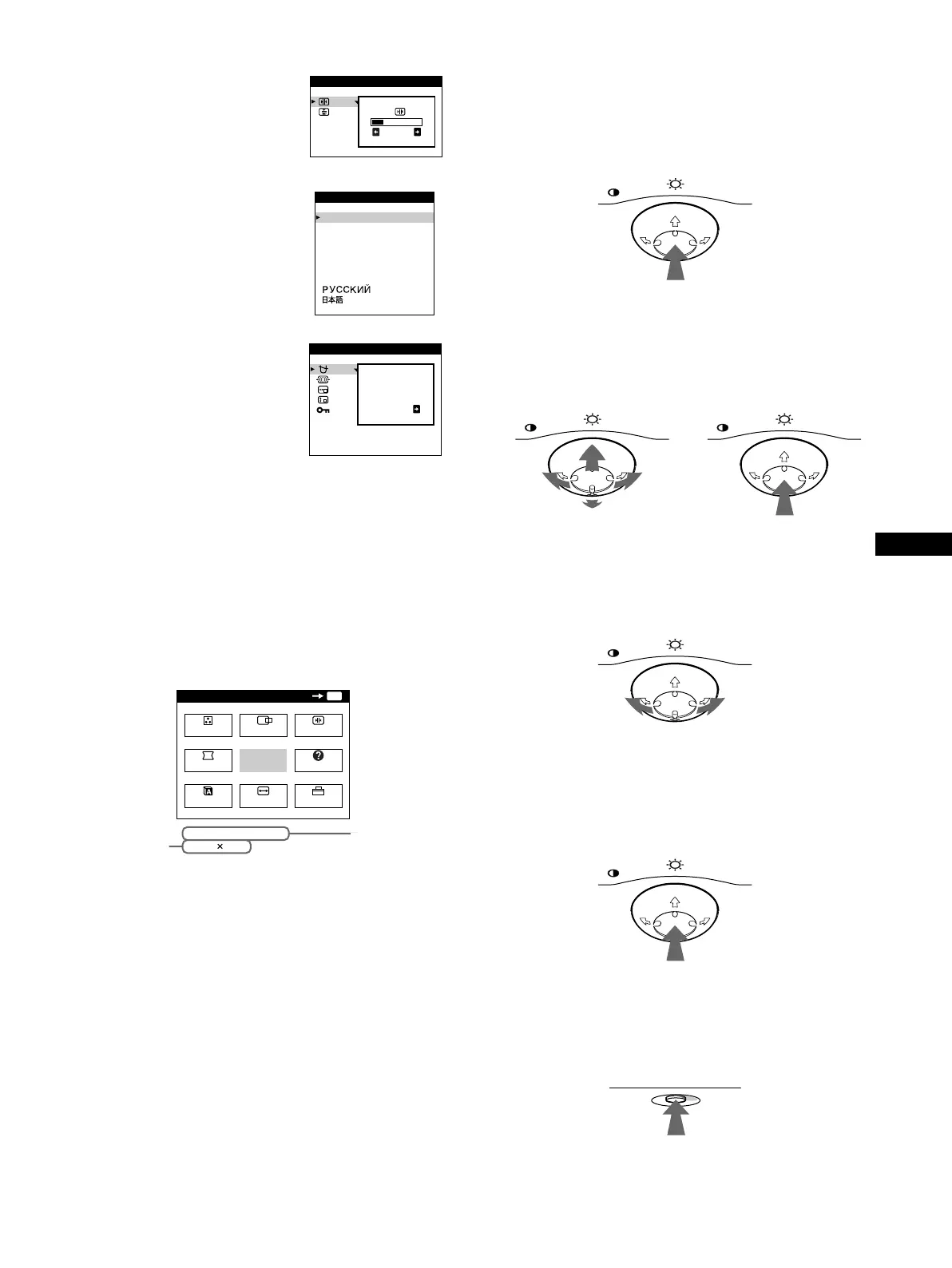
Displaying the current input signal
The horizontal and vertical frequencies of the current input signal
are displayed in the main MENU. If the signal matches one of this
monitor’s factory preset modes, the resolution is also displayed.
x
Using the control button
1
Display the main MENU.
Press the center of the control button to display the main
MENU on your screen.
2
Select the menu you want to adjust.
Highlight the desired menu by moving the control button
towards the rear to go up (
M
), towards the front to go down
(
m
), and left (
<
) or right (
,
) to move sideways.
3
Adjust the menu.
Move the control button left (
<
) or right (
,
) to make the
adjustment.
4
Close the menu.
Press the center of the control button once to return to the
main MENU, and twice to return to normal viewing. If no
buttons are pressed, the menu closes automatically after about
30 seconds.
x
Resetting the adjustments
Press the RESET button. See page 14 for more information on
resetting the adjustments.
6
CONV (page 12)
Selects the CONV menu to adjust
the picture’s horizontal and vertical
convergence.
7
LANG (page 8)
Selects the LANG menu to choose
the on-screen menu’s language.
8
OPTION (page 12)
Selects the OPTION menu to adjust
the monitor’s options. The options
include:
• degaussing the screen
• adjusting the moire cancellation
level
• changing the on-screen menu
position
• locking the controls
9
EXIT
Select EXIT to close the menu.
26
CONVERGENCE
ENGL I SH
FRANÇA I S
DEUTSCH
ESPAÑOL
ITALIANO
NEDERLANDS
SVENSKA
LANGUAGE
DEGAUSS
ON
OPT I ON
MENU
MENU
EXIT
CENTER
SIZE
GEOM
COLOR
LANG
HELP
CONV
OPTION
OK
68.7kHz/ 85Hz
1024
768
the horizontal
and vertical
frequencies of
the current
input signal
the resolution
o
f the current
in
put sig
nal
MENU MENU
REAR
FRONT
01US01COV-UC.book Page 9 Friday, October 22, 1999 10:19 AM





 To Next Page