EasyManua.ls Logo

Sony Trinitron KV-27V20 - Page 22

Sony Trinitron KV-27V20
32 pages
Print Icon
To Next Page IconTo Next Page
To Previous Page IconTo Previous Page
Loading...
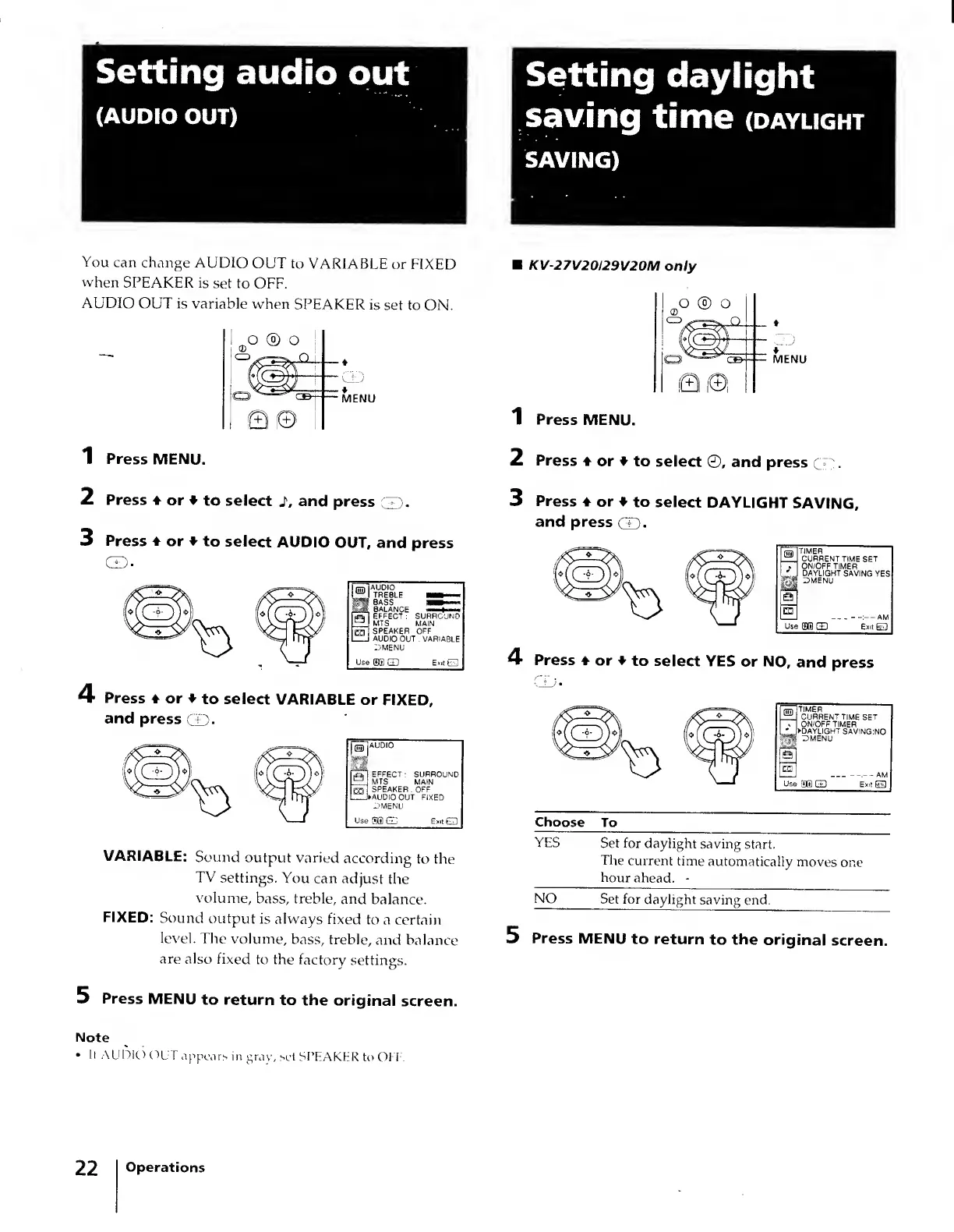
You
can
change
AUDIO
OUT
to
VARIABLE
or
FIXED
when
SPEAKER
is
set
to
OFF.
AUDIO
OUT
is
variable
when
SPEAKER
is
set
to
ON.
ILo
®
O
'I
KV-27V20I29V20M
only
o
®
o
II
Q©
ll
1
Press
MENU.
2
Press
♦
or
♦
to
select
2
,
and
press
:'T).
3
Press
♦
or
♦
to
select
AUDIO
OUT,
and
press
CD.
I
(HD
|
A
t
U
R
eb
LE
I
rlvX
nsTl
effect
:
surround
C\
^
\
XMV7
£±1
MTS
MAIN
\W\
kSy
H]
SPEAKER
OFF
V
1
1
MT
_I
AUDIO
OUT
.
VARIABLE
V
^
(
J
DMENU
.
'•
Use
(5®
GD
Exit
E3
4
Press
♦
or
♦
to
select
VARIABLE
or
FIXED,
and
press
CD-
rw
AUDIO
■
■
ijafl
EFFECT
:
SURROUND
MTS
.
MAIN
SPEAKER
OFF
►
AUDIO
OUT
FIXED
DMENU
Use
3®
CD
Exit
ED
VARIABLE:
Sound
output
varied
according
to
the
TV
settings.
You
can
adjust
the
volume,
bass,
treble,
and
balance.
FIXED:
Sound
output
is
always
fixed
to
a
certain
level.
The
volume,
bass,
treble,
and
balance
are
also
fixed
to
the
factory
settings.
5
P
ress
MENU
to
return
to
the
original
screen.
1
Press
MENU.
2
Press
♦
or
♦
to
select
©,
and
press
CD.
3
Press
4
or
♦
to
select
DAYLIGHT
SAVING,
and
press
CD.
HITIMER
_
CURRENT
TIME
SET
j.
ON/OFF
TIMER
*
J
DAYLIGHT
SAVING:YES
mg
DMENU
|Q
I_I
AM
Use
®®
GD
Exit
EG)
4
P
ress
4
or
♦
to
select
YES
or
NO,
and
press
m
timer
±1
CURRENT
TIME
SET
-
ON/OFF
TIMER
l
'
►
DAYLIGHT
SAVING:NO
DMENU
I_I
-—.—
AM
Use
dm
GD
Exit
ED
Choose
To
YES
Set
for
daylight
saving
start.
The
current
time
automatically
moves
one
hour
ahead.
-
NO
Set
for
daylight
saving
end.
5
P
ress
MENU
to
return
to
the
original
scre«
It
AUDIO
OUT
appears
in
gray,
set
SPEAKER
to
OFF.
22
Operations