EasyManua.ls Logo

Sony Trinitron KV-27V20 - Clock and Timer Settings

Sony Trinitron KV-27V20
32 pages
Print Icon
To Next Page IconTo Next Page
To Previous Page IconTo Previous Page
Loading...
Setting
the
clock
(CURRENT
TIME
SET)
Setting
the
timer
to
turn
the
TV
on
and
off
(ON/OFF
TIMER)
■
KV-27V20I29V20M
only
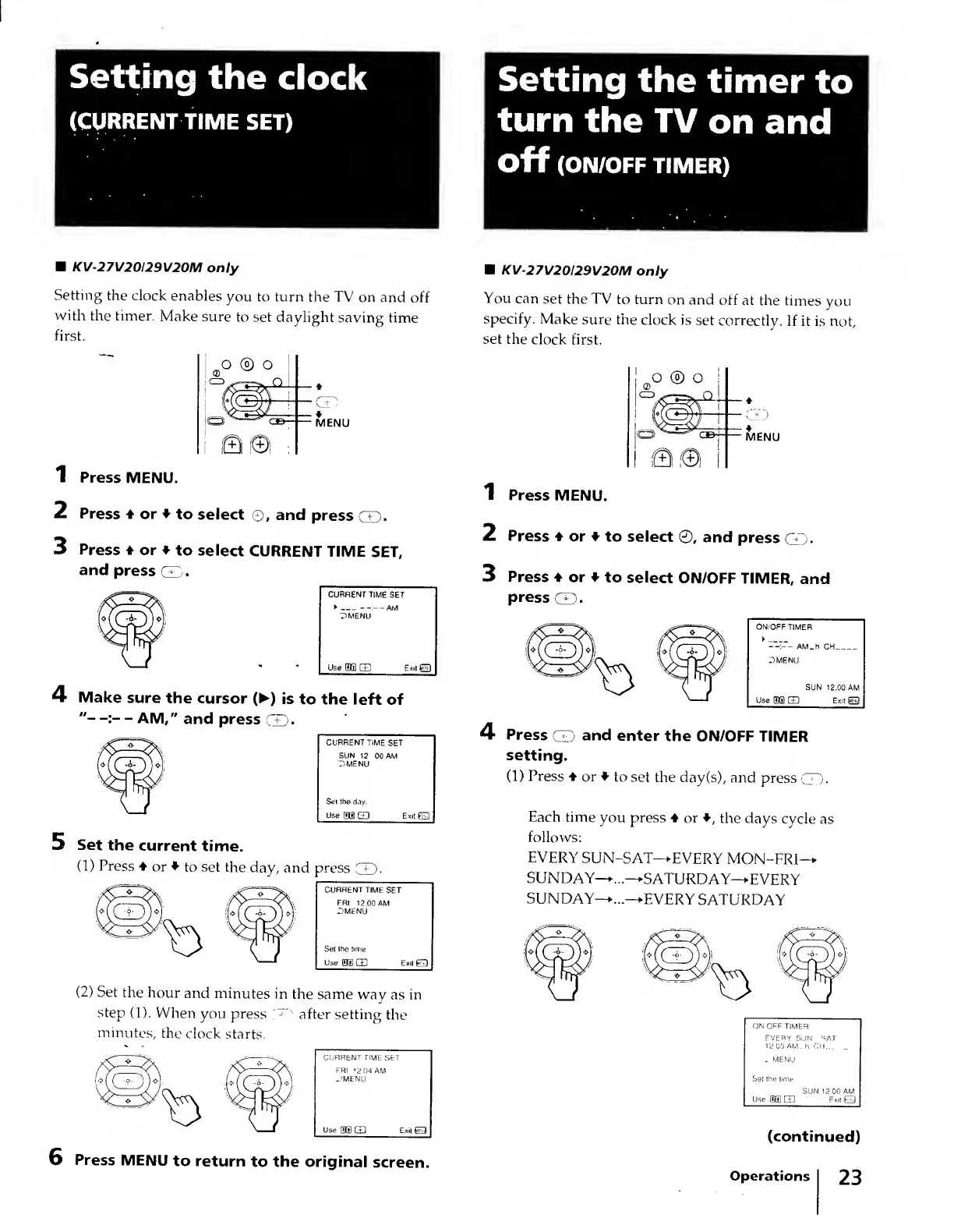
Setting
the
clock
enables
you
to
turn
the
TV
on
and
off
with
the
timer.
Make
sure
to
set
daylight
saving
time
first.
1
Press
MENU.
2
Press
♦
or
♦
to
select
©,
and
press
CD-
3
Press
♦
or
♦
to
select
CURRENT
TIME
SET,
and
press
CD.
4
M
ake
sure
the
cursor
(
►
)
is
to
the
left
of
-
AM,"
and
press
CD-
5
Set
the
current
time.
(1)
Press
♦
or
♦
to
set
the
day,
and
press
GD-
(2)
Set
the
hour
and
minutes
in
the
same
way
as
in
step
(1).
When
you
press
T
after
setting
the
minutes,
the
clock
starts.
6
Press
MENU
to
return
to
the
original
screen.
■
KV-27V20I29V20M
only
You
can
set
the
TV
to
turn
on
and
off
at
the
times
you
specify.
Make
sure
the
clock
is
set
correctly.
If
it
is
not,
set
the
clock
first.
♦
MENU
1
Press
MENU.
2
Press
♦
or
♦
to
select
©,
and
press
CD.
3
Press
♦
or
♦
to
select
ON/OFF
TIMER,
and
press
CD
.
4
Press
CD
and
enter
the
ON/OFF
TIMER
setting.
(1)
Press
♦
or
♦
to
set
the
day(s),
and
press
0.
Each
time
you
press
♦
or
♦
,
the
days
cycle
as
follows:
EVERY
SUN-SAT—EVERY
MON-FRI—
SUNDAY—
...—SATURDAY—EVERY
SUNDAY—..—EVERY
SATURDAY
(continued)
Operations
23