12
Connections
Cable Box Connections
Some cable TV systems use scrambled or encoded signals that require a cable box to view all
channels. If you subscribe to that kind of cable service, use this connection.
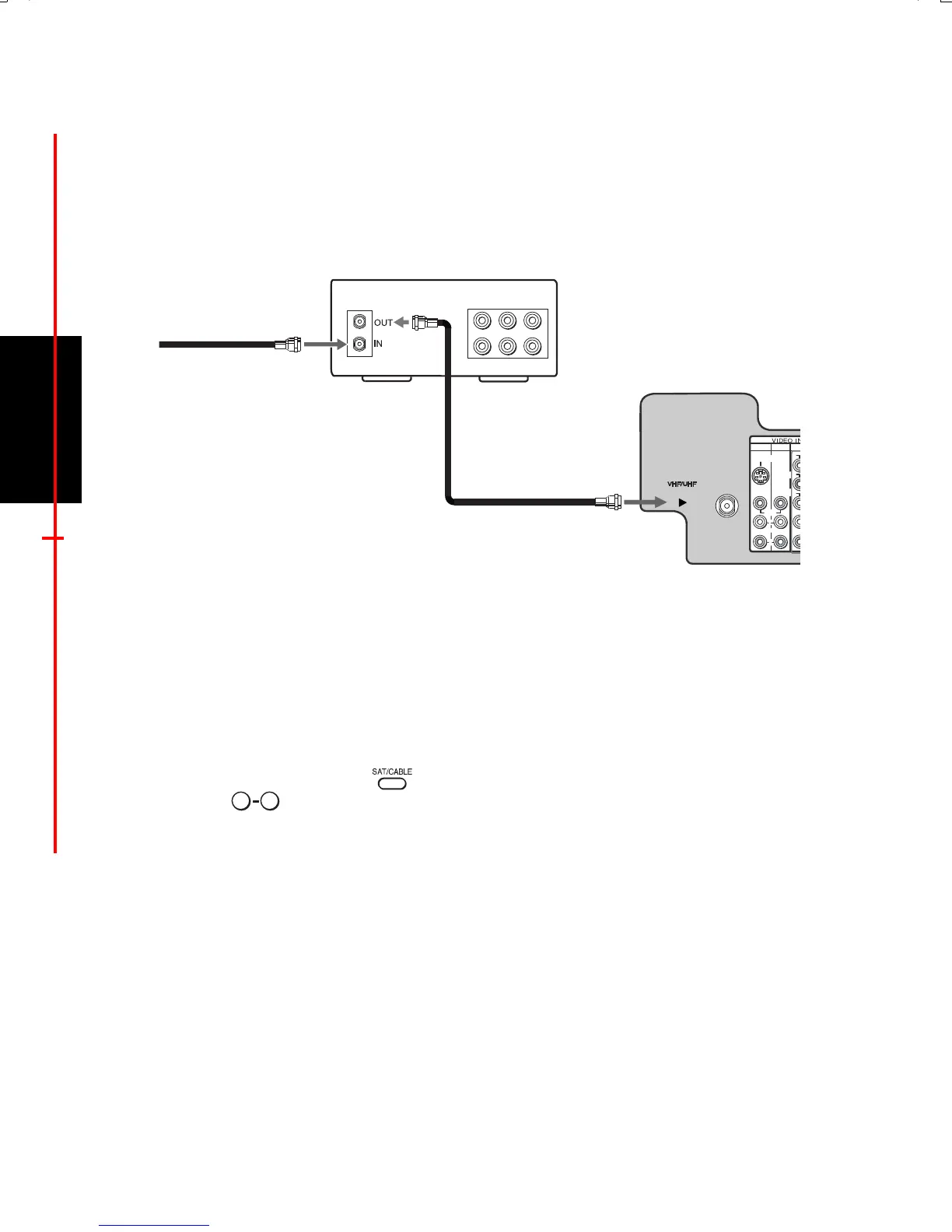
TV and Cable Box
1 Connect the coaxial cable from your cable service to the IN jack on your cable box.
2 Connect a coaxial cable (not supplied) from the OUT jack on your cable box to the
VHF/UHF jack on your TV.
Using your TV with this connection
This connection allows you to do the following:
❏ Program your Sony remote control to operate your cable box (see page 5).
❏ To activate your remote press (FUNCTION button) to operate your cable box and
then use the
buttons or CH+/- buttons to change the channels. To do this, first
program your remote control, then use the Channel Fix feature to set your TV to channel 3
or 4 (see page 31).
VIDEO
LINE
IN
LINE
OUT
AUDIO L AUDIO R
1
3
4
VIDEO
L
(MONO)
R
S VIDEO
Y
P
B
P R
1
2
Rear of TV
Cable box
From cable/
antenna
0 9
01US01COV-BR2.book Page 12 Wednesday, March 3, 2004 3:02 PM







 To Next Page