20
Connections
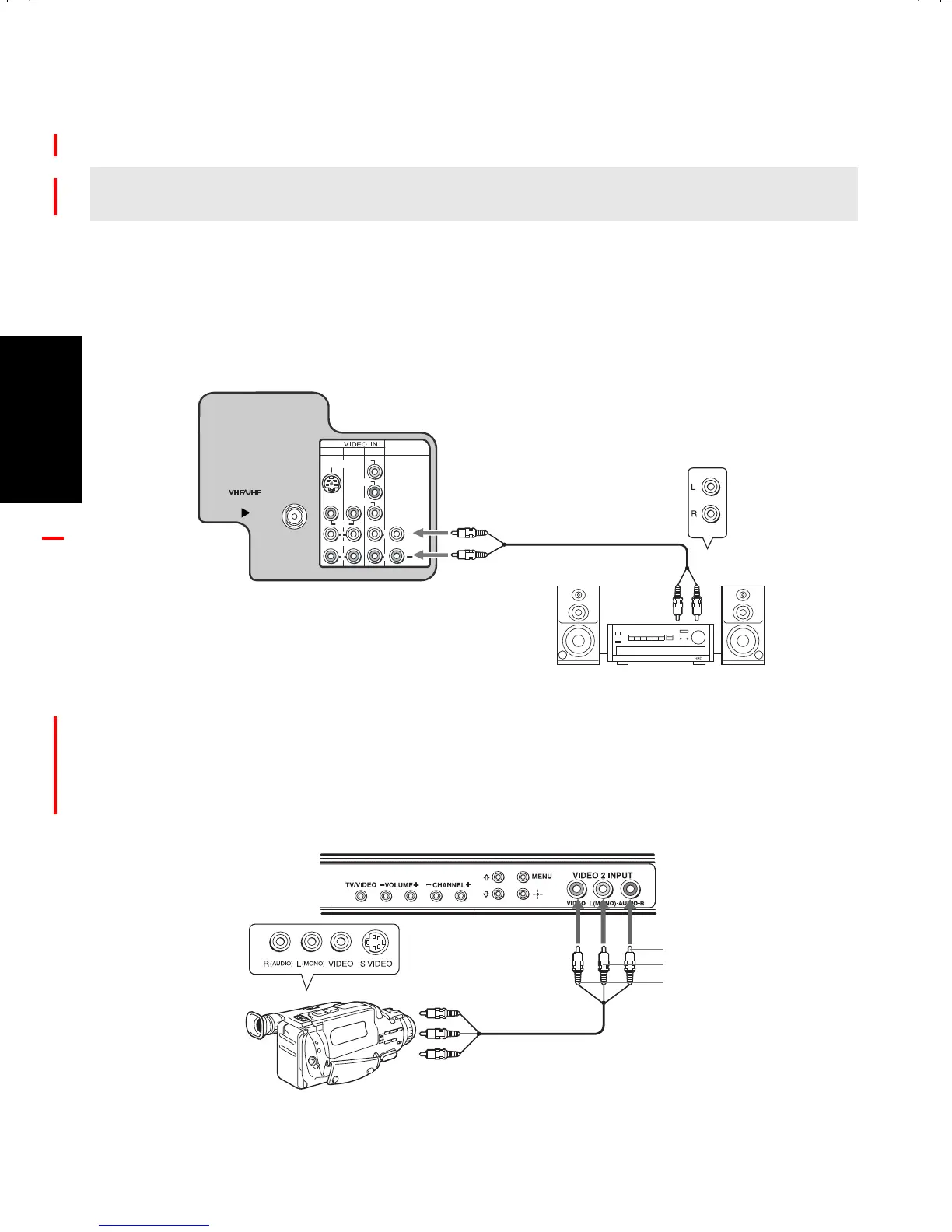
Connecting an Audio System
1 Using audio/video cables (not supplied), connect AUDIO OUT on your TV to one of the
unused line inputs (e.g. TV, AUX, TAPE2) on your stereo.
2
Set the Speaker option to Off. For more instructions, see "Using the Audio Menu" on page 29.
3
Open the Audio Out option on the Audio Menu and select Fixed to control the volume through
the connected audio system. For more instructions, see "Using the Audio Menu" on page
29
.
Connecting a Camcorder (for playback)
To connect your camcorder, you can use the Audio/Video inputs on either the front or rear
panel of the TV. Using the audio/video cables (not supplied), connect the AUDIO/VIDEO
OUT on your camcorder to the AUDIO/VIDEO IN on your TV.
✍ If you are connecting a Home Theater, please refer to your Home Theater manual for additional
connections.
1
3
4
AUDIO OUT
(VAR/FIX)
VIDEO
L
(MONO)
R
(MONO)
S VIDEO
Y
P
B
P R
L
R
L
R
Rear of TV
AUDIO-L (white)
AUDIO-R (red)
Line
input
4-089-010 >PC<
A/V output
Audio R (red)
Audio L (white)
Video (yellow)
Front A/V Panel
01US01COV-BR2.book Page 20 Wednesday, March 3, 2004 3:02 PM







 To Next Page