EasyManua.ls Logo

Sony TRINITRON KV-32S12 - Page 8

Sony TRINITRON KV-32S12
69 pages
Print Icon
To Next Page IconTo Next Page
To Previous Page IconTo Previous Page
Loading...
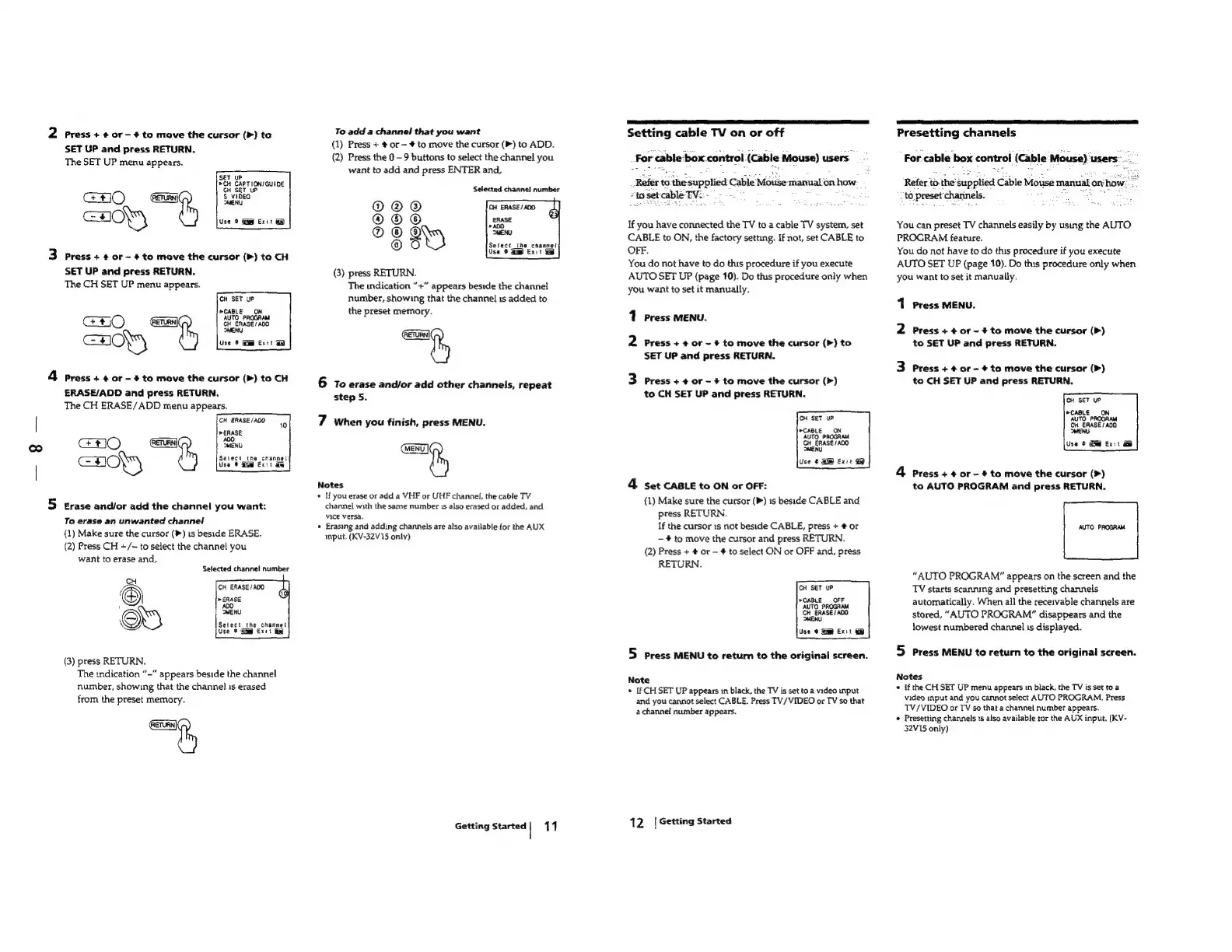
2
Press
+
#0r-¢
to
move
the
cursor
(>)
ta
SET
UP
and
press
RETURN.
The
SET
UP
menu
appears.
SET
UP
>CH
CAPTION/GUIDE
GO
cH
a
Use
>
i
Exit
&
3
Press++or~#
to
move
the
cursor
(P)
to
CH
SET
UP
and
press
RETURN.
The
CH
SET
UP
menu
appears.
CH
SET
uP
CABLE
ON
Use
¢
Si
exit
HON
4
press
+
¢
or
-
+
to
move
the
cursor
{(P)
to
CH
ERASE/ADD
and
press
RETURN.
The
CH
ERASE/ADD
menu
appears.
GH
ERASE
/A00
»
ERASE
CHO
co
CHOP)
10
Select
the
cnannel
Use
Exit
a
5
erase
and/or
add
the
channel
you
want:
To
erase
an
unwanted
channel
(1)
Make
sure
the
cursor
(®)
1s
beside
ERASE.
(2)
Press
CH
+/~
to
select
the
channel
you
want
to
erase
and,
Selected
channel
number
CH
ow
CH
ERASE/AOD
f
6)
ERASE
'
400
©}
MENU
x
Select
the
channel
Use
¢
Gig
Exit
ie
(3)
press
RETURN.
The
indication
“-"
appears
beside
the
channel
number,
showing
that
the
channel
1s
erased
from
the
preset
memory.
“e
To
add
a
channal
that
you
want
(1)
Press
+
#
or
~
+
to
move
the
cursor
(P)
to
ADD.
(2)
Press
the
0
9
buttons
to
select
the
channel
you
want
to
add
and
press
ENTER
and,
Selected
channel
number
@
®
Q)
Setect_the
channet
Use
0
mp
Exit
aw
@
@
@
7,
©©C®
(3)
press
RETURN.
The
indication
“+”
appears
beside
the
channel
number,
showing
that
the
channel
is
added
to
the
preset
memory.
=
6
To
erase
and/or
add
other
channels,
repeat
step
5.
7
When
you
finish,
press
MENU.
MENU
fy
Notes
*
If
you
erase
or
add
a
VHF
or
UHF
channel,
the
cable
TV
channel
with
the
same
number
1s
also
erased
or
added,
and
vice
versa.
«
Erasing
and
adding
channels
are
also
available
for
the
AUX
input.
(KV-32V15
only)
Getting
Started|
11
Setting
cable
TV
on
or
off
For
cable
:box.control
(Cable
Mouse)
users
:
Refer
to
the
supplied
Cable
Mouse
marnualon
how:
:
:
toset
cable
TV:
.
we
If
you
have
connected
the
TV
to
a
cable
TV
system,
set
CABLE
to
ON,
the
factory
setting.
If
not,
set
CABLE
to
OFF.
You
do
not
have
to
do
this
procedure
if
you
execute
AUTO
SET
UP
(page
10).
Do
this
procedure
only
when
you
want
to
set
it
manually.
1
Press
MENU.
2
Press
+
¢
or
~
+
to
move
the
cursor
(>)
to
SET
UP
and
press
RETURN.
3
Press
+
¢
or
-
+
to
move
the
cursor
(>)
to
CH
SET
UP
and
press
RETURN.
CH
SET
UP
*CABLE
ON
AUTO
PROGRAM
CH
_ERASE/ADO
MENU
Use
¢
Gm
Ex:t
4
Set
CABLE
to
ON
or
OFF:
(1)
Make
sure
the
cursor
(P)
1s
beside
CABLE
and
press
RETURN.
If
the
cursor
1s
not
beside
CABLE,
press
+
#
or
#
to
move
the
cursor
and
press
RETURN.
(2)
Press
+
#
or
#
to
select
ON
or
OFF
and,
press
RETURN.
CH
SET
UP
CABLE
OFF
AUTO
PROGRAM
CH
ERASE/
AOD
MENU
Use
@
Sm
Ex:t
@&
5
press
MENU
to
return
to
the
original
screen.
Note
*
If
CH
SET
UP
appears
in
black,
the
TV
is
set
to
a
video
input
and you
cannot
select
CABLE.
Press
TV/VIDEO
or
TV
so
that
a
channel
number
appears.
12
|
Getting
Started
ES
AAP
PEE
AES
NE
ER
AE CT
ST
EO
TE
Presetting
channels
For
cable
box
controi
(Cable
Mouse)
users:
:
Refer
to:
the’
supplied
Cable
Mouse
manual
ony
how
.
to.
preset
charinels.
eye
hoeds
PH
ee
You
can
preset
TV
channels
easily
by
using
the
AUTO
PROGRAM
feature.
You
do
not
have
to
do
this
procedure
if
you
execute
AUTO
SET
UP
(page
10).
Do
this
procedure
only
when
you
want
to
set
it
manually.
1
Press
MENU.
2
Press
+
4
or
~
+
to
move
the
cursor
(Pm)
to
SET
UP
and
press
RETURN.
3
Press
+
+
or
-
+
to
move
the
cursor
(>)
to
CH
SET
UP
and
press
RETURN.
CH_EAASE/A00
MENU
Use
¢
Gi@
Ext
4
Press
+
¢
or
-
+
to
move
the
cursor
(>)
to
AUTO
PROGRAM
and
press
RETURN.
AUTO
PROGRAM
“AUTO
PROGRAM”
appears
on
the
screen
and
the
TV
starts
scanning
and
presetting
channels
automatically.
When
all
the
receivable
channels
are
stored,
“AUTO
PROGRAM”
disappears
and
the
lowest
numbered
channel
is
displayed.
5
Press
MENU
to
return
to
the
original
screen.
Notes
«
If
the
CH
SET
UP
menu
appears
in
black,
the
TV
is
set
toa
video
input
and
you
cannot
select
AUTO
PROGRAM.
Press
TV/VIDEO
or
TV
so
that
a
channel
number
appears.
Presetting
channels
1s
also
available
tor
the
AUX
input.
(KV-
32V15
only)

Table of Contents

Related product manuals