EasyManua.ls Logo

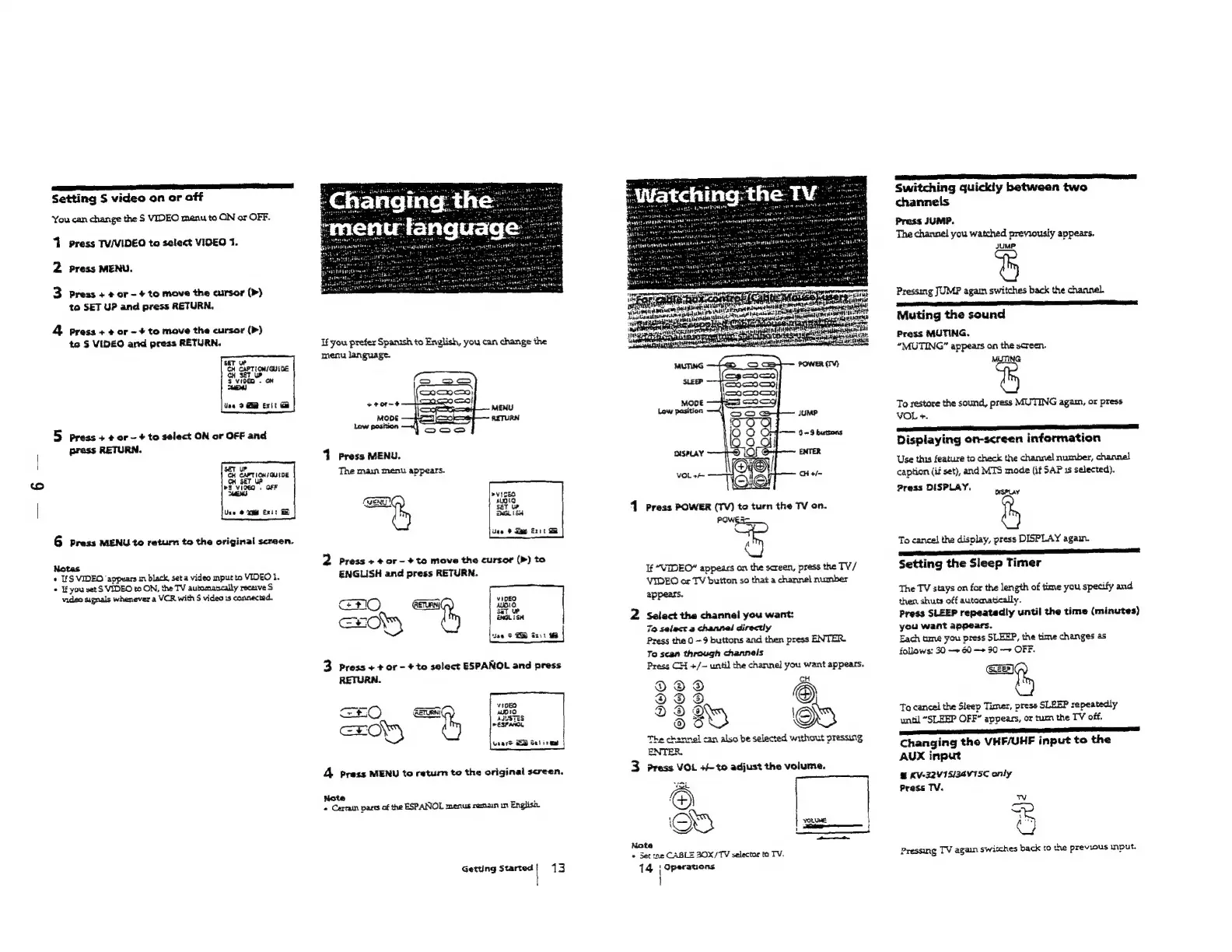
Sony TRINITRON KV-32S12 - Changing the Menu Language

Sony TRINITRON KV-32S12
69 pages
Print Icon
To Next Page IconTo Next Page
To Previous Page IconTo Previous Page
Loading...
Setting
S
video
on
or
off
You
can
change
the
S
VIDEO
menu
to
ON or
OFF.
1
press
TV/VIDEO
to
select
VIOEO
1.
2
press
MENU.
3
press
+
+
or
-
+
to
move
the
cursor
(>)
to
SET
UP
and
press
RETURN,
&
presa
+
+
or
-
+
to
move
the
cursor
(>)
te
§
VIDEO
and
press
RETURN.
Use
9
Qi
Exit
Gi
5
press
+
¢
or
-
+
to
select
ON
or
OFF
and
press
RETURN.
6
press
MENU
to
return
to
the
original
screen.
Notas
«
IfS
VIDEO
‘appears
im
black,
seta
video
mput
ta
VIDEO
1.
©
Ifyou
set
S
VIDEO
to
ON,
the
TV
automatcally
recerve
S
video
signals
whenever
a
VCR
with
S
video
1s
connected.
If
you
prefer
Spanish
to
English,
you
can
change
the
menu
language.
+eor~e
MODE
Law
position
1
Press
MENU.
The
main
menu
appears.
CERT
ty
2
Press
+
¢
ar
-
+
to
move
the
cursor
(>)
to
ENGLISH
and
press
RETURN.
Use
®
Sap
Ext
Ge
GO
cH
HOP)
3
press
+
+
or
-
+
to
select
ESPANOL
and
press
RETURN.
—
———
vICEO
+t
O
GETURNI
10
EON)
10
ASISTES
P
ESPANOL
uaare
ES
Selires
4
press
MENU
to
return
to
the
original
screen.
Note
«
Cerrain
pasts
of
the
ESPANOL
menus
remain
in
English.
Getting
Started!
13
1
Press
POWER
(TV)
to
turn
the
TV
on.
POWES
A
If
“VIDEO”
appears
an
the
screen,
press
the
TV/
VIDEO
or
TV
button
so
that
a
channel
number
appears.
2
Select
the
channel
you
want:
70
selact
a
channel
directly
Press
the
0
-9
buttons
and
then
press
ENTER.
To
scan
through
channels
Press
CH
+/—
until
the
channel
you
want
appears.
DDdd
2Dod
DD
g
38D
The
channel
can
also
be
selected
without
pressing
ENTER,
CH
©)
ED
3
Press
VOL
++
to
adjust
the
volume.
é
OS
Note
«
Set
zne
CABLE
BOX/TV
selector
ta
TV.
14
{
Operations
|
VOLUME
Switching
quickly
between
two
channels
Press
JUMP.
The
channel
you
watched
previously
appears.
JUMP
Pressing
JUMP
agai
switches
back
the
channel.
ERR
gE
OE
a
ET
Muting
the
sound
Press
MUTING.
“MUTING”
appears
on
the
screen.
MUTING
To
restore
the
sound,
press
MUTING
agam,
or
press
VOL
+.
Displaying
on-screen
information
Use
this
feature
to
check
the
channel
number,
channel
caption
(if
set),
and
MTS
mode
(if
SAP
1s
selected).
Press
DISPLAY.
neoiy
To
cancel
the
display,
press
DISPLAY
again.
Setting
the
Sleep
Timer
The
TV
stays
on
for
the
length
of
time
you
specify
and
then
shuts
off
automatically.
Press
SLEEP
repeatedly
until
the
time
(minutes)
you
want
appears.
Each
ume
you
press
SLEEP,
the
time
changes
as
follows:
30
—»
60
—+
30
—»
OFF.
=e
To
cancel
the
Sleep
Timer,
press
SLEEP
repeatedly
until
“SLEEP
OFF”
appears,
or
tur
the
TV
off.
Changing
the
VHF/UHF
input
to
the
AUX
input
&
KV-22VISIZSVISC
only
Press
TV.
Vv
ri
as
Pressing
TV
again
switches
back
to
the
previous
input.

Table of Contents