EasyManua.ls Logo

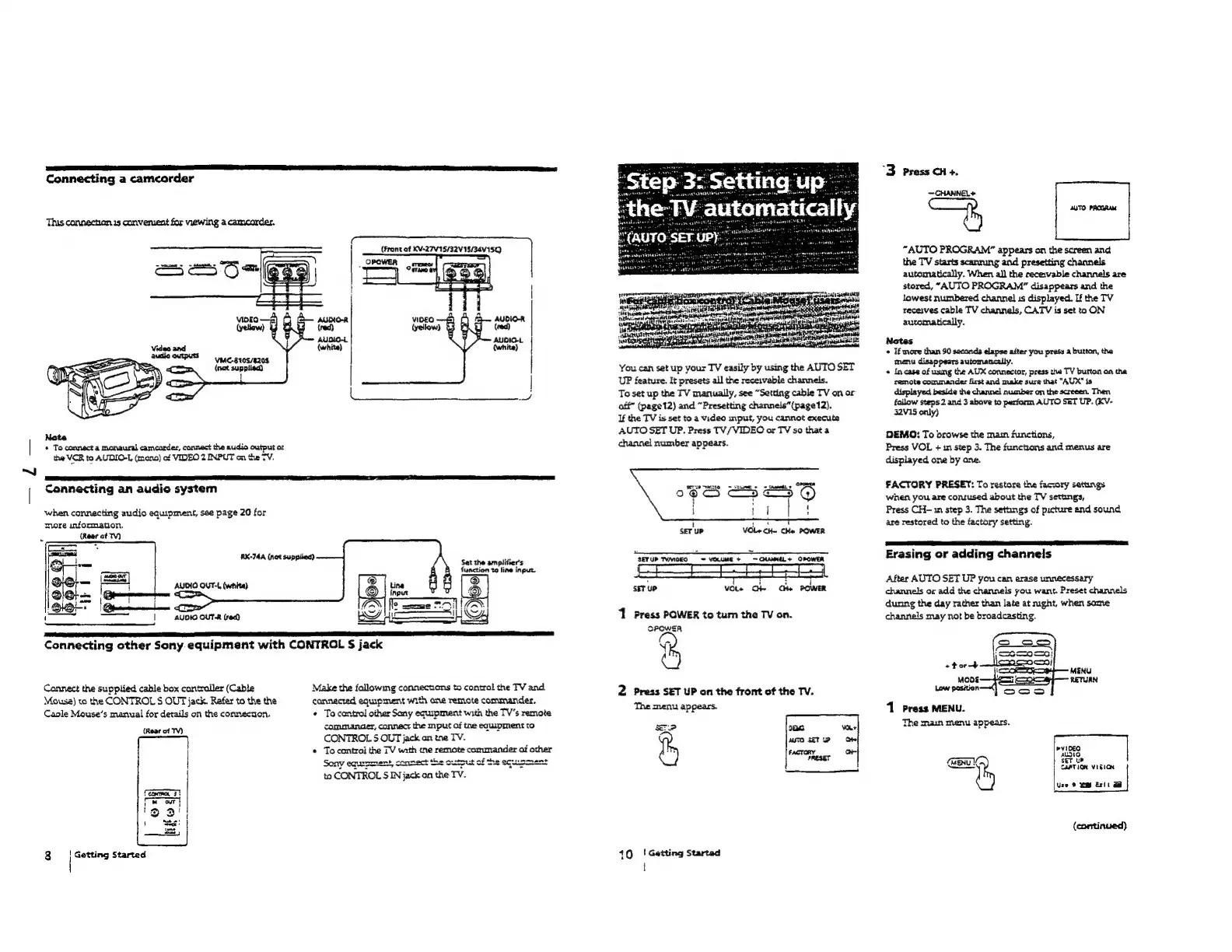
Sony TRINITRON KV-32S12 - Setting up the TV Automatically (AUTO SET UP)

Sony TRINITRON KV-32S12
69 pages
Print Icon
To Next Page IconTo Next Page
To Previous Page IconTo Previous Page
Loading...
Connecting
a
camcorder
This
connechian
is
converuent
for
viewing
a
camcorder.
|
CS
CIARA
ORE
{Front
of
KV-27V15/32V15/34V15Q)
|
viDEO
Py
AUDIO-R
(yellow)
(red)
AUDIO~
AUDIO-L
Video
and
(white)
(white)
audio
OutPUSS
anc.
3105/4208
(nat
suppiied)
Ka
oe
a,
~~
Note
|
«
To
connect
a
monaural
camcorder,
connect
the
audio
output
o:
the
VCR
to
AUDIO-L
(mano)
of
VIDEO
2
INPUT
on
the
TV.
|
|
Connecting
an
audio
system
when
connecting
audio
equipment,
see
page
20
for
more
infommation.
7
(Rear
of
T)
oA
Bette
tne
eoneiee
Sat
the
amplitier's
|
function
10
line
input.
AUDIO
OUT-L
(white)
!
:
r
wy
iz
aes
|
AUDIO
OUT-R
(rect)
SF
Connecting
other
Sony
equipment
with
CONTROL
S$
jack
Make
the
fallowing
connections
to
contral
the
TV
and
connected
equipment
with
one
remote
commander,
¢
To
contro!
other
Sany
equipment
with
the
TV’s
remote
commander,
connect
the
mput
of
tne
equipment
to
CONTROL
§
OUT
jack
on
tne
TV.
*
Tocantroi
the
TV
with
tne
remote
conunander
of
other
Sony
equrment,
connect
the
output
of
ne
equusment
to
CONTROL
S
IN
jack
on
the
TV.
Connect
the
supplied
cable
box
cantrailer
(Cable
Mousa)
to
the
CONTROL
S
OUT
jack.
Rafer
to
the
the
Caple
Mouse’s
manual
for
details
on
the
connecaon.
(Rear
of
TV)
3
|
Getting
Started
You
can
set
up
your
TV
easily
by
using
the
AUTO
SET
UP
feature.
It
presets
all
the
receivable
channels.
To
set
up
the
TV
manually,
see
“Setting
cable
TV
on
or
aff”
(page12)
and
“Presetting
channeis”(page12).
If
the
TV
is
set
to
a
video
input,
you
cannot
execute
AUTO
SET
UP.
Press
TV/VIDEO
or
TV
so
that
a
channel
number
appears.
3
: i
SET
UP
VOl+
Gh
Ce
POWER
‘1
Press
POWER
to
tum
the
TV
on.
CPCWESAR
N
2
Press
SET
UP
on
the
front
of
the
TV.
The
menu
appears.
10
|!
Getting
Started
t
“3
Press
CH
+.
~—CHANNEL+
AUTO
PROGRAM
“AUTO
PROGRAM”
appears
on
the
screen
and
the
TV
starts
scanrung
and
presetting
channels
automatically.
When
all
the
rece:vable
channels
are
stored,
“AUTO
PROGRAM”
disappears
and
the
Jowest
numbered
channel
is
displayed.
If
the
TV
receives
cable
TV
channels,
CATV
is
set
to
ON
automatically.
Notes
«
If
more
than
90
secands
elapse
after
you
press
a
button,
the
menu
disappears
automaacally.
«
In
case
of
using
the
AUX
connector,
press
tha
TV
button
an
the
remote
commander
first
and
make
sure
that
"AUX"
is
yed
beside
the
channel
number
on
the
screeen.
Then
fallow
steps
2
and
3
above
to
perfarm
AUTO
SET
UP.
(KV-
32V15
only)
DEMO:
To
browse
the
mam
funciions,
Press
VOL
+
in
step
3.
The
functions
and
menus
are
displayed
one
by
ane.
FACTORY
PRESET:
To
restore
the
faccory
settings
when
you
are
contused
about
the
TV
settings,
Press
CH-n
step
3.
The
settings
of
picture
and
sound
are
restored
to
the
factory
setting.
Erasing
or
adding
channels
After
AUTO
SET
UP
you
can
erase
unnecessary
channels
or
add
the
channels
you
want.
Preset
channels
dunng
the
day
rather
than
late
at
mght,
when
same
channels
may
not
be
broadcasting.
1
Press
MENU.
The
main
menu
appears.
=n
ie)
Str
ue
CAPTION
VIBION
Use
©
im
Exit
a
(continued)

Table of Contents

Related product manuals