– 14 –
KV-PG21P40/PG21M70/PG21P70
RM-952
3-2. CONVERGENCE
Preparation :
• Before starting this adjustment, adjust the focus, horizontal
size and vertical size.
• Receive dot/hatch signal.
• Pic mode: Soft.
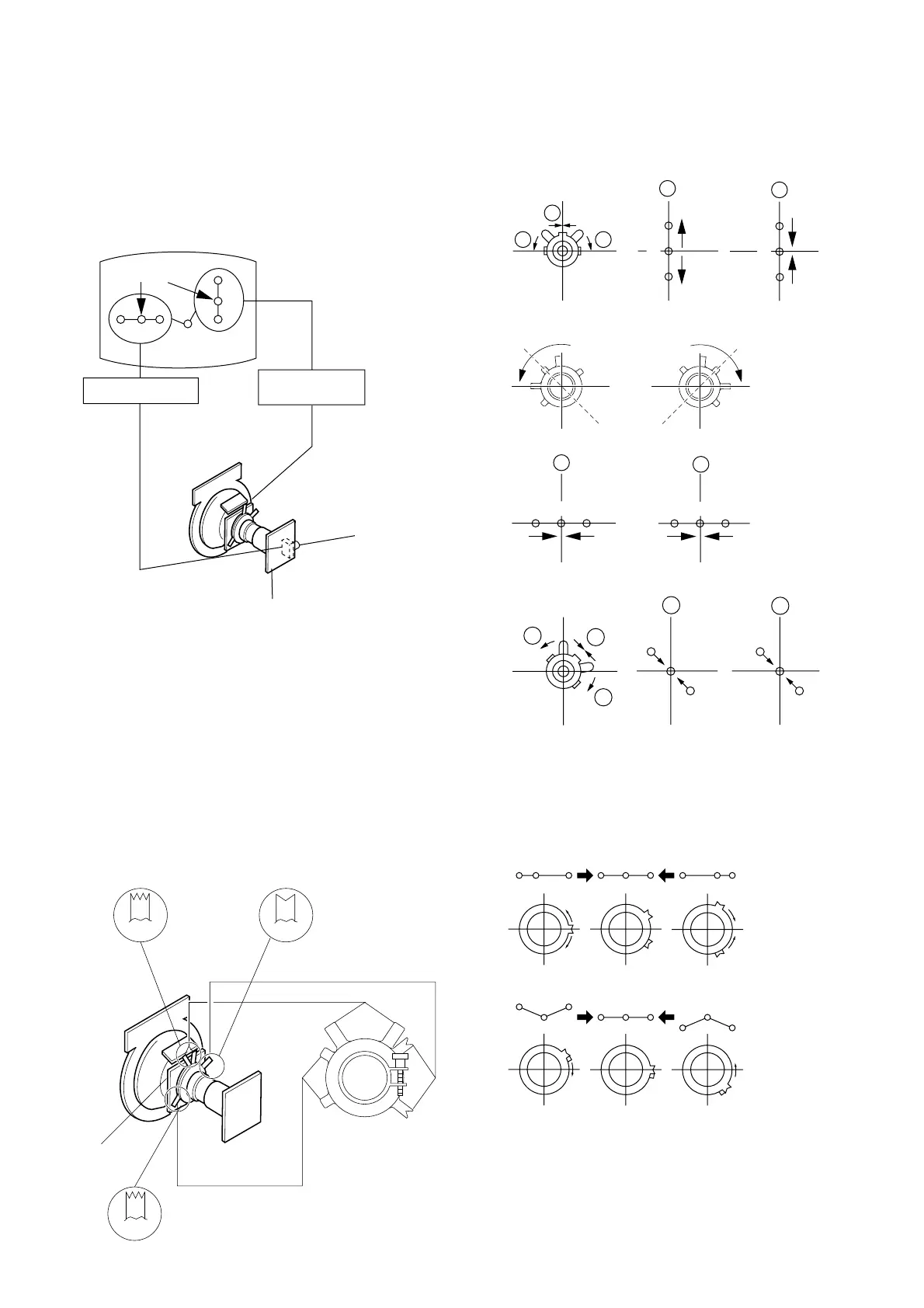
(1) Horizontal and Vertical Static Convergence
1. (Moving vertically), adjust the V.STAT magnet so that the
red, green and blue dots are on top of each other at the
center of the screen.
2. (Moving horizontally), adjust the H.STAT VR control so
that the red, green and blue dots are on top of each other at
the center of the screen.
3. If the H.STAT variable resistor cannot bring the red, green
and blue dots together at the center of the screen, adjust the
horizontal convergence with the H.STAT variable resistor
and the V.STAT magnet in the manner given below.
(In this case, the H.STAT variable resistor and the V.STAT
magnet influence each other, so be sure to perform adjust-
ments while tracking.)
1
3
Center dot
R G B
R
G
B
H. STAT VR
V. STAT
Magnet
RV702
H. STAT
CV Board
• Operation of V. Stat magnet
If the V. Stat magnet is moved in the "a" and "b" arrows, the
red, green and blue dots move as shown below.
BMC (Hexapole)
V.STAT
DY pocket
Purity
V.STAT
BMCPurity
2
R
R
G
G
B
B
a
a
b
b b
R
R
G
G
B
B
a
b
a
b
R
R
G
G
B
B
a
a
b
b
b
4 BMC (Hexapole) Magnet.
If the red, green and blue dots are not balanced or aligned,
then use the BMC magnet to adjust in the manner described
below.
RG B R G B R GB
RB
RG
G
GB
RB






 To Next Page