EasyManua.ls Logo

Sony TRINITRON KV2680R - Page 4

Sony TRINITRON KV2680R
14 pages
Print Icon
To Next Page IconTo Next Page
To Previous Page IconTo Previous Page
Loading...
word
SET-UP
REMOTE
COMMANDER
1
Turn
the
Remote
Cammander
face
down,
press
the
tab
and
lift
the
cover.
2
Place
batteries
in
the
Commander
with
the
polarities
in
the
cor-
rect
directions,
as
illustrated
inside
the
case.
3
Replace
the
cover.
Notes
@
Use
2
size
AA
batteries
(IEC
designation
R6).
@
Innormal
operation,
batteries
will
fast
up
to
half
a
year.
If
the
set
does
not
operate
properly,
the
batteries
might
be
exhausted.
Replace
ail
with
new
ones.
@
To
avoid
damage
from
possible
battery
leakage,
remove
the
bat-
teries
for
extended
unused
periods.
@
Be
sure
that
there
are
no
obstructions
between
the
Commander
and
the TV.
@
Operable
range
is
limited.
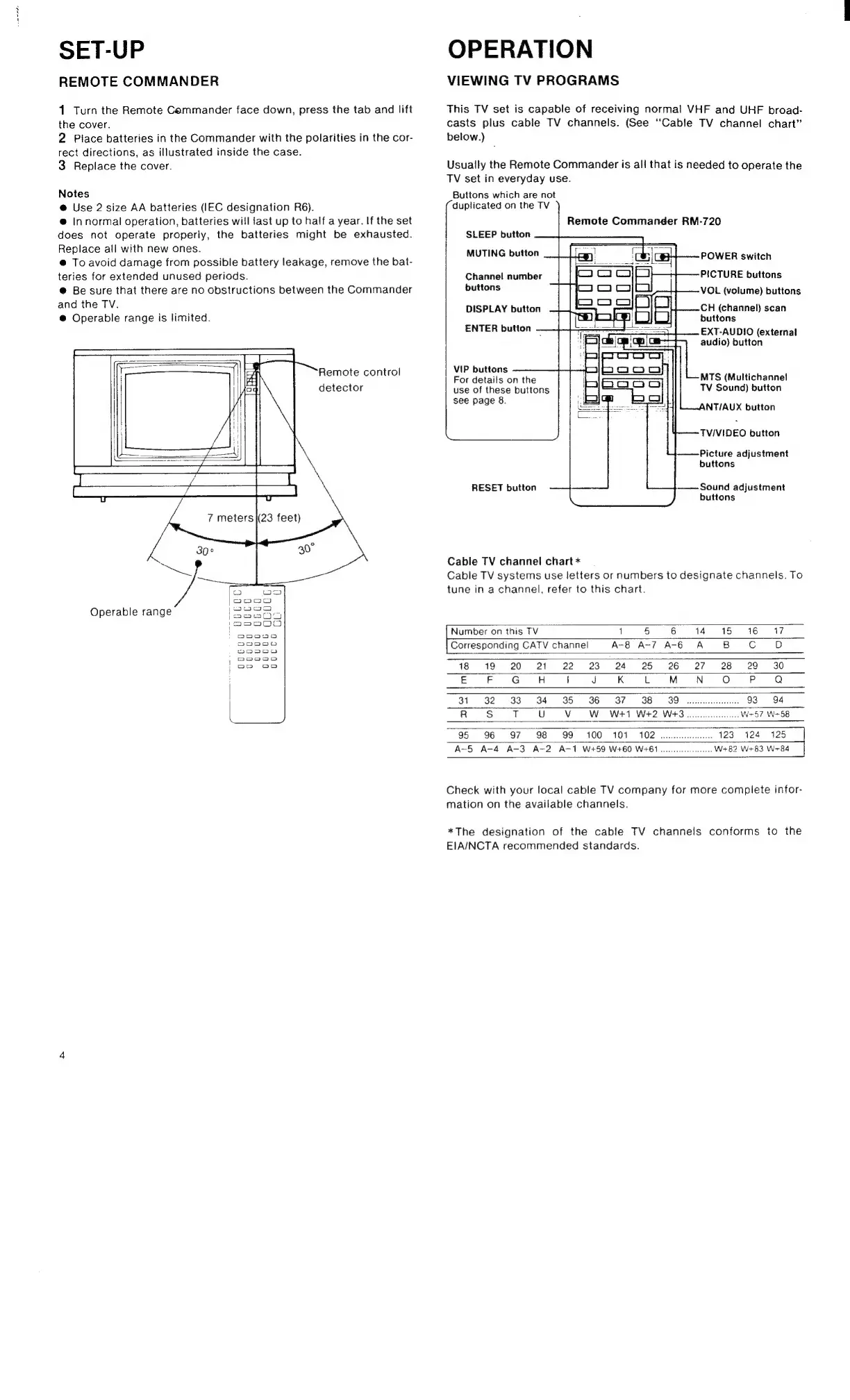
Remote
control
detector
ry
og
aunad
Operable
range
[Sores
jp9oo000
a0000
m2oa00n
onoaog
ao00a0
om oo
OPERATION
VIEWING
TV
PROGRAMS
This
TV
set
is
capable
of
receiving
normal
VHF
and
UHF
broad-
casts
plus
cable
TV
channels.
(See
‘Cable
TV
channel
chart”
below.)
Usually
the
Remote
Commander
is
all
that
is
needed
to
operate
the
TV
set
in
everyday
use.
Buttons
which
are
not
duplicated
on
the
TV
Remote
Commander
RM-720
SLEEP
button
MUTING
button
POWER
switch
PICTURE
buttons
VOL
(volume)
buttons
Channel
number
buttons
CH
(channel)
scan
buttons
EXT-AUDIO
(external
audio)
button
DISPLAY
button
ENTER
button
VIP
buttons
For
details
on
the
use
of
these
buttons
see
page
8.
MTS
(Multichannel
TV
Sound)
button
ANT/AUX
button
TV/VIDEO
button
Picture
adjustment
buttons
RESET
button
Sound
adjustment
buttons
Cable
TV
channel
chart
*
Cable
TV
systems
use
letters
or
numbers
to
designate
channels.
To
tune
in
a
channel,
refer
to
this
chart.
Number
on
this
TV
1
5
6
14
#15
16
17
Corresponding
CATV
channel
A-8
A-7
A-6
A
B
Cc
D
18 19
20
21
22 23 24
25 26
27
28
29°
30
E
F
G
H
|
J
K
L
M
N
fe)
P
Q
31
32
33
34
«635
6
6338637
388
we
93
94
R
Ss
T
U
Vv
Ww
W+1
W+2 W+3
wee
W257
W258
95
96
97 98
99
100
101
102
0.
123
124
125
A-5
A-4
A-3
A-2
A-1
W+t59
W+60
W461.
W+82 W+83
W+84
Check
with
your
local
cable
TV
company
for
more
complete
infor-
mation
on
the
available
channels.
*The
designation
of
the
cable
TV
channels
conforms
to
the
EIAINCTA
recommended
standards.

Related product manuals