EasyManua.ls Logo

Sony Trinitron Multiscan 100sx - Basic Controls; Power Indicator Behavior; Brightness and Contrast Adjustment; Image Adjustment

Sony Trinitron Multiscan 100sx
9 pages
Print Icon
To Next Page IconTo Next Page
To Previous Page IconTo Previous Page
Loading...
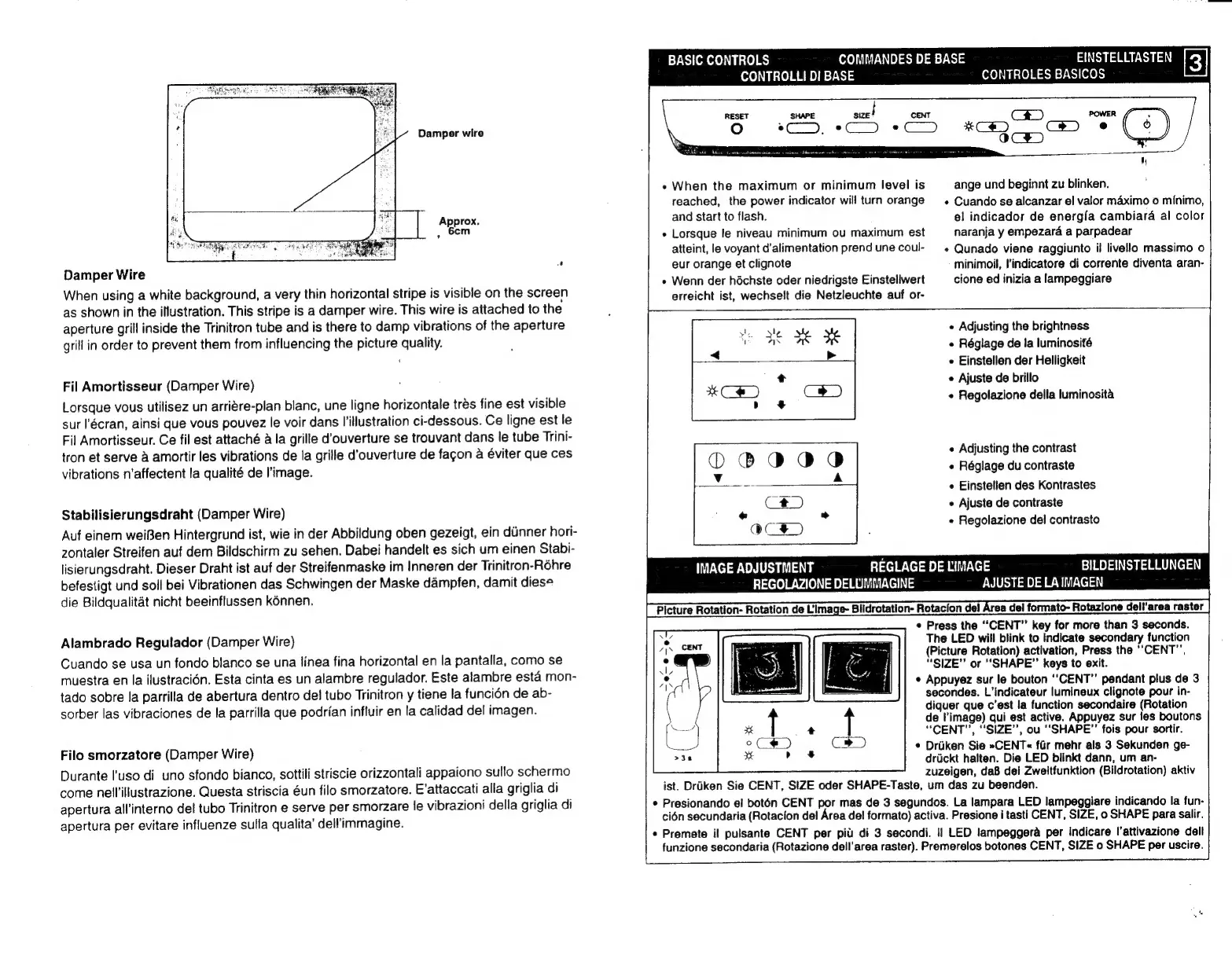
Damper
wire
Damper
Wire
Ñ
When
using
a
white
background,
a
very
thin
horizontal
stripe
is
visible
on
the
screen
as
shown
in
the
illustration.
This
stripe
is
a
damper
wire.
This
wire
is
attached
to
the
aperture
grill
inside
the
Trinitron
tube
and
is
there
to
damp
vibrations
of
the
aperture
grill
in
order
to
prevent
them
from
influencing
the
picture
quality.
Fil
Amortisseur
(Damper
Wire)
Lorsque
vous
utilisez
un
arrière-plan
blanc,
une
ligne
horizontale
très
fine
est
visible
sur
l'écran,
ainsi
que
vous
pouvez
le
voir
dans
l'illustration
ci-dessous.
Ce
ligne
est
le
Fil
Amortisseur.
Ce
fil
est
attaché
à
la
grille
d'ouverture
se
trouvant
dans
le
tube
Trini-
tron
et
serve
á
amortir
les
vibrations
de
la
grille
d'ouverture
de
fagon
á
éviter
que
ces
vibrations
n'affectent
la
qualité
de
l'image.
Stabilisierungsdraht
(Damper
Wire)
Auf
einem
weißen
Hintergrund
ist,
wie
in
der
Abbildung
oben
gezeigt,
ein
dünner
hori-
zontaler
Streifen
auf
dem
Bildschirm
zu
sehen.
Dabei
handelt
es
sich
um
einen
Stabi-
lisierungsdraht.
Dieser
Draht
ist
auf
der
Streifenmaske
im
Inneren
der
Trinitron-Rôhre
befestigt
und
soll
bei
Vibrationen
das
Schwingen
der
Maske
dämpfen,
damit
diese
die
Bildqualitàt
nicht
beeinflussen
kònnen.
Alambrado
Regulador
(Damper
Wire)
Cuando
se
usa
un
fondo
blanco
se
una
linea
fina
horizontal
en
la
pantalla,
como
se
muestra
en
la
ilustracién.
Esta
cinta
es
un
alambre
regulador.
Este
alambre
està
mon-
tado
sobre
la
parrilla
de
abertura
dentro
del
tubo
Trinitron
y
tiene
la
función
de
ab-
sorber
las
vibraciones
de
la
parrilla
que
podrían
influir
en
la
calidad
del
imagen.
Filo
smorzatore
(Damper
Wire)
Durante
l'uso
di
uno
sfondo
bianco,
sottili
striscie
orizzontali
appaiono
sullo
schermo
come
nell'illustrazione.
Questa
striscia
éun
filo
smorzatore.
E'attaccati
alla
griglia
di
apertura
all'interno
del
tubo
Trinitron
e
serve
per
smorzare
le
vibrazioni
della
griglia
di
apertura
per
evitare
influenze
sulla
qualita'
dell'immagine.
BASIC
CONTROLS
COMMANDES
DE
BASE
EINSTELLTASTEN
CONTROLES
BASICOS
CONTROLLI
DI
BASE
«
When
the
maximum
or
minimum
level
is
ange
und
beginnt
zu
blinken.
reached,
the
power
indicator
will
turn
orange
+
Cuando
se
alcanzar
el
valor
máximo
o
mínimo,
and
start
to
flash.
el
indicador
de
energía
cambiará
al
color
*
Lorsque
le
niveau
minimum
ou
maximum
est
naranja
y
empezará
a
parpadear
atteint,
le
voyant
d'alimentation
prend
une
coul-
«
Qunado
viene
raggiunto
il
livello
massimo
o
eur
orange
et
clignote
minimoil,
l'indicatore
di
corrente
diventa
aran-
»
Wenn
der
hóchste
oder
niedrigste
Einstellwert
cione
ed
inizia
a
lampeggiare
erreicht
ist,
wechselt
die
Netzleuchte
auf
or-
e
Adjusting
the
brightness
e
Réglage
de
la
luminosité
e
Einstellen
der
Helligkeit
e
Ajuste
de
brillo
e
Regolazione
della
luminosità
e
Adjusting
the
contrast
e
Réglage
du
contraste
e
Einstellen
des
Kontrastes
»
Ajuste
de
contraste
e
Regolazione
del
contrasto
DB
v
A
IMAGE
ADJUSTMENT
RÉGLAGE
DE
LIMAGE
BILDEINSTELLUNGEN
REGOLAZIONE
DELUMMAGINE
AJUSTE
DE
LA
IMAGEN
Picture
Rotation-
Rotation
de
L'Image-
Bildrotation-
Rotacfon
del
Area
del
formato-
Rotazione
dell’area
raster
*
Press
the
“CENT”
key
for
more
than
3
seconds.
The
LED
will
blink
to
indicate
secondary
function
(Picture
Rotation)
activation,
Press
the
"CENT",
"SIZE"
or
“SHAPE”
keys
to
exit.
e
Appuyez
sur
le
bouton
"CENT
pendant
plus
de
3
secondes.
L'indicateur
lumineux
clignote
pour
in-
diquer
que
c'est
la
function
secondaire
(Rotation
de
l'image)
qui
est
active.
Appuyez
sur
les
boutons
"CENT",
"SIZE",
ou
“SHAPE”
fois
pour
sortir.
e
Drüken
Sie
»CENT«
für
mehr
als
3
Sekunden
ge-
drückt
halten.
Die
LED
blinkt
dann,
um
an-
zuzeigen,
daB
dei
Zweitfunktion
(Bildrotation)
aktiv
ist.
Drüken
Sie
CENT,
SIZE
oder
SHAPE-Taste,
um
das
zu
beenden.
+
Presionando
el
botón
CENT
por
mas
de
3
segundos.
La
lampara
LED
lampeggiare
indicando
la
fun-
ción
secundaria
(Rotacíon
del
Área
del
formato)
activa.
Presione
i
tasti
CENT,
SIZE,
o
SHAPE
para
salir.
e
Premete
il
pulsante
CENT
per
più
di
3
secondi.
ll
LED
lampeggerà
per
indicare
l'attivazione
dell
funzione
secondaria
(Rotazione
dell'area
raster).
Premerelos
botones
CENT,
SIZE
o
SHAPE
per
uscire.

Related product manuals