EasyManua.ls Logo

Sony TRINITRON PVM-20N1E - Operation through On-Screen Menus.9

Sony TRINITRON PVM-20N1E
15 pages
Print Icon
To Next Page IconTo Next Page
To Previous Page IconTo Previous Page
Loading...
Operation
through
On-Screen
Menus
Menu
operation
buttons
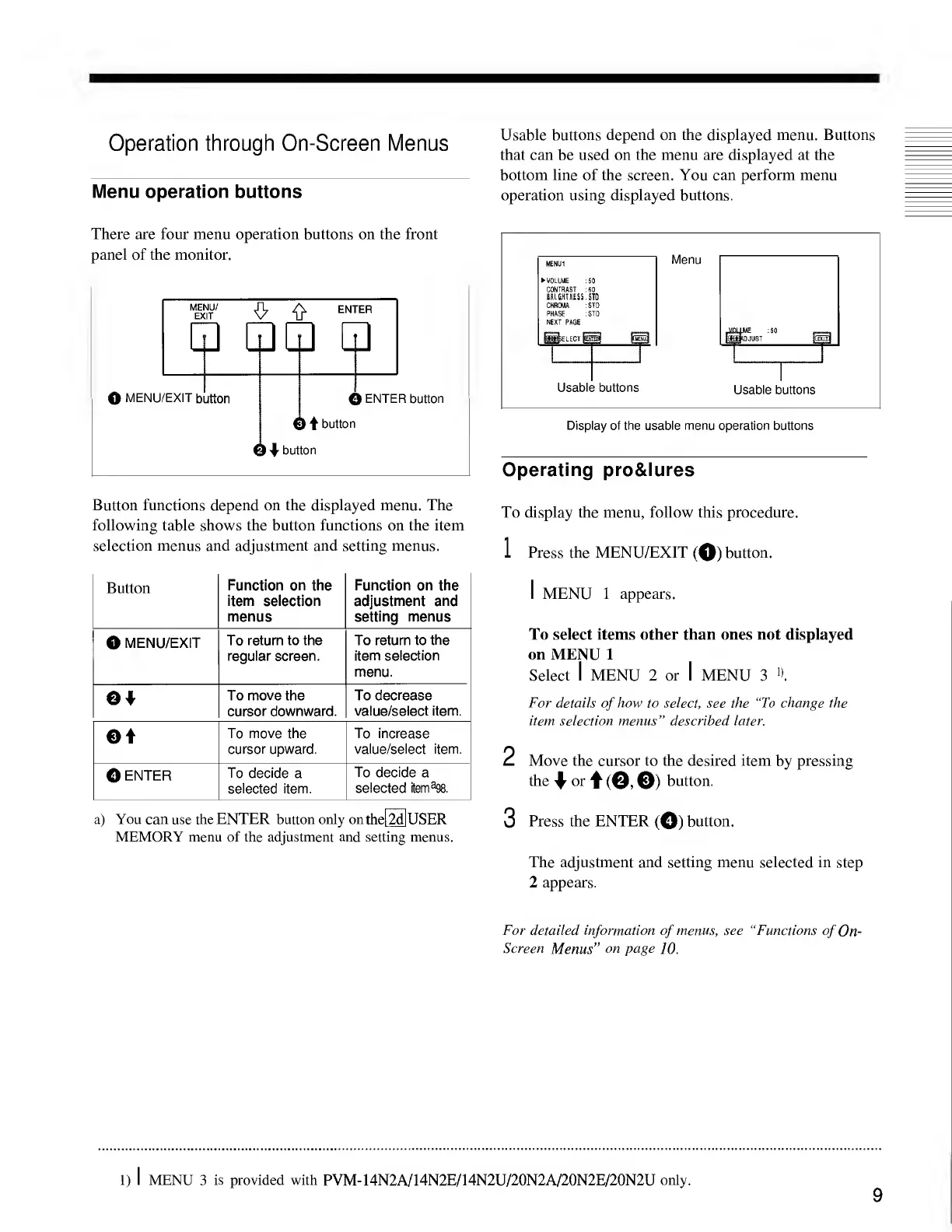
There
are
four
menu
operation
buttons
on
the
front
panel
of
the
monitor.
Button
functions
depend
on
the
displayed
menu.
The
following
table
shows
the
button
functions
on
the
item
selection
menus
and
adjustment
and
setting
menus.
Button
Function
on
the
item
selection
menus
Function
on
the
adjustment
and
setting
menus
O
MENU/EXIT
To
return
to
the
regular
screen.
To
return
to
the
item
selection
menu.
Of
To
move
the
cursor
downward.
To
decrease
value/select
item.
©t
To
move
the
cursor
upward.
To
increase
value/select
item.
0
ENTER
To
decide
a
selected
item.
To
decide
a
selected
tern
3
*.
a)
You
can
use
the
ENTER
button
only
onthel2d|USER
MEMORY
menu
of
the
adjustment
and
setting
menus.
Usable
buttons
depend
on
the
displayed
menu.
Buttons
that
can
be
used
on
the
menu
are
displayed
at
the
bottom
line
of
the
screen.
You
can
perform
menu
operation
using
displayed
buttons.
Display
of
the
usable
menu
operation
buttons
Operating
pro&lures
To
display
the
menu,
follow
this
procedure.
1
Press
the
MENU/EXIT
(O)
button.
1
MENU
1
appears.
To
select
items
other
than
ones
not
displayed
on
MENU
1
Select
I
MENU
2
or
I
MENU
3
».
For
details
of
how
to
select,
see
the
“To
change
the
item
selection
menus”
described
later.
2
Move
the
cursor
to
the
desired
item
by
pressing
the
4
1
or
t(0©)
button.
3
Press
the
ENTER
(©)
button.
The
adjustment
and
setting
menu
selected
in
step
2
appears.
For
detailed
information
of
menus,
see
“Functions
of
On-
Screen
Menus"
on
page
10.
1)
I
MENU
3
is
provided
with
PVM-14N2A/14N2E/14N2U/20N2A/20N2E/20N2U
only.
9

Related product manuals