EasyManua.ls Logo

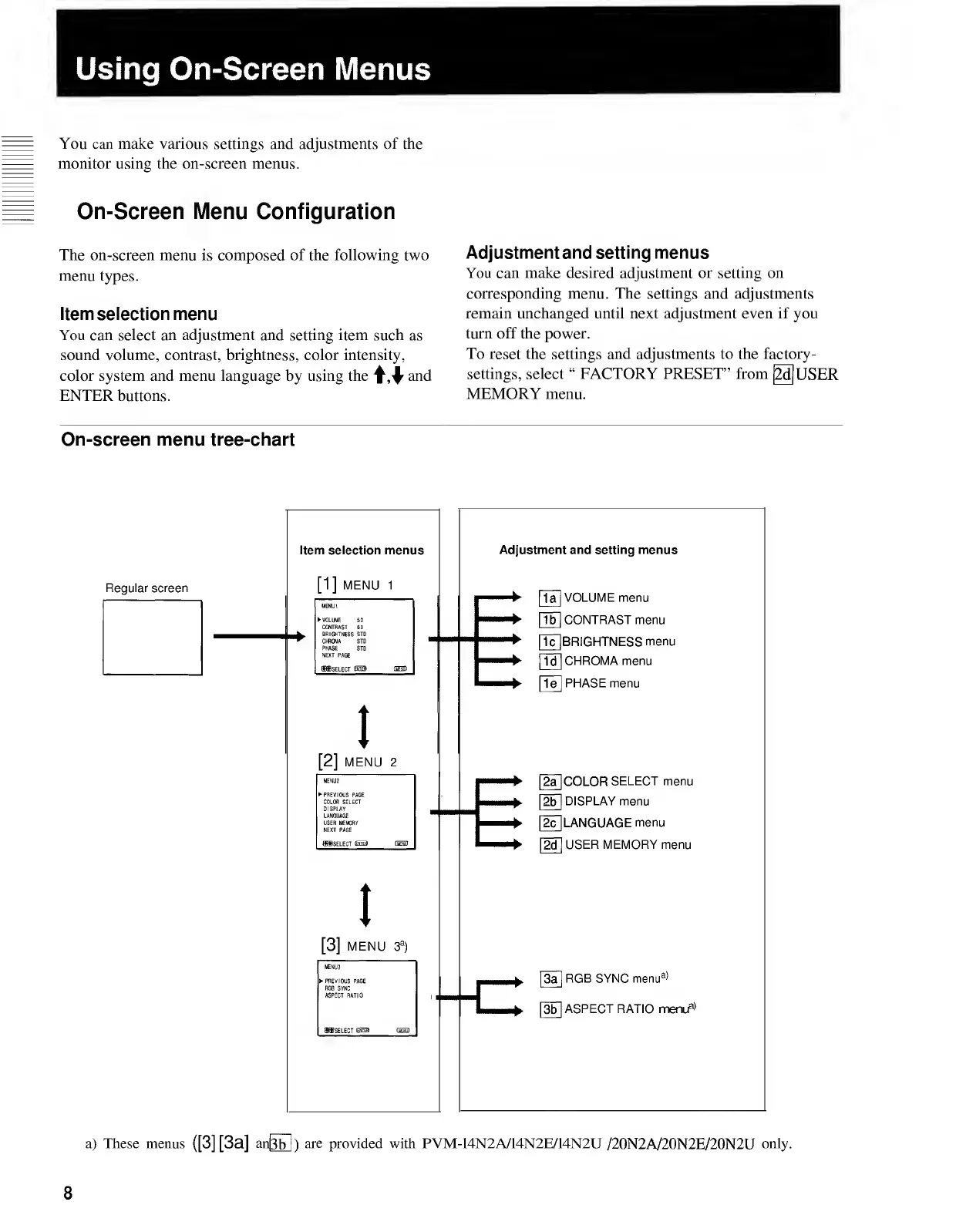
Sony TRINITRON PVM-20N1E - Using On-Screen Menus.8; On-Screen Menu Configuration

Sony TRINITRON PVM-20N1E
15 pages
Print Icon
To Next Page IconTo Next Page
To Previous Page IconTo Previous Page
Loading...
Using
On-Screen
Menus
You
can
make
various
settings
and
adjustments
of
the
monitor
using
the
on-screen
menus.
On-Screen
Menu
Configuration
The
on-screen
menu
is
composed
of
the
following
two
menu
types.
Item
selection
menu
You
can
select
an
adjustment
and
setting
item
such
as
sound
volume,
contrast,
brightness,
color
intensity,
color
system
and
menu
language
by
using
the
and
ENTER
buttons.
Adjustment
and
setting
menus
You
can
make
desired
adjustment
or
setting
on
corresponding
menu.
The
settings
and
adjustments
remain
unchanged
until
next
adjustment
even
if
you
turn
off
the
power.
To
reset
the
settings
and
adjustments
to
the
factory-
settings,
select
FACTORY
PRESET”
from
[2d]
USER
MEMORY
menu.
On-screen
menu
tree-chart
8

Related product manuals