EasyManua.ls Logo

Sony UP-890MD - 1-5. Before Printing

Sony UP-890MD
72 pages
Print Icon
To Next Page IconTo Next Page
To Previous Page IconTo Previous Page
Loading...
1-5.
BEFORE
PRINTING
LLL
aaa
OT
Ee
A
eT
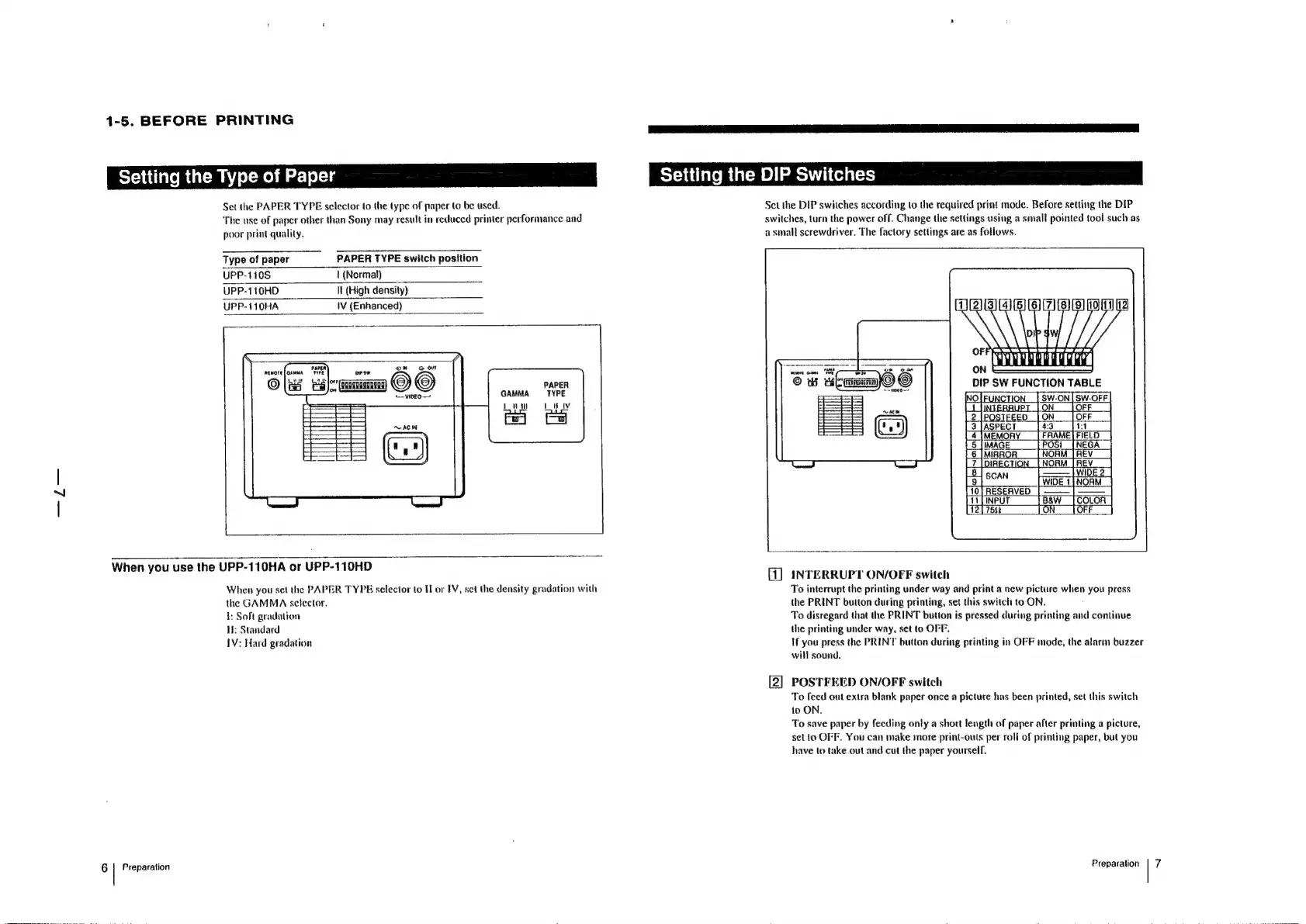
Setting
the
Type
of
Paper
Setting
the
DIP
Switches
Set
the
PAPER
TYPE
selector
to
the
type
of
paper
to
be
used.
Set
the
DIP
switches
according
to
the
required
print
mode.
Before
setting
the
DIP
‘The
use
of
paper
other
than
Sony
may
result
in
reduced
printer
performance
and
switches,
turn
the
power
off,
Change
the
settings
using
a
small
pointed
tool
such
as
poor
print
quality.
a
small
screwdriver.
The
factory
settings
are
as
follows.
Type
of
paper
PAPER
TYPE
switch
position
UPP-110S
|
(Normal)
UPP-110HD
Il
(High
density)
UPP-110HA
!V
(Enhanced)
on
Parti
oor
AtMore
i
onew
NN
i
APER
P
<-viDEO—
GAMMA
TYPE
Louw
Luv
SW-ON|SW-OFF
O
OFF
FEED
[ON
[OFF
|
When
you
use
the
UPP-110HA
or
UPP-110HD
ERRUEFONGEE
Seal
When
you
set
the
PAPER
TYPE
selector
to
I
or
IV,
set
the
density
gradation
with
To
interrupt
the
printing
under
way
and
print
a
new
picture
when
you
press
the
GAMMA
selector.
the
PRINT
button
during
printing,
set
this
switch
to
ON.
1:
Soft
gradation
To
disregard
that
the
PRINT
button
is
pressed
during
printing
and
continue
Hi:
Standard
the
printing
under
way,
set
to
OFF.
IV:
Hard
gradation
If
you
press
the
PRINT
button
during
printing
in
OFF
mode,
the
alarm
buzzer
will
sound.
[2]
POSTFEED
ON/OFF
switch
To
feed
out
extra
blank
paper
once
a
picture
has
been
printed,
set
this
switch
to
ON.
To
save
paper
by
feeding
only
a
short
length
of
paper
after
printing
a
picture,
set
(o
OFF.
You
can
make
more
print-outs
per
roll
of
printing
paper,
but
you
have
to
take
out
and
cut
the
paper
yourself,
6
|
Preparation
Preparation
|
7

Other manuals for Sony UP-890MD

Related product manuals