EasyManua.ls Logo

Sony UP-890MD - Page 8

Sony UP-890MD
72 pages
Print Icon
To Next Page IconTo Next Page
To Previous Page IconTo Previous Page
Loading...
er
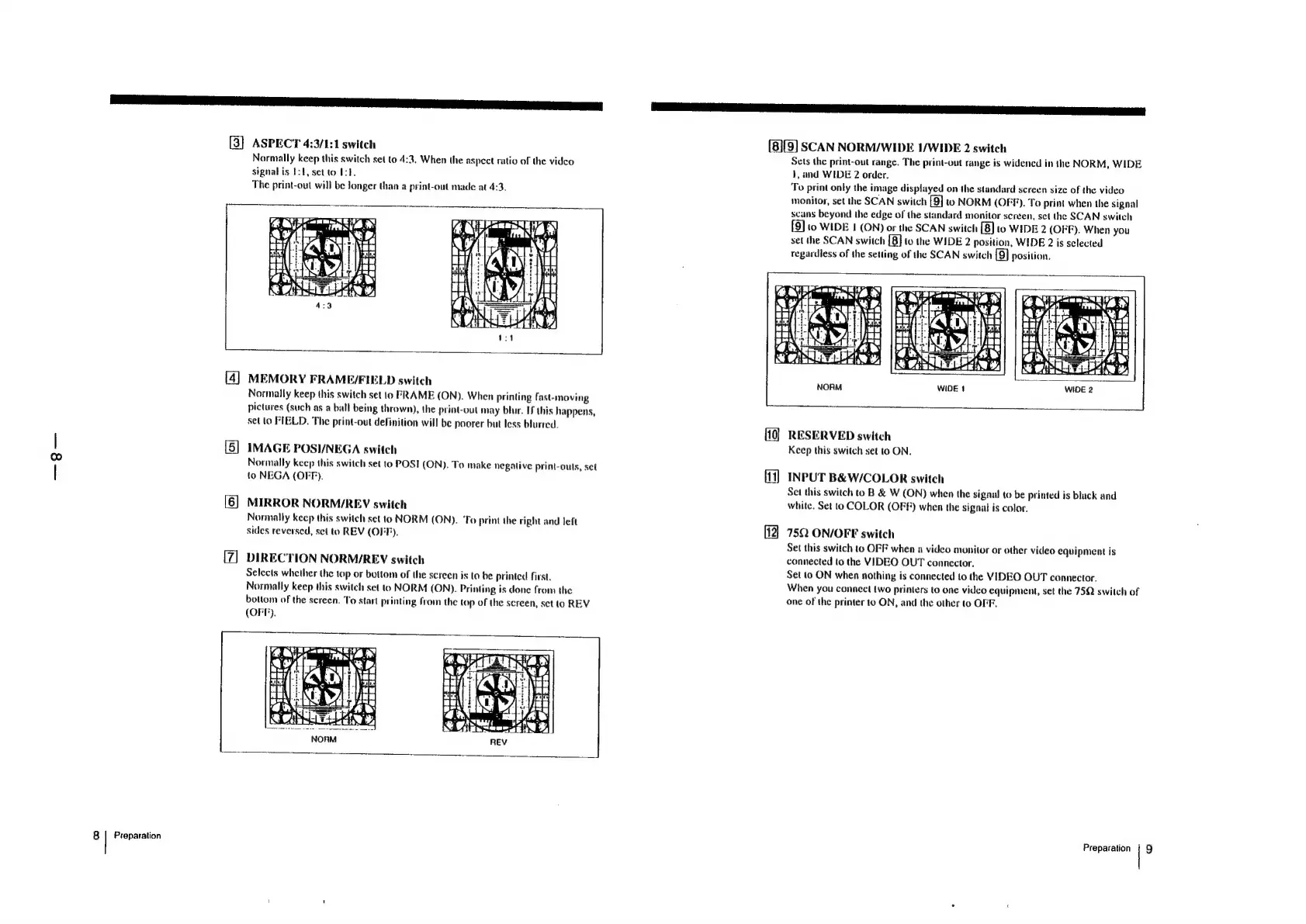
ASPECT
4:3/1:1
switch
(8][9]
SCAN
NORM/WIDE
I/WIDE
2
switch
Normally
keep
this
switch
set
to
4:3.
When
the
aspect
ratio
of
the
vidco
Sets
the
print-out
range.
The
print-out
range
is
widened
in
the
NORM,
WIDE
signal
is
1:1,
set
to
Ist.
1,
and
WIDE
2
order.
The
print-out
will
be
longer
than
a
print-oul
made
at
4:3.
To
print
only
the
image
displayed
on
the
standard
screen
size
of
the
video
monitor,
set
the
SCAN
switch
[9]
to
NORM
(OFF).
To
print
when
the
signal
scans
beyond
the
edge
of
the
standard
monitor
screen,
set
the
SCAN
switch
[9]
10
WIDE
1
(ON)
or
the
SCAN
switch
[8]
to
WIDE
2
(OFF).
When
you
set
the
SCAN
switch
{8]
to
the
WIDE
2
position,
WIDE
2
is
selected
regardless
of
the
setting
of
the
SCAN
switch
[9]
position.
an
N
LI
bel
{|
7
i
-
t
i)
PSs
FE
milk
1
CI
=
CSN
«
q
ory
5
@.
8
He
|
|
Hd
4
BEN,
H
HH
:
f
co
ORS
Zi
a
AJ
Ati
as,
ry
[4]
MEMORY
FRAME/FIELD
switch
Normally
keep
this
switch
set
to
FRAME
(ON).
When
Printing
fast-moving
pictures
(such
as
a
ball
being
thrown),
the
print-out
may
blur.
If
this
happens,
set
lo
FIELD.
The
print-out
definition
will
be
poorer
but
less
blurred.
RESERVED
switch
[5]
IMAGE
POSI/NEGA
switch
Keep
this
switch
set
to
ON.
Normally
keep
this
switch
set
to
POST
ON).
To
make
negative
print-outs,
set
;
to
NEGA
(OFF).
iia
[i]
INPUT
B&W/COLOR
switch
Set
this
switch
to
B
&
W
(ON)
when
the
signal
to
be
printed
is
black
and
[6]
MIRROR
NORM/REV
switch
white.
Set
to
COLOR
(OFF)
when
the
signal
is
color.
Normally
keep
this
switch
set
to
NORM
(ON).
‘To
print
the
right
and
left
ane
sides
reversed,
set
to
REV
(OFF).
75Q
ON/OFF
switch
Set
this
switch
to
OFF
when
a
video
monitor
or
other
video
equipment
is
DIRECTION
NORM/REV
switch
connected
to
the
VIDEO
OUT
connector.
Selects
whether
the
top
or
bottom
of
the
screen
is
to
be
printed
first.
Set
to
ON
when
nothing
is
connected
to
the
VIDEO
OUT
connector.
;
Normally
keep
this
switch
set
to
NORM
(ON).
Printing
is
done
from
the
When
you
connect
two
printers
to
one
video
equipment,
set
the
75Q
switch
of
bottom
of
the
screen.
To
start
printing
from
the
top
of
the
screen,
set
to
REV
one
of
the
printer
to
ON,
and
the
other
to
OFF,
(OFF),
AEA
an
ity
lina
Ra?
8
|
Preparation
Preparation
|
9

Other manuals for Sony UP-890MD

Related product manuals