EasyManua.ls Logo

Sony VPL-GH10 - User Manual

Sony VPL-GH10
155 pages
Print Icon
To Next Page IconTo Next Page
Loading...
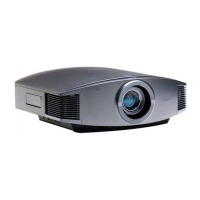
VPL-GH10
© 2009 Sony Corporation
4-139-070-03 (1)
Data Projector
Operating Instructions
Mode d’emploi
GB
FR
S
ony Corporation
Printed in Japan
Printed on recycled paper.

Table of Contents

Other manuals for Sony VPL-GH10

Questions and Answers

  • C
    cunninghamcarlaSep 6, 2025
    How to fix image retention on Sony VPL-GH10 Projector?
    • R
      Ryan CervantesSep 6, 2025
      If you're seeing an image left on the screen of your Sony Projector (image retention), turning off the power for a while will eliminate the retained image.
  • B
    Brandon DavisAug 22, 2025
    How to fix Sony VPL-GH10 Projector when the power is not turned on?
    • W
      William LeeAug 22, 2025
      If the Sony Projector power is not turning on, try the following: wait about 1 minute, then try turning the power on again. Ensure that the lamp cover is securely closed and the screws are tightened. Also, make sure the filter holder is securely closed. Finally, check the warning indicators for any alerts.
  • A
    Amber DixonSep 4, 2025
    How to fix a blurry picture on my Sony VPL-GH10 Projector?
    • N
      nicholaschandlerSep 4, 2025
      If the picture on your Sony Projector is not clear, try adjusting the focus. If condensation has accumulated on the lens, leave the projector on for about 2 hours to clear it.
  • J
    Jared MorrisSep 2, 2025
    How to brighten the picture on my Sony VPL-GH10?
    • A
      Ashley RojasSep 2, 2025
      If the picture on your Sony Projector is too dark, adjust the 'Contrast' or 'Brightness' in the Picture menu.
  • J
    James ScottSep 1, 2025
    What to do if LAMP/COVER flashes in red on Sony Projector?
    • E
      Edward PaceSep 1, 2025
      If the LAMP/COVER indicator on your Sony Projector is flashing red with a repetition rate of 2 flashes, close the lamp cover securely and tighten the screws. Also, ensure that the filter holder is securely closed.
  • A
    Amanda MartinezAug 30, 2025
    What does 'High temp.! Lamp off in 1 min.' mean on my Sony Projector?
    • M
      michaelwatkinsAug 30, 2025
      If you see 'High temp.! Lamp off in 1 min.' on your Sony Projector, turn off the power immediately. Check to ensure that nothing is blocking the ventilation holes.
  • A
    Alexander TrujilloAug 29, 2025
    What to do if my Sony VPL-GH10 Projector says 'Please replace the Lamp/ Filter'?
    • J
      Jerry MunozAug 29, 2025
      If your Sony Projector displays 'Please replace the Lamp/ Filter,' it indicates that it's time to replace the lamp. You should also replace the air filter at the same time.
  • M
    Mark Wilson Jr.Aug 27, 2025
    What does it mean when LAMP/COVER flashes red on my Sony VPL-GH10 Projector?
    • A
      Anthony StewartAug 27, 2025
      If the LAMP/COVER indicator on your Sony Projector is flashing red with a repetition rate of 3 flashes, it could mean that the lamp has reached the end of its useful lifespan and needs replacing. Alternatively, the lamp might have reached a high temperature; in this case, wait for it to cool down before turning the power on again.
  • F
    fnguyenAug 27, 2025
    What to do if my Sony VPL-GH10 says 'Please clean the filter'?
    • S
      sharon87Aug 27, 2025
      If your Sony projector displays the message 'Please clean the filter', you should clean the air filter.
  • H
    harveybradleyAug 25, 2025
    How to troubleshoot no picture on Sony Projector?
    • C
      Carlos DavisAug 25, 2025
      If there is no picture on your Sony Projector, check that the proper connections have been made. Also, set the computer signal to output from an external monitor or to output only to an external monitor.

Summary

Precautions

Safety Guidelines

Essential safety measures to follow during operation.

Heat and Ventilation

Precautions regarding internal heat and proper ventilation.

Installing the Projector

Ventilation and Spacing

Specifies necessary space around the projector for ventilation.

Connecting the Projector

Adjusting Picture Position

Adjusting Picture Position

Guide to adjusting the projected image's horizontal and vertical position.

Picture Adjustment Procedures

Adjusting Picture Size and Focus

How to adjust the size and focus of the projected image.

Fine-tuning Picture Display

Focus and Tilt Adjustment

Steps to adjust focus and level the projector.

Selecting Menu Language

Projecting the Image

Turning Off the Projector

Powering Down Procedure

Step-by-step guide to safely turn off the projector.

Adjusting Picture Quality

Real Color Processing (RCP)

Adjusting Color and Hue

Fine-tuning specific color tones and hues.

Picture Menu Settings

Operating Projector via Computer

Troubleshooting Common Issues

Power, Picture, and Display Problems

Solutions for power, picture clarity, and on-screen display issues.

Warning Indicators Explained

Interpreting Indicator Lights

Explains the meaning of ON/STANDBY and LAMP/COVER indicator lights.

Message Lists

Replacing Lamp and Air Filter

Lamp and Filter Replacement Procedure

Step-by-step guide to replace the lamp and air filter.

Sony VPL-GH10 Specifications

General IconGeneral
BrandSony
ModelVPL-GH10
CategoryProjector
LanguageEnglish

Related product manuals