14
• After you have selected and confirmed the lens position, the lens
starts to move. Do not touch, or place anything near, the lens,
otherwise it may cause injury or a malfunction.
• If you press any button on the remote control or the unit while the
lens is moving, the lens stops. In this case, select the lens position
again or adjust the lens manually.
• The Picture Position function is not guaranteed to reproduce the
lens settings precisely.
• When you use the subtended screen angle of two or more aspects
using lens zoom, install the unit within the specified parameters
referring to “Projection distance” (page 47). With some setting
positions, the range of lens shift may be restricted, even though the
unit is installed within the specified parameters.
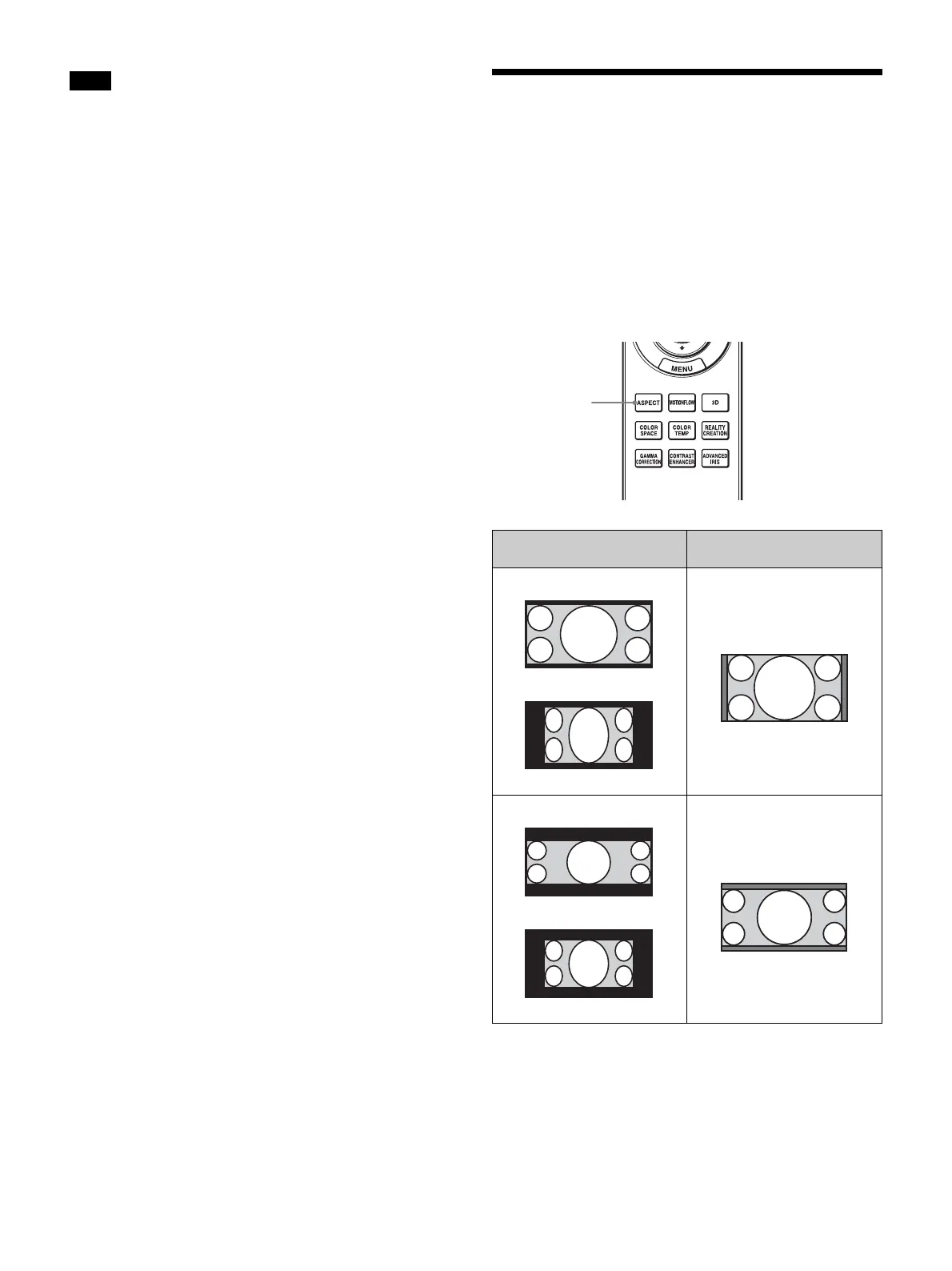
Selecting the Aspect
Ratio According to the
Video Signal
You can select an aspect ratio best suited for the video
signal received.
Press ASPECT.
Each time you press the button, you can select the “Aspect”
setting.You can also select it using the menu (page 25).
Notes
Original image (for 16:9
display)
Recommended setting and
resultant images
ASPECT
button
1.85:1
Squeezed 1.85:1
1.85:1 Zoom
2.35:1
Squeezed 2.35:1
2.35:1 Zoom


 To Next Page