ModelName: Canary_E
PartNumber: 4-154-408-11
8
8
Basic Operations and Screens
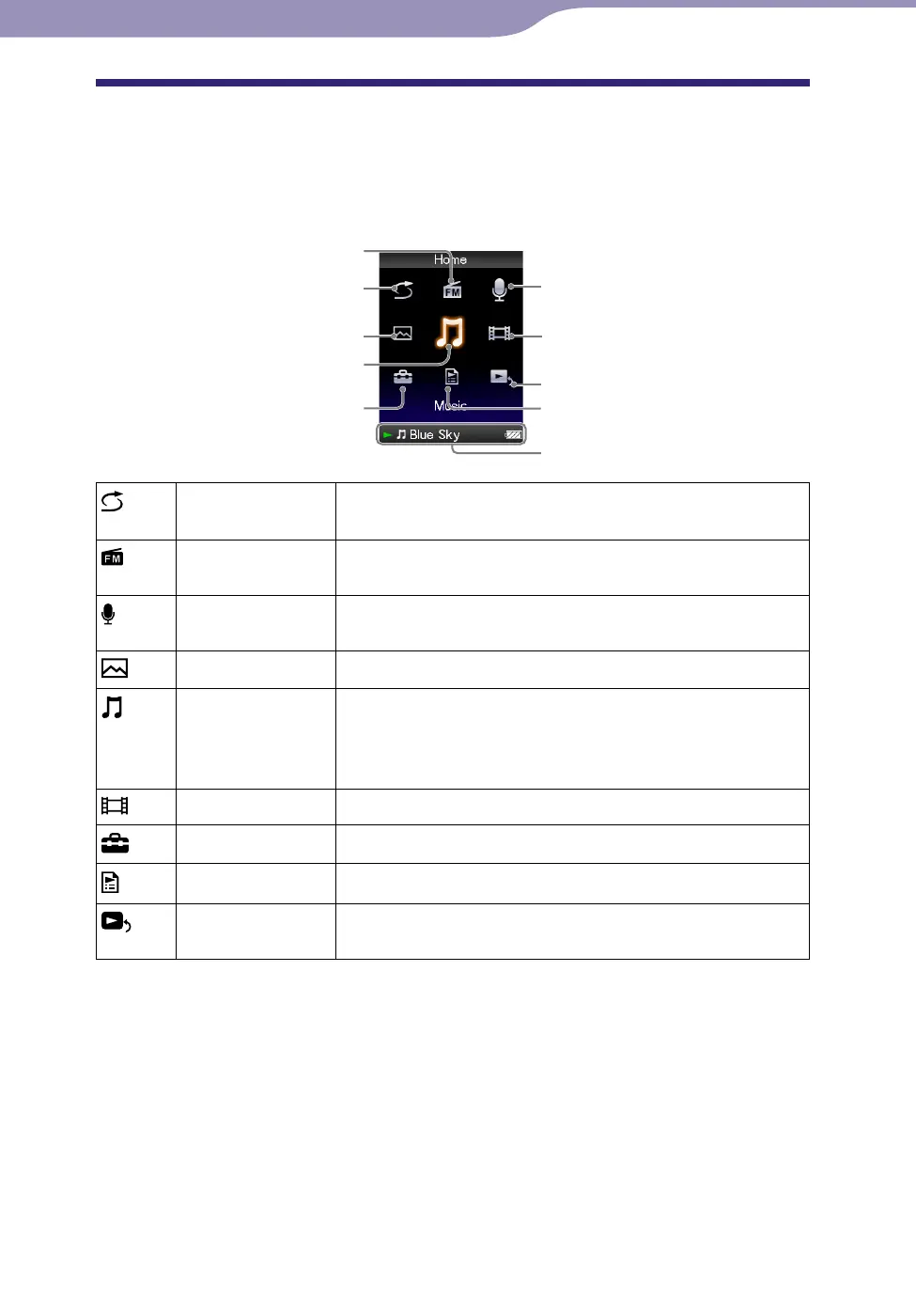
About the Home Menu
The following table shows the items of the [Home] menu. For details on the
item list of each menu, see
p
. 9.
For details about each menu item, refer to the specified reference page.
[Shuffle All] Listen to all the songs stored on the player in random
order (
p
. 40).
[FM Radio] Listen to FM radio broadcasting, and also record the
currently received FM radio program (
p
. 66).
[Voice Recording]
Record voice using the player’s built-in microphone (
p
. 77).
[Photos]
View photos transferred to the player (
p
. 58).
[Music] Listen to songs transferred to the player. You can also
listen to voice recorded on the player using [Voice
Recording] function, and FM radio programs recorded on
the player (
p
. 35).
[Videos]
Watch videos transferred to the player (
p
. 50).
[Settings]
Set up the player and its applications (
p
. 87).
[Playlists]
Listen to songs in the playlists (
p
. 39).
[Now Playing] Display the playback or display screen of the currently
playing content.
Continued
[FM Radio]
[Shuffle All]
[Photos]
[Music]
[Settings]
[Voice Recording]
[Videos]
[Now Playing]
[Playlists]
Information area









 To Next Page