Contents [ hide
1 Getting Started
2 Listening to the Radio
2.1 (DAB)
2.2 FM
2.3 To turn off the radio
2.4 To adjust the volume
3 Presetting stations (5 DAB and 5 FM)
4 Listening to a preset station
5 Improving DAB/FM radio reception
6 Setting the alarm
6.1 To stop the alarm
6.2 To deactivate the alarm
6.3 To doze for a few more minutes
7 Setting the sleep timer
8 Switching the information display
9 Setting the brightness of the display
10 Charging a smartphone
11 Setup Menu Options
11.1 Basic Operations:
11.2 Radio options
11.2.1 Auto Tune (DAB)
11.2.2 Information (DAB)
11.2.3 Info. PTY (FM)
11.2.4 DAB Manual Tune (DAB)
11.2.5 Initialize (DAB) (FM)
11.3 Other options
11.3.1 Set Date & Time
11.3.2 Time Format
11.3.3 Date Format
11.3.4 Beep
12 About the battery as a backup power
source
13 When to replace the battery
14 Replacing the backup battery
15 WARNING
16 WARNING ON LITHIUM BATTERY
17 Precautions
18 NOTES ON LITHIUM BATTERY
19 Troubleshooting
20 Specifications
21 File Downloads
22 References
23 Related Manuals
Getting Started
1. Remove the battery insulation film.


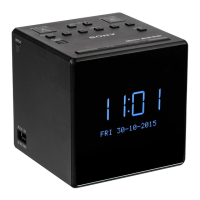

 To Next Page