EasyManua.ls Logo

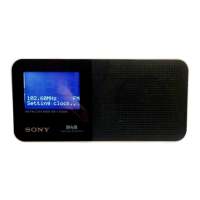
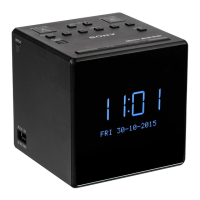
Sony XDR-C1DBP - User Manual

Sony XDR-C1DBP
18 pages
Print Icon
To Next Page IconTo Next Page
Loading...
Skip to content
Manuals+
User Manuals Simplified.
SONY Clock Radio DAB FM Instruction Manual
Home » Sony » SONY Clock Radio DAB FM Instruction Manual
SONY Clock Radio DAB FM
Instruction Manual
http://www.sony.net/

Other manuals for Sony XDR-C1DBP

Question and Answer IconNeed help?

Do you have a question about the Sony XDR-C1DBP and is the answer not in the manual?

Summary

Getting Started

Listening to the Radio

DAB

Instructions for listening to the radio using DAB.

FM

Instructions for listening to the radio using FM.

Presetting Stations

Listening to a Preset Station

Improving DAB;FM Radio Reception

Setting the Alarm

Set Alarm Time and Period

Setting the hour, minute, and alarm period for the alarm.

Select Alarm Mode

Selecting the alarm mode: DAB, FM, or Buzzer.

Adjust Alarm Volume

Adjusting the alarm volume.

Setting the Sleep Timer

Switching Information Display

Setting Display Brightness

Charging a Smartphone

Setup Menu Options

Basic Operations

Basic operations for navigating the setup menu.

Radio Options

Setting radio options within the setup menu.

Auto Tune (DAB)

Performing DAB auto tune to update the station list.

Information (DAB)

Displaying information about the current DAB station.

Info. PTY (FM)

Displaying programme type (PTY) for FM stations.

DAB Manual Tune (DAB)

Manually tuning DAB channels when auto tune is poor.

Initialize (DAB) (FM)

Initializing the radio to factory default settings.

Set Date & Time

Setting the date and time manually or automatically.

Time Format

Selecting the clock display mode: 12-hour or 24-hour.

Date Format

Selecting the date display mode (e.g., DD-MM-YYYY).

Beep

Enabling or disabling the beep sound.

About the Battery as a Backup Power Source

Notes on Alarm in Power Interruption

When to Replace the Battery

Replacing the Backup Battery

Safety Warnings and Lithium Battery Information

General Safety Warnings

Important safety precautions to reduce fire and electric shock risks.

Lithium Battery Safety

Handling, charging, and disposal precautions for lithium batteries.

Disposal of Waste Batteries and Electronic Equipment

Precautions

Operating Precautions

Guidelines for operating the unit safely and correctly.

Lithium Battery Notes

Specific notes on handling and caring for lithium batteries.

Troubleshooting

Alarm Not Sounding

Troubleshooting steps when the alarm does not sound.

No Sound on Alarm Activation

Troubleshooting steps when the radio activates but emits no sound.

Specifications

Time Display

Details on time display formats (12-hour/24-hour).

Frequency Range

Specifies the DAB and FM frequency ranges.

DAB Frequency Table

A table listing DAB channels and their frequencies.

Speaker Specifications

Specifications for the unit's speaker.

Power Requirements

Details on power sources and backup battery.

USB Power Output

Specifications for the USB port power output.

Dimensions

Physical dimensions of the unit.

Mass

Weight of the unit.

PTY Programme Type

Explanation of the Programme Type (PTY) function.

File Downloads

References

Related Manuals

Summary

Getting Started

Listening to the Radio

DAB

Instructions for listening to the radio using DAB.

FM

Instructions for listening to the radio using FM.

Presetting Stations

Listening to a Preset Station

Improving DAB;FM Radio Reception

Setting the Alarm

Set Alarm Time and Period

Setting the hour, minute, and alarm period for the alarm.

Select Alarm Mode

Selecting the alarm mode: DAB, FM, or Buzzer.

Adjust Alarm Volume

Adjusting the alarm volume.

Setting the Sleep Timer

Switching Information Display

Setting Display Brightness

Charging a Smartphone

Setup Menu Options

Basic Operations

Basic operations for navigating the setup menu.

Radio Options

Setting radio options within the setup menu.

Auto Tune (DAB)

Performing DAB auto tune to update the station list.

Information (DAB)

Displaying information about the current DAB station.

Info. PTY (FM)

Displaying programme type (PTY) for FM stations.

DAB Manual Tune (DAB)

Manually tuning DAB channels when auto tune is poor.

Initialize (DAB) (FM)

Initializing the radio to factory default settings.

Set Date & Time

Setting the date and time manually or automatically.

Time Format

Selecting the clock display mode: 12-hour or 24-hour.

Date Format

Selecting the date display mode (e.g., DD-MM-YYYY).

Beep

Enabling or disabling the beep sound.

About the Battery as a Backup Power Source

Notes on Alarm in Power Interruption

When to Replace the Battery

Replacing the Backup Battery

Safety Warnings and Lithium Battery Information

General Safety Warnings

Important safety precautions to reduce fire and electric shock risks.

Lithium Battery Safety

Handling, charging, and disposal precautions for lithium batteries.

Disposal of Waste Batteries and Electronic Equipment

Precautions

Operating Precautions

Guidelines for operating the unit safely and correctly.

Lithium Battery Notes

Specific notes on handling and caring for lithium batteries.

Troubleshooting

Alarm Not Sounding

Troubleshooting steps when the alarm does not sound.

No Sound on Alarm Activation

Troubleshooting steps when the radio activates but emits no sound.

Specifications

Time Display

Details on time display formats (12-hour/24-hour).

Frequency Range

Specifies the DAB and FM frequency ranges.

DAB Frequency Table

A table listing DAB channels and their frequencies.

Speaker Specifications

Specifications for the unit's speaker.

Power Requirements

Details on power sources and backup battery.

USB Power Output

Specifications for the USB port power output.

Dimensions

Physical dimensions of the unit.

Mass

Weight of the unit.

PTY Programme Type

Explanation of the Programme Type (PTY) function.

File Downloads

References

Related Manuals

Sony XDR-C1DBP Specifications

General IconGeneral
TypeClock Radio
TunerDAB/DAB+/FM
DisplayLCD
AlarmDual Alarm
Power SourceAC Power
Snooze FunctionYes
Preset Stations5 (DAB) / 5 (FM)
Alarm SourceRadio/Buzzer
Backup BatteryYes

Related product manuals