Home
Sony
Clock Radio
XDR-C1DBP
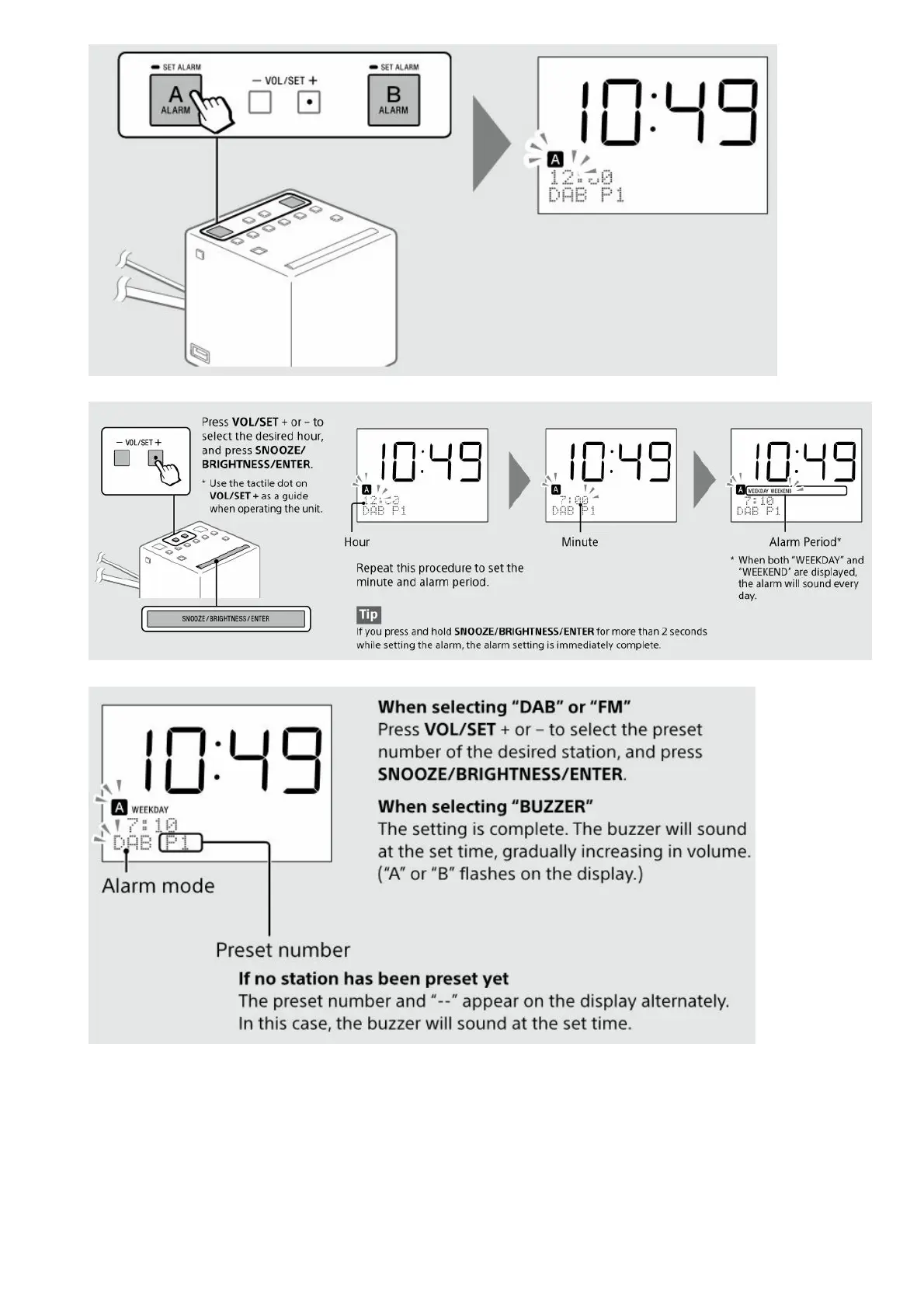
Page 8 (Set Alarm Time and Period)
Sony XDR-C1DBP - Set Alarm Time and Period; Select Alarm Mode; Adjust Alarm Volume
18 pages
Manual
Save Page as PDF
To Next Page
To Next Page
To Previous Page
To Previous Page
Loading...
2.
Set the ho
ur, minut
e, and alar
m period
(“WEEK
DAY,” “W
EEKEN
D,” or bot
h).
3.
Set the al
arm mod
e (“DAB,
” “FM,” o
r “BUZZE
R”).
4.
Adjust the
volume.
Press VO
L/SET +
or – to ad
just the vo
lume, and
press SN
OOZE/B
RIGHTN
ESS/EN
TER.
7
9
Table of Contents
Main Page
SONY Clock Radio DAB FM Instruction Manual
1
Getting Started
2
Listening to the Radio
3
(DAB)
3
FM
4
To turn off the radio
5
To adjust the volume
5
Presetting stations (5 DAB and 5 FM)
5
Listening to a preset station
6
Improving DAB/FM radio reception
7
Setting the alarm
7
To stop the alarm
9
To deactivate the alarm
9
To doze for a few more minutes
9
Setting the sleep timer
9
Switching the information display
10
Setting the brightness of the display
10
Charging a smartphone
10
Setup Menu Options
11
Basic Operations:
11
Radio options
11
Auto Tune (DAB)
12
Information (DAB)
12
Info. PTY (FM)
12
DAB Manual Tune (DAB)
12
Initialize (DAB) (FM)
12
Other options
12
Set Date & Time
12
Time Format
13
Date Format
13
Beep
13
About the battery as a backup power source
13
When to replace the battery
13
Replacing the backup battery
14
WARNING
14
WARNING ON LITHIUM BATTERY
14
Precautions
15
NOTES ON LITHIUM BATTERY
15
Troubleshooting
15
Specifications
16
File Downloads
17
References
17
Related Manuals
18
Other manuals for Sony XDR-C1DBP
Operating Instructions
2 pages
Related product manuals
Sony Dream Machine XDR-C705DAB
2 pages
Sony ICF-C1PJ
2 pages
Sony ICF C218
2 pages
Sony ICF-CDK50
2 pages
Sony ICF C05iP
2 pages
Sony ICF-CD853
2 pages
Sony ICF ICF-C318
2 pages
Sony Dream Machine ICF-C218
2 pages
Sony C318 - ICF Clock Radio
2 pages
Sony Dream Machine ICF-C717PJ
2 pages
ICFC414 - ICF C414 Clock Radio
2 pages
ICF-CS10IP - Clock Radio With Ipod Dock
2 pages



 To Next Page