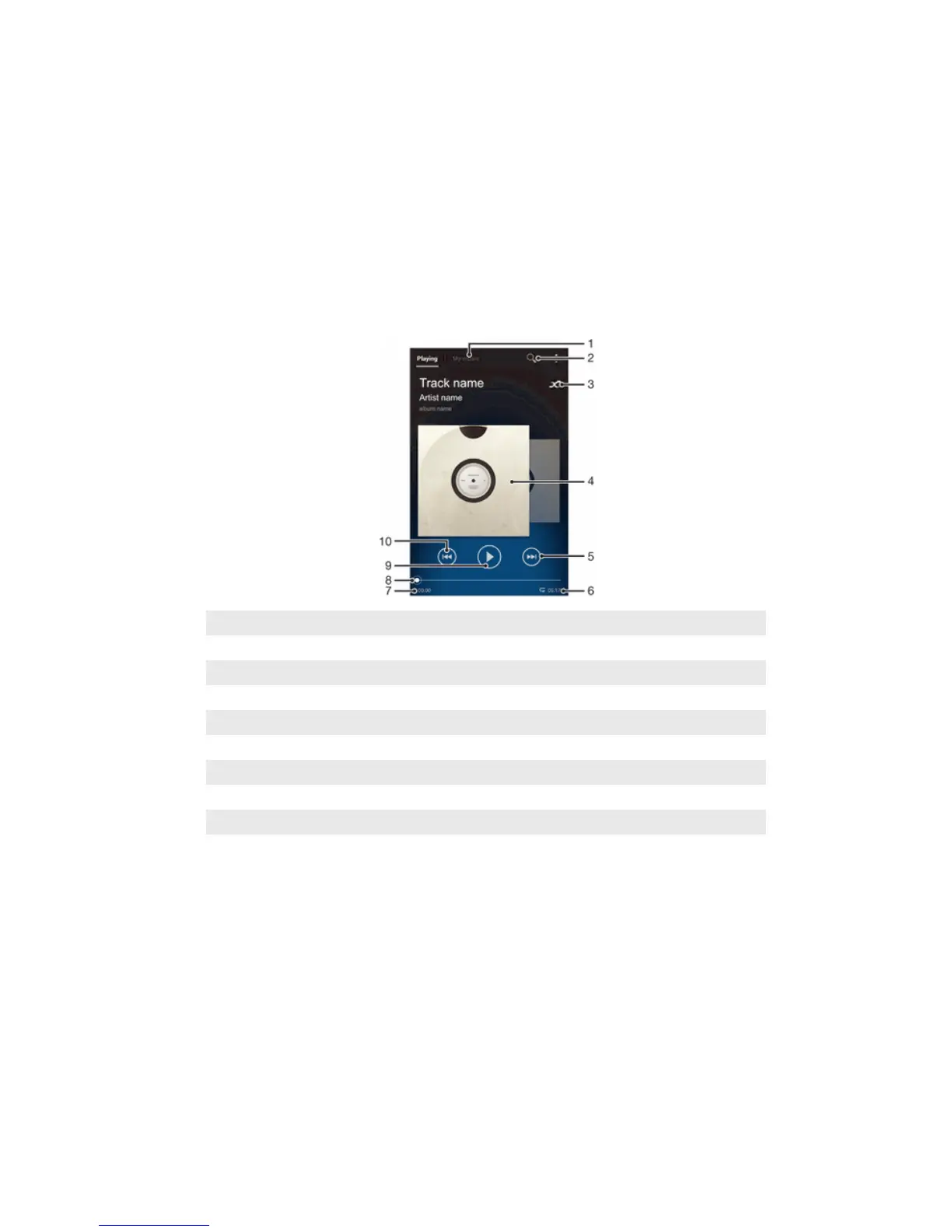
"WALKMAN" application
About Music
Get the most out of your Walkman™ player. Listen to and organize music, audio books
and podcasts that you have transferred to your memory card from a computer, or
purchased and downloaded from online stores.
To make content easily available to the music player, you can use the Media Go™
application. Media Go™ helps transfer music content between a computer and a device.
For more information, see Connecting your device to a computer on page 98.
"WALKMAN" application overview
1 Browse your music
2 Search all songs saved on your device
3 Tap the infinite button to find related information online and plug-ins on Google Play™
4 Album art (if available)
5 Go to the next song in the current play queue, or fast forward
6 Total time length of the song
7 Elapsed time of current song
8 Progress indicator – drag the indicator or tap along the line to fast-forward or rewind
9 Play/Pause button
10 Go to the previous song in the current play queue, or rewind
Transferring media files to your device
Before using the "WALKMAN" application, it's a good idea to transfer all your favorite
media content from a computer to your device, and then play or view this content on
your device. Media content can include music, photos, and videos. The easiest way to
transfer files is with a USB cable. After you connect your device and the computer using
the USB cable, you can use the file manager application on the computer or the Media
Go™ application to transfer the files.
55
This is an Internet version of this publication. © Print only for private use.



 To Next Page