Camera
About the camera
From the camera, you can, for example, send your photos and videos to friends as
messages, or upload them to a web service. Your device also has a front camera, which
is useful for self-portraits.
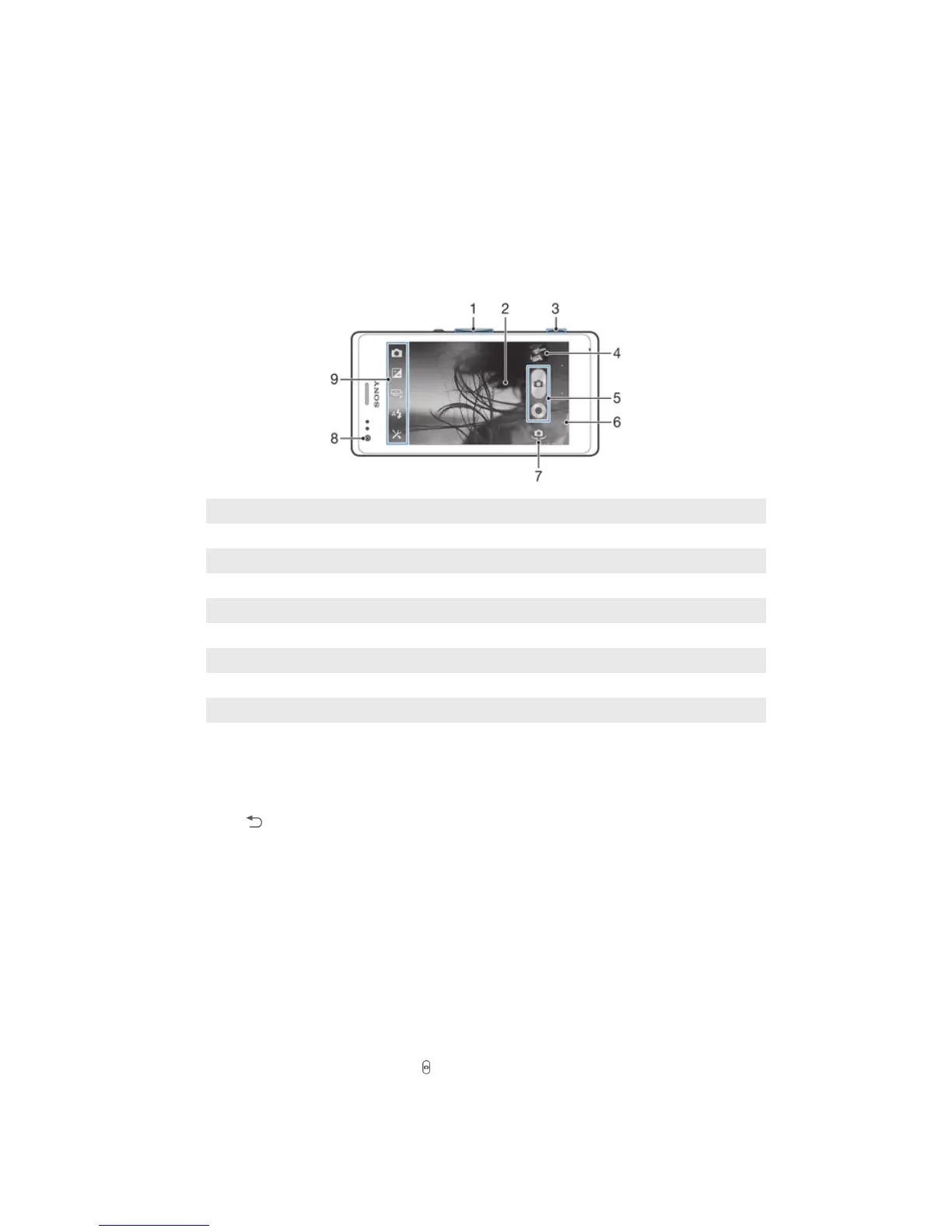
Camera controls overview
1 Zoom in or out
2 Main camera screen
3 Camera key – Activate the camera/Take photos/Record videos
4 View photos and videos
5 Take photos or record video clips
6 Go back a step or exit the camera
7 Switch between the front and the main camera
8 Front camera
9 Camera settings icon and shortcut icons
To open the camera
• Press and hold down the camera key.
To close the camera
• Press from the main camera screen.
Using the still camera
There are three ways to take photos with the still camera. You can press the camera key,
tap the on-screen camera button, or touch a spot on the screen.
To take a photo using the camera key
1 Activate the camera.
2 Press the camera key fully down.
To take a photo by tapping the on-screen camera button
1 Activate the camera.
2 Point the camera toward the subject.
3 Tap the on-screen camera button . The photo is taken as soon as you release
your finger.
65
This is an Internet version of this publication. © Print only for private use.



 To Next Page