To add a geotag when viewing the map in Album
1 When viewing the map in Album, tap , then tap Add geotag.
2 Find and tap the photo to which you want to add the geotag.
3 Tap the desired location on the map to set the geotag, then tap OK.
To edit the geotag of a photo in Album
1 When viewing a photo on the map in Album, touch and hold the photo until its
frame turns blue.
2 Drag the photo to the new location.
You can also tap the desired location on the map instead of dragging.
To change the map view in Album
• When viewing the map in Album, tap , then select Classic view or Satellite view.
Viewing online albums
In Album, view the photos and videos that you and your friends have uploaded to online
services, such as Picasa™ and Facebook™. You can view comments from your friends
and add your own comments as well.
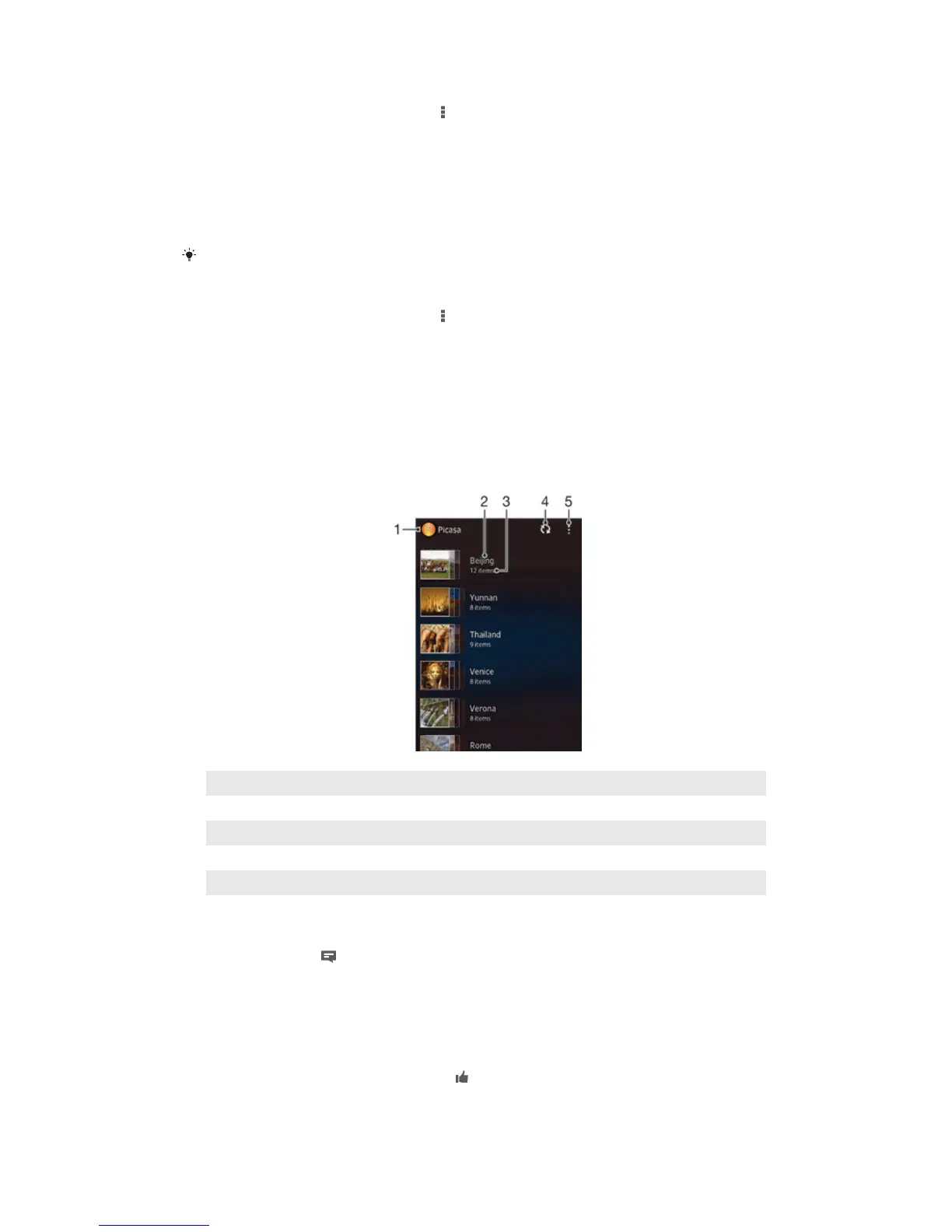
Overview of online services
1 Active online service.
2 Name of online album.
3 Number of items in the online album.
4 Refresh.
5 View menu options.
To view and add comments to online album content
1 When viewing a photo from an online album, tap the screen to display the
toolbars, then tap to view the comments.
2 To view more comments, scroll down the screen.
3 To add your own comments, enter your comments at the bottom of the screen,
then tap Post.
To recommend a photo or video on Facebook™
• While viewing a photo or video from one of your Facebook™ albums, tap the
screen to display the toolbars, then tap to show that you "Like" the item on
Facebook™.
82
This is an Internet version of this publication. © Print only for private use.



 To Next Page