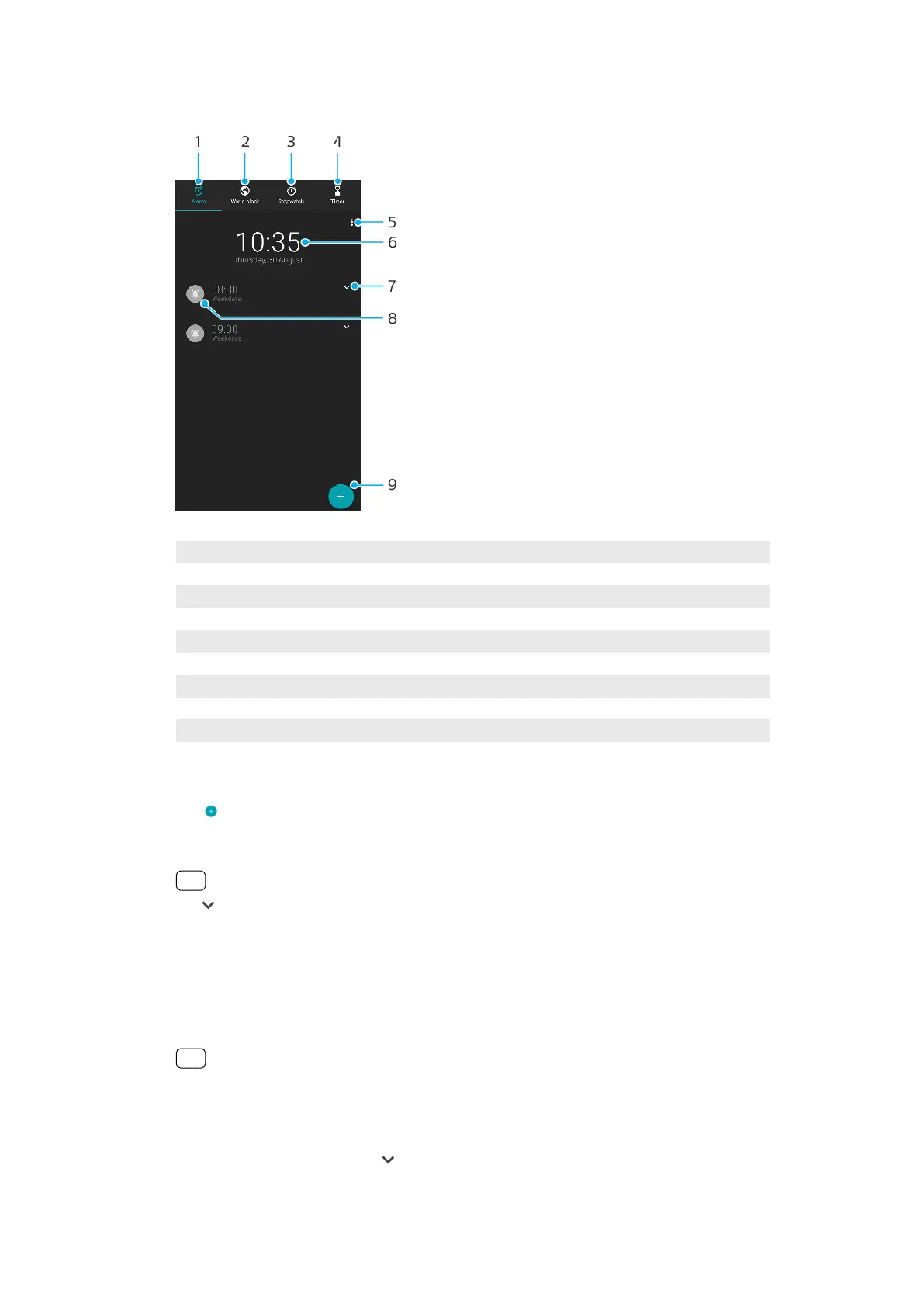
Clock overview
1 Access the Alarm tab
2 Access the World clock tab
3 Access the Stopwatch tab
4 Access the Timer tab
5 View options for the current tab
6 Open date and time settings
7 Edit an existing alarm
8 Turn an alarm on or o
9 Add a new alarm
To set a new alarm
1 Find and tap Clock.
2 Tap (Add item icon).
3 Select the desired value.
4 Tap OK.
Hint
Tap (More options icon) to reveal MORE SETTINGS.
To snooze an alarm when it sounds
• When the alarm sounds, tap SNOOZE.
To turn o an alarm when it sounds
• Drag the slider to turn o the alarm, or tap DISMISS if the screen is active.
Hint
To turn o a snoozed alarm, you can drag down the status bar to open the Notication
panel and then tap DISMISS.
To edit an existing alarm
1 Find and tap Clock, then tap (More options icon) for the alarm that you want to
edit.
110
Internet version. For personal use only.















 To Next Page