Camera
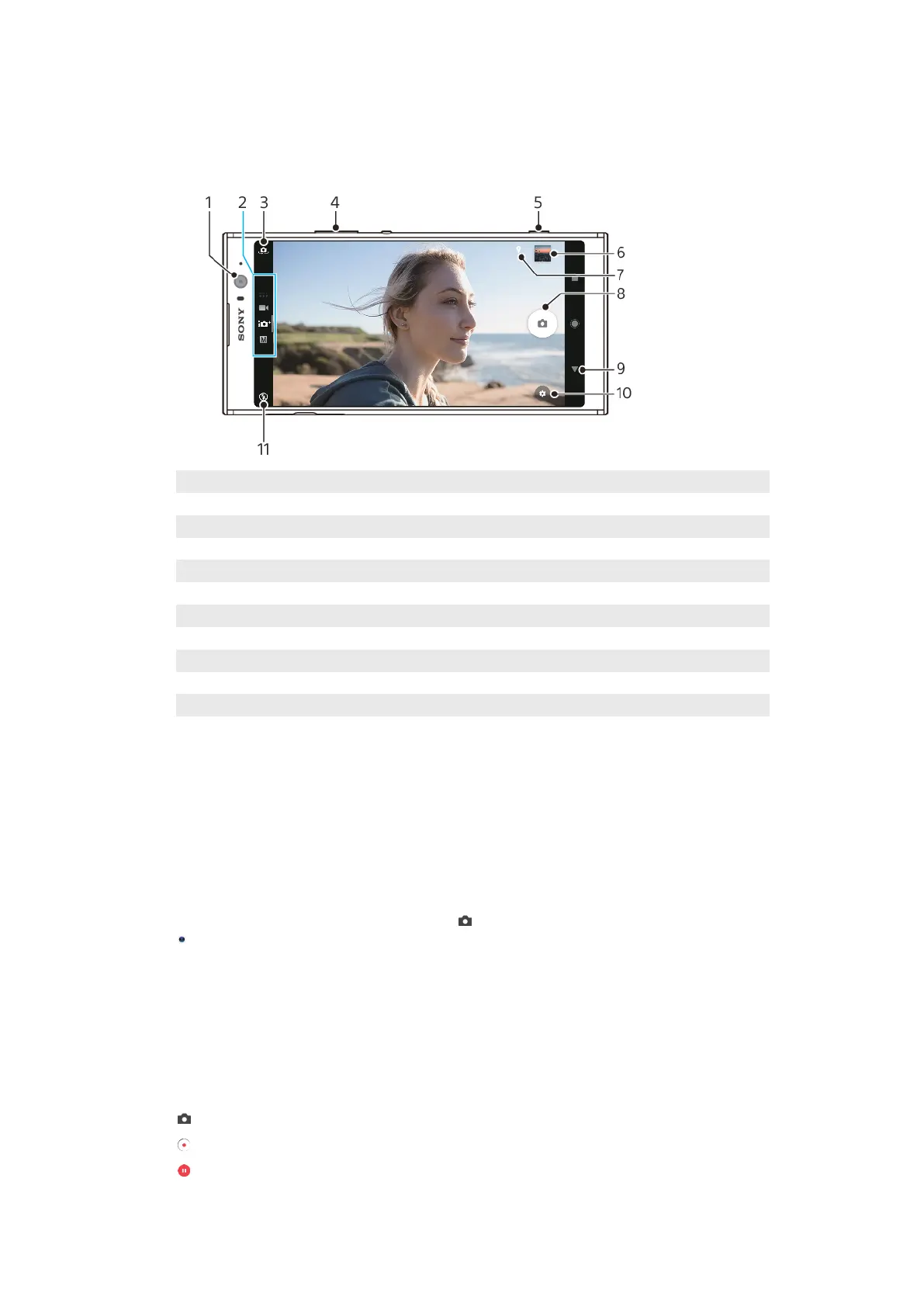
Getting to know your camera
1 Front camera lens
2 Select the capturing mode
3 Switch between the front and main camera
4 Use the volume keys to zoom in or out
5 Use the camera key to activate the camera, take photos or record videos
6 Tap the thumbnail to view, share or edit photos and videos
7 Save your location
8 Use the shutter button to take photos or record videos
9 Go back or exit the camera
10 Capturing mode settings
11 Flash settings
Basic camera tips
• Make sure the lens is clean. A ngerprint or a little dirt can diminish photo quality.
• Use the self-timer when you need extra time to prepare, or to avoid blurred
photos.
• Check your device’s memory status often. High-resolution photos and videos
consume more memory.
To launch the camera
• Press the camera key fully down, swipe
(Camera icon) from the lock screen or tap
(Camera icon) from the Application screen.
Shutter button
The shutter button is used dierently depending on the capturing mode and
activated features.
Shutter button overview
Take a photo
Record a video/Resume recording
Pause a video
83
Internet version. For personal use only.










 To Next Page