Help Guide
Interchangeable Lens Digital Camera
ZV-E1
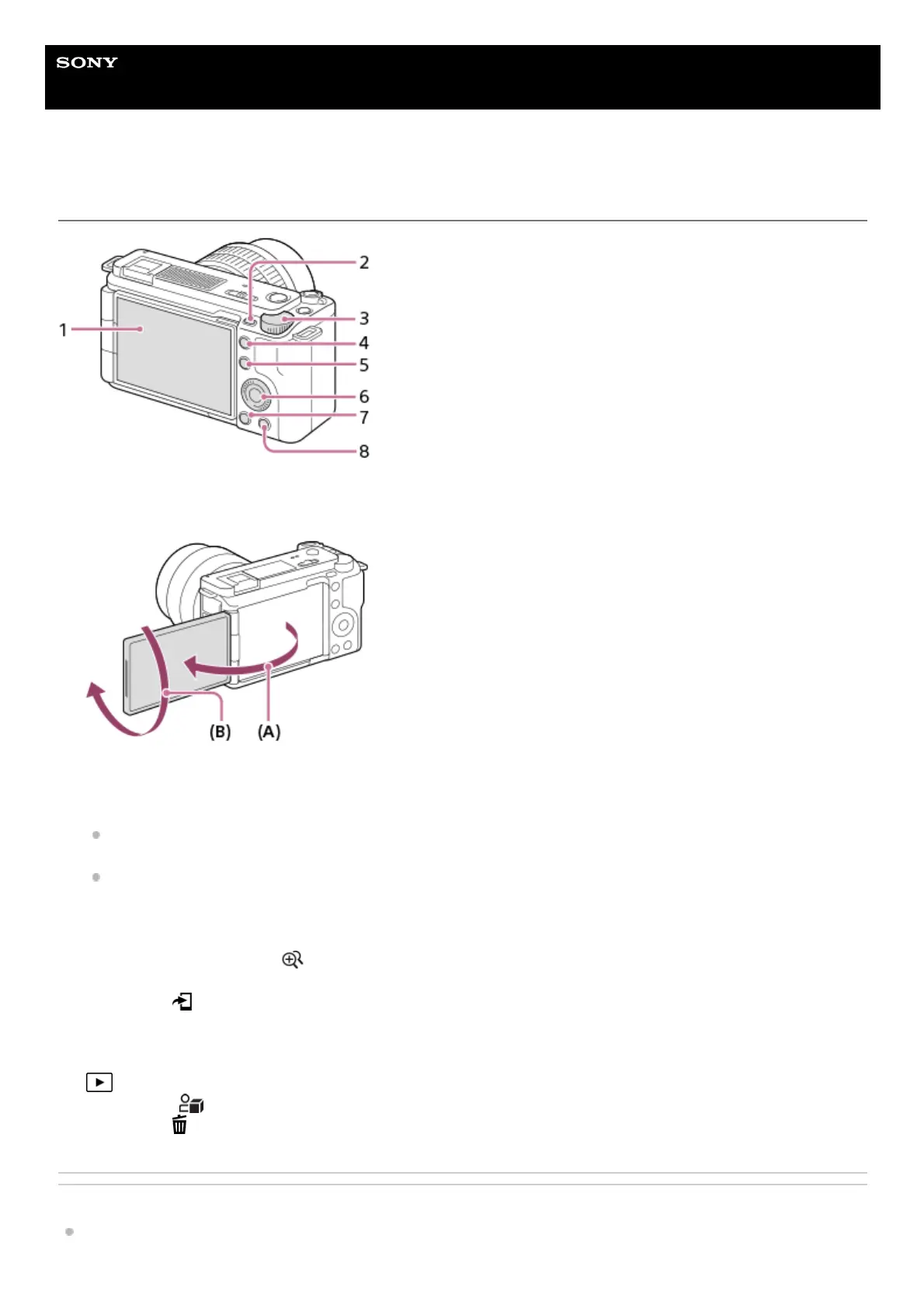
Rear side
Related Topic
Front side
Monitor/Touch panel
You can adjust the monitor to an easily viewable angle and shoot from any position.
(A): Approx. 176°
(B): Approx. 270°
You may not be able to adjust the monitor angle depending on the type of a tripod you use. In such a case,
release the tripod screw once to adjust the monitor angle.
Do not apply excessive force when opening, closing, or rotating the monitor. Doing so may cause a malfunction.
1.
MENU button2.
Control dial3.
C2 button (Custom button 2)/
(Step zoom) button4.
For shooting: Fn (Function) button
For viewing:
(Send to Smartphone) button
You can display the screen for transferring images to a smartphone by pressing this button.
5.
Control wheel6.
(Playback) button7.
For shooting:
(Product Showcase Set) button
For viewing:
(Delete) button
8.



 To Next Page