Help Guide
Interchangeable Lens Digital Camera
ZV-E1
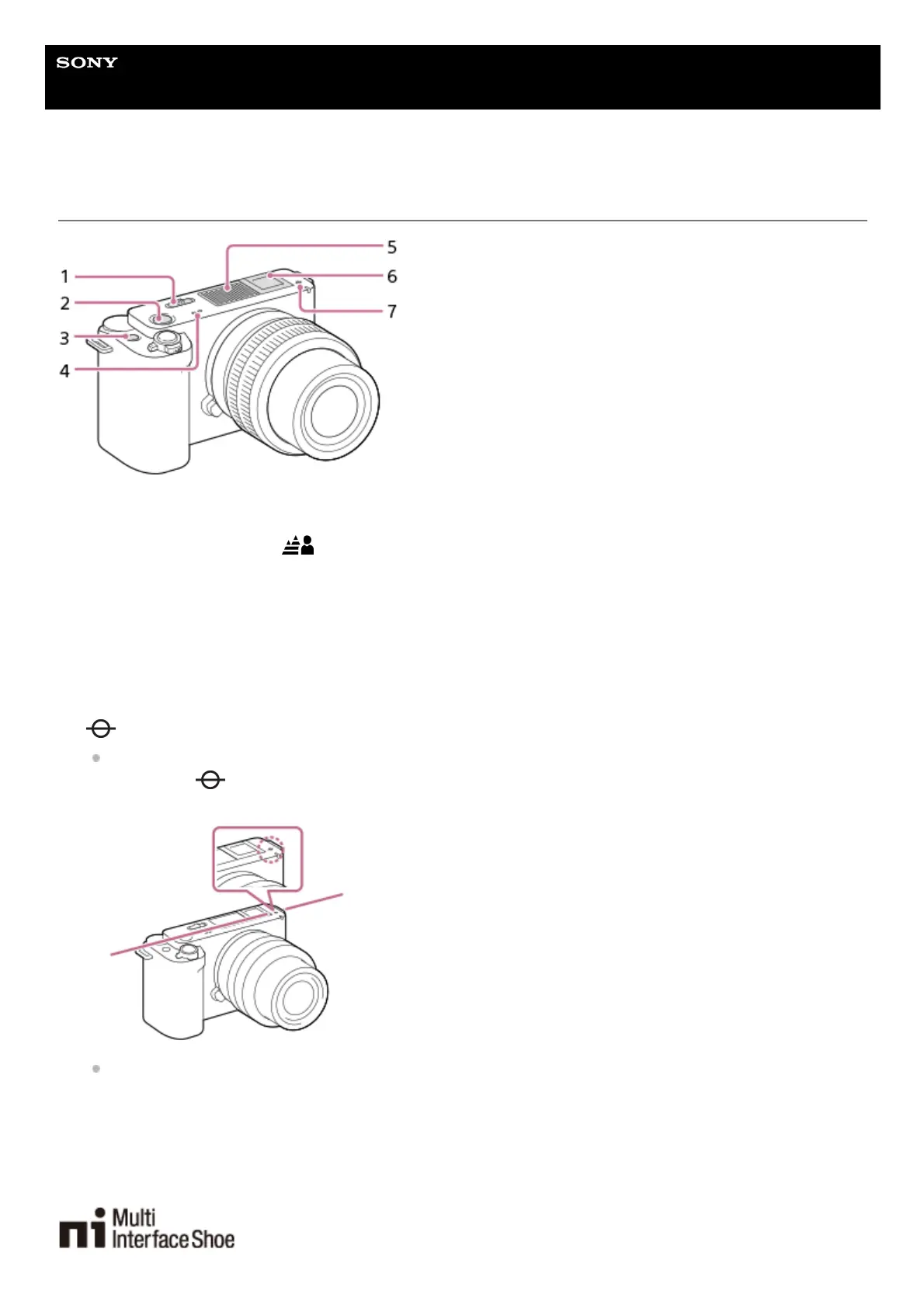
Top side
Still/Movie/S&Q switch1.
MOVIE (Movie) button2.
C1 button (Custom button 1)/
(Background Defocus) button3.
Speaker4.
Internal microphone
Do not cover this part during movie recording. Doing so may cause noise or lower the volume.
5.
Multi Interface Shoe*
Some accessories may not go in all the way and protrude backward from the Multi interface shoe. However, when
the accessory reaches the front end of the shoe, the connection is completed.
6.
Image sensor position mark
The image sensor is the sensor that converts light into an electric signal. The position of the image sensor is
indicated by
(Image sensor position mark). When you measure the exact distance between the camera and
the subject, refer to the position of the horizontal line.
If the subject is closer than the minimum shooting distance of the lens, the focus cannot be confirmed. Make sure
you put enough distance between the subject and the camera.
7.
For details on compatible accessories for the Multi Interface Shoe, visit the Sony website, or consult your Sony dealer or local authorized Sony
service facility.
Accessories for the Accessory Shoe can also be used. Operations with other manufacturers’ accessories are not guaranteed.
*



 To Next Page